In this article, we cover the basics to checking the stability of your power supply unit (PSU) and measuring the voltage using a multimeter.
Introduction
Power supplies provide power to your entire computer. They do this by converting high voltage alternating AC current from the wall to a lower voltage direct current that your computer can use. See our guide to Understanding Power Supplies for more on this subject. To determine how much power you really need, it is best to use a calculator to find a ballpark estimate. As I have previously mentioned regarding power supply efficiency, it is best to have an adequate, but not overabundant supply of power. Once you have your computer rig all set up, you should check the stability of the computer by stressing the computer with a few handy programs. By running such a stress test, the computer will run various calculations and draw the most power.
Stressing the Computer
To see just how stable your computer is, you will need a digital multimeter to measure the voltage of the power supply. Relying on the voltages in the BIOS or other software programs like SpeedFan are great for monitoring temperatures of your CPU, video card, and hard drive but are lousy and greatly inaccurate for measuring the true voltage.
Prime 95
To stress the CPU and all its cores, you will need Prime95. Download it for Windows 32-bit or 64-bit . When it opens, it should default to the “Tortue Test,” but if it does not, go to Advanced > Select Round-Off Checking and then go to Options > Tortue Test. Run the “In-Place Large FFTs” test to stress the CPU the most resulting in the greatest heat and power consumption.
Furmark
Run this program to stress the onboard graphics or video card. This is particularly important if you have one or more dedicated cards because they tend to draw a large amount of energy in addition to the CPU. You can download furmark here . Run the stability test at your native resolution for the greatest stress.
Measuring the Voltage and Interpreting your Results
+12V
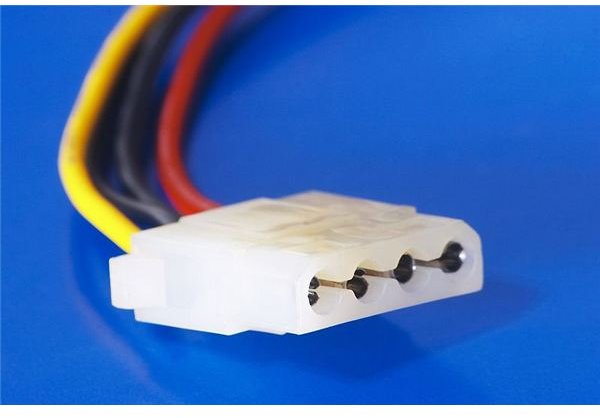
While the computer is running the stress tests, find a free molex cable (as seen in the picture) and place the black probe into one of the two middle black connectors (this is the ground). Place the other red probe into the yellow connector (yellow cables are usually always 12V inside the computer). Watch the reading on the multimeter. It should read very close to 12V and be consistent. It should not fluctuate or deviate too far from 12V.
+5V
To measure the +5V rail, now place the red probe in the red connector (red is usually always +5V) and read the voltage from the multimeter. It should likewise remain close to 5V and be consistent.
If the numbers fluctuate and are not around their proper voltages, it is probably time for a new power supply. A new power supply will be better able to handle the large load of energy the CPU and video cards demand. It will also be more efficient. A good place to start your research is to consult my guide to the future of power supplies and what to look for when selecting your next PSU unit.


