Have an Old Laptop lying around? Learn how you can utilize parts from your Old laptop to effectively build a Desktop PC with low power consumption. Put your Unused Laptop to good use.
Introduction
Do you have an old laptop which you bought many years ago that does not get enough use? Do not fret. You can build a nifty desktop PC, by utilizing the maximum number of parts from your old laptop. Some of the parts which you can scavenge and put to good use are the Laptop LCD, the hard drive, and the optical drive. In the sections below, I will be exploring the various components and explain how you can use them on a PC.
By any means, It is not practical to use laptop parts on a PC and you are better off selling the laptop or laptop parts and building a PC from newly purchased components, but where’s the fun in that? For those who really love their hardware, this project is the way to go.
The Hard Drive
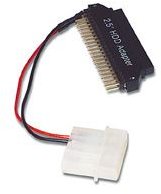
A laptop hard drive is one of the easiest parts to integrate into your new PC. The reason is that the laptop hard drives and their desktop counterparts share the same interface. So, If your hard drive is SATA based, all you have to do is directly connect it to the SATA data and power cables on your motherboard. If the hard drive is IDE based, you may need to purchase an adaptor like the one pictured on the right. It allows you to use an IDE laptop hard drive with a PC IDE cable.
A hard drive larger than 60 GB in capacity should suffice for this task.
The LCD
Utilizing the laptop LCD on your desktop is a slightly trickier proposition. A laptop LCD communicates differently with the motherboard as opposed to a standard VGA connection on a PC. So you would need to first identify the model and manufacturer of your laptop LCD and purchase the required adaptor for it. The adaptor is not cheap any means, so make sure you really want to use it.
Another issue withl aptop LCD screens is that they are not really suited for PC usage due to their limited viewing angles. Their low brightness is also another issue.
You can purchase a VGA controller card for your laptop LCD from EarthLCD or Aurora IT Systems . Once you have connected the LCD to the adaptor, set up the LCD at a convenient angle.
Optical Drive
If you have an IDE based DVD drive on your laptop, you’re in luck. You can use the drive with your PC. All you need to do is use a laptop IDE to PC IDE converter which can be purchased from here . A SATA optical drive can be directly connected to your PC with standard SATA cabling. A slot loading laptop optical drive, if present on your laptop is convenient and is a perfect fit if you are building a Home theater PC .
Conclusion
If your laptop came with a wireless mouse or external optical drive, you can use both the parts while building a PC. Using parts from a laptop has the added benefit of lower power consumption. Unfortunately you will not be able to use your Laptop’s SO-DIMM RAM on your PC. What you can do is sell the laptop RAM and purchase a PC kit at a similar price.
The above guide should help you salvage parts from your old laptop to incorporate into your PC. Check out these other articles on building a PC for more ideas to help you decide your next build.
Build a Budget PC to Beat the Recession for $250
How to Build a Cheap Gaming PC
Build a Quality Budget PC to Beat the Recession for Less Than $500


