RAID arrays are something we are hearing more and more every day. Once it was for system administrators, nowadays it is for enthusiasts and possibly it will be for every user. Inside is a detailed look at RAID arrays and RAID levels.
Introduction
Let’s start our article with the question “what does RAID stand for.” RAID is an abbreviation of Redundant Array of Independent Disks. At first, the idea behind was to achieve high storage capacities by combining disks in an array by using off the shelf (inexpensive) disks. Therefore it was named as Redundant Array of Inexpensive Disks. Later on, it was changed to independent instead of inexpensive to not let the users think that the system is just a low-cost system.
RAID is actually a term that describes a storage system which data is divided and/or replicated between hard disks. To further explain which system is used, a number is added after the word RAID (such as RAID 0, RAID 1, RAID 5 etc.) which we will discuss in the next section.
RAID Levels
The first word in RAID - redundancy - is achieved in such a way that either the same data is written to all disks (mirroring) or written in such a way that extra data is calculated and written to allow recovering data in case of a loss of a hard disk (this extra data is called parity). With parity, when a hard disk failure occurs, a disk is replaced and the data is recalculated and written.
The most common RAID arrays are as follows:
- RAID 0: Minimum two disks are required. The data is distributed to two disks, and this takes advantage of higher disk read/write speeds. If one disk fails, there is no chance of recovering data, since some parts are lost and there is no parity. In a RAID 0 array, the capacity of the total array is twice the capacity of the smallest drive. For example if you use two 1 Gigabyte disks in a RAID 0 array, the total size is 2 Gigabytes.
- RAID 1: Minimum two disks are required. The data is written exactly to two disks, which mean that if one disk fails, you have an exact copy on the other. Again, if you have two 1 Gigabyte disks in a RAID 1 array, the total capacity is not 2 Gigabytes, but 1 Gigabyte.
- RAID 5: Minimum three disks are required. The disks hold both data and parity, so if any disk fails, it can be replaced and the data could be recovered from the data in the other disks. Total storage capacity with three 1 Gigabyte drives is 2 Gigabytes. The system can recover from one hard disk failure.
- RAID 6: Minimum four disks are required. The data and the parity information is distributed to all the disks, and the parity data is distributed twice (dual distribution). RAID 6 arrays can recover if two hard disks fail. If the array is arranged with four 1 Gigabyte disks, the total storage capacity of the array is 2 Gigabytes (4 x 1 Gigabytes, minus 2 x 1 Gigabytes dual parity: (4 x 1) - (2 x 1) = 2 Gigabytes)
There are also other RAID arrays such as RAID 3, RAID 10, RAID 01, RAID 4, RAID 1.5, RAID 5E etc., which have their own arrangements and complexities.
RAID Implementations
RAID implementations can either be hardware based or software-based (operating system based).
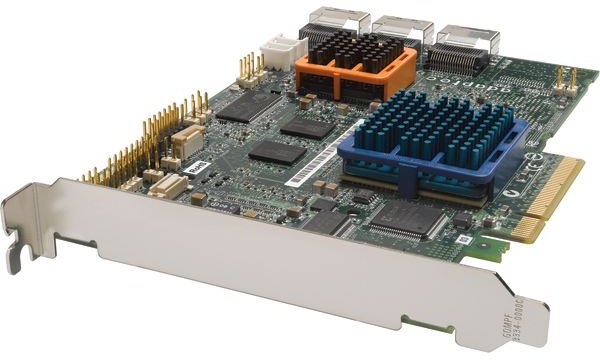
Hardware based RAID arrays use a RAID controller, which manage hard disks in an array and present to the operating system as logical units. The disk controllers use different disk layouts and it is not possible to use RAID controllers from different manufacturers on the same configuration. But these controllers do not require operating system resources and allow the BIOS to boot from them.
Software based RAID arrays put the disk controlling on the operating system but easier to set up compared to the hardware RAID. However there are some considerations about the software RAID:
- The processor load may be negligible in RAID 0 and RAID 1 configurations, but can be significant with arrays that use parity.
- All the buses between the CPU and the disk controller must carry RAID information, which may cause congestion.
- If the boot disk fails, it can be difficult, maybe impossible to recover the array.
- In software RAID systems, the disk format is locked to the operating system. It is difficult and in many cases impossible to use this system on shared partitions (partitions which are used by more than one operating system). However, disks in an array can be carried to another system running the same operating system, which is not achievable by hardware RAID.
- In a software RAID, partitions can be used as disk arrays.
Hardware RAID systems are proprietary and expensive and software RAID systems cannot protect the boot process. So, an intermediate solution was developed, which are called firmware-based RAID systems (or driver-based RAID systems). The RAID controllers in this type do not include a hardware RAID controller chip but a special firmware and drivers to do the work of the missing chip. During the boot time, the process is handled by the firmware and the drivers. Intel’s Matrix RAID is an example for this type of RAID controllers. In fact, these systems are called “fake RAIDs.”
With the RAID implementation, if supported either by hardware controller or the operating system, a hot spare (or hot spares) can be introduced. A hot spare is a disk, which sits inactive during the use of a RAID system; it is idle until a failure occurs. During the failure the system immediately puts the disk into use and rebuilds the data. This reduces the time to recovery but does not eliminate it completely. If during the recovery process, another failure occurs and the system is not tolerant, then a data loss may occur.
Conclusion
As we have seen, RAID configurations, in no case can replace data backup. RAID arrays provide high uptime, fault recovery and in RAID 0, increased read/write speeds but in no case a replacement for a data backup solution.
Nowadays hardcore gamers consider and implement RAID 0 arrays to decrease any latency that may be attributed to hard disk speeds and fault-intolerant people use RAID 1 or RAID 5 systems. Depending on your needs, you can set your RAID array conceptually and begin working on it.


