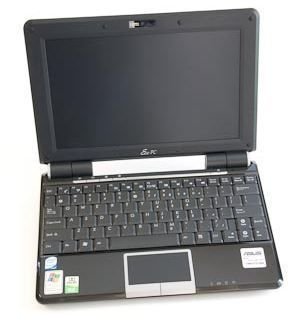
Here we look at adding RAM to your netbook to increase the performance of the system.
Introduction
So you just purchased that new netbook or you have had one for a year and now you want to learn how to boost the performance of it. Well you’ve come to the right place. In this guide we look at the many ways to speed up your netbook.
Netbooks were originally designed by Asus as a low-cost, portable, power-supping alternative to the more expensive, larger notebooks on the market. To keep costs down and prolong battery life, they were given slower (weaker) computer processors. While this made for great battery life allowing some netbooks to achieve 10+ hours of battery life (Asus EEE PC 1005HA), performance was sacrificed. For more on current netbooks, see our roundup of the best 10" models . Fortunately, there are a few things you can do to overcome these drawbacks and have the best of both worlds. Obviously, you will not be able to by any means play the latest games or do serious video editing on your netbook, but other tasks will be improved. So without further ado, let’s begin.
Increasing the RAM
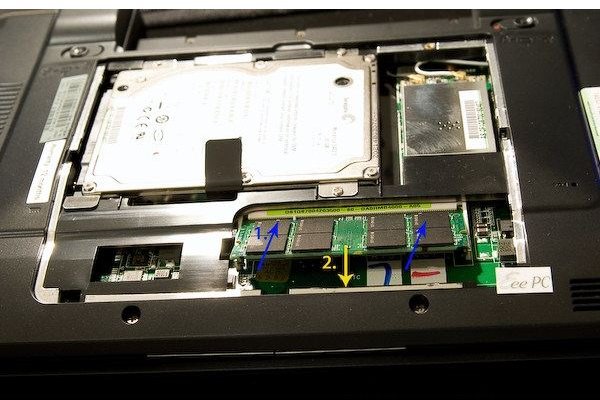
The first, most basic, and cheapest hardware upgrade to your netbook that everyone should do is upgrading the system’s RAM (see here for our in-depth look at What Is RAM? ). Most netbooks come standard issue with a single stick of 1GB DDR2. This is fine for the most basic of tasks, but we want more, after all that’s why you are here!
Most netbooks can only hold 1 stick of ram, but a few can hold 2 sticks. A good site to consult is Crucial’s Memory Advisor Tool . If yours can hold 2 sticks, all you need to do is purchase another 1GB DDR2-667 SO-DIMM 200-Pin stick and pop it in next to your existing RAM. If only 1 slot is available, then you will need to purchase a 2GB SO-DIMM 200-Pin DDR2-667 stick of memory and replace your existing memory. A 1-2GB stick can be had for around $15 - $30 depending on the brand and size. Adding more than 2GB is technically possible, although your computer may not support more than 2GB, it may not work, and it is very expensive (that money is better spent on a new hard drive). To access the memory, consult your owner’s manual on finding out how to open the netbook. It is usually accessed through a few screws and removing a small panel on the underside of the laptop. For a step by step pictorial demonstration, see here .
By upgrading your RAM, your computer will be more responsive and better equipped to handle multiple tasks at once. Videos will play smoother, and programs and the operating system will load faster. The integrated video card will have access to more shared memory allowing for higher frame rates in games and videos.
In the next article of this series, we will look at how replacing the hard drive can bring similar benefits as replacing the RAM.
Photos by dr4gon
This post is part of the series: Guide to Increasing the Speed of Your Netbook
In this comprehensive guide, we look at various ways to boost the performance of your netbook.


