There are many forms of portable storage for files you want to share, move or back up. The one method that has probably been used the longest is copying those files from a computer to a CD. If you have never done so. this tutorial will show you how.
Getting Started
To begin copying a file from a computer to a CD, you will need a computer with CD-burning capability (if you have Windows XP or Vista, you automatically have this capability) and a CD burner, as well as a recordable or rewritable CD. A recordable compact disc will be labeled CD-R. If you copy a file from your computer to a recordable CD, the file cannot be erased or altered from the CD. A rewritable CD will be labeled CD-RW. A file copied from a computer to a rewritable CD can be deleted and the CD can be reused.
Photo Credit: sxc.hu/lilieks
Copying Files in XP
Navigate to the folder on your computer that contains the file or files you want to copy to a CD. You do not need to open the file. Simply open the folder and make sure you can see the file you want to copy. Click on the file once to select it. If there are multiple files that you would like to copy from the computer to a CD at the same time, and they are located in the same folder, you can select them all by pressing and holding the CTRL key while you click on each one.
Right click any of the highlighted files on the computer and point to Send To. In the Send To menu, select the CD RW or DVD RW drive.
You will see a “balloon” in the lower right corner of your screen near the computer clock that says, “You have files waiting to be written to CD.”
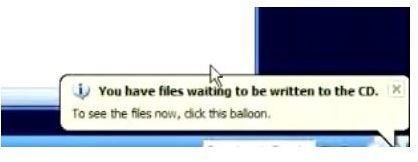
Click the balloon to open the folder that will allow you to copy the files from the computer to a CD. Under CD Writing Tasks in the left pane of this window, click Write these files to CD. The CD Writing Wizard will begin. If desired, type a name for the CD in the CD Name box. Otherwise, it will default to the current date. Click Next and you will be prompted to insert a CD if there is not already a CD in the drive. Insert a CD, click Next and copy the files from the computer to the CD.
Copying Files in Vista
If you are using Windows Vista, you will also select the files you want to copy from the computer to a CD by holding down the CTRL key and clicking each one. Then, right click any of the highlighted files, point to Send To and select the CD RW or DVD RW drive.
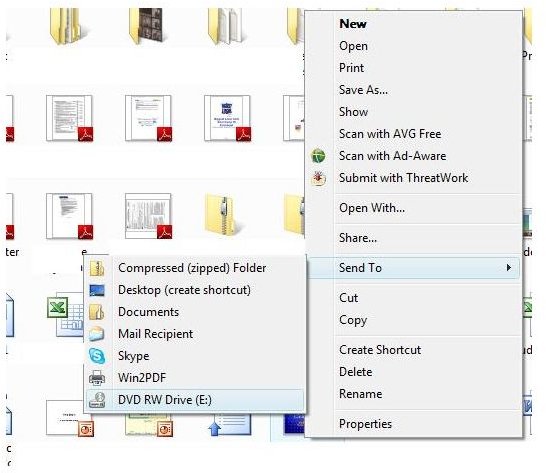
You will be prompted to insert a CD into the computer to copy the files. Insert the CD into the drive and wait. Vista will instantly copy the files from your computer to the CD.
If you want to copy photos from your computer to a CD, check out the Bright Hub tutorial Transfer Photos to CD - How to Burn Images .


