We all know that Shift+Delete happens. This is not the end of the world though. The files are still on your hard disk, but you just can’t see it. Getting back files is much easier than you think. Read on to learn simple tips for recovering your lost files.
Introduction: Things to Know Before Attempting to Get Back Files
Deleting a file from your hard disk (or an external disk) does not mean that it is permanently deleted, which in turn means that you need a tool to recover files. In fact, the file is not deleted, but is hidden from the operating system and the user. In the operating system, there is a file called the master file table which records where every individual file and directory is located. Deleting a file simply deletes the record from the master file table, but it does not delete the file from the system. This means that the file is already present on the hard disk but the operating system cannot see it. You just need to know the way to get back files.
How to Get Back Files
What we learned above leads us to an important result: we must not install anything on our system nor make any file operations if we want to get back files. But on the other hand, we need a program that will go through the file system and look for the deleted files and recover them. In order to solve this dilemma, we will go for a portable application, named Recuva from Piriform. Piriform has many handy applications. Recuva is one of them and used only to recover files.
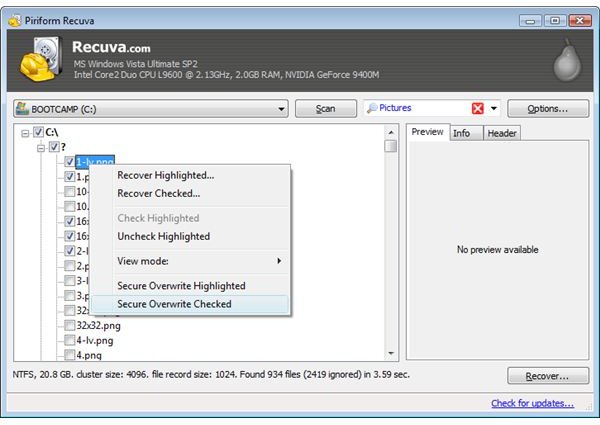
Insert a USB stick into your computer and download Recuva from its website directly to your USB stick (when prompted for the download location, select the USB stick, not your C drive). This will minimize any writes to your hard disk (of course it’s better if you can use another computer for this). Then, run Recuva from the USB drive and select your hard disk (or external disk) and wait for it to complete its scan. Once the scan is complete, you can select the files that you want to recover and get back files by simply clicking on the “Recover” button on the bottom right corner.
When Not to Attempt to Get Back Files
The steps we have talked above is for personal file recovery from a system that is already running. But, as you have guessed there are also other serious cases in which you would better off to seek professional assistance to get back files. For example, if your hard disk has crashed and you are not able to boot or if your hard disk is suffering from a hardware failure, then anything, any simple thing that you will attempt to do will result in irrecoverable damages to your disk and make it impossible to recover files. Therefore, in case of any such unpleasant situations, always seek assistance from professional companies which specialize in data recovery. Of course, if you would rather be safe than sorry, do not forget to back up your computer periodically.
References
Article: Author’s own experience
Screenshot: Piriform: https://www.piriform.com/recuva


