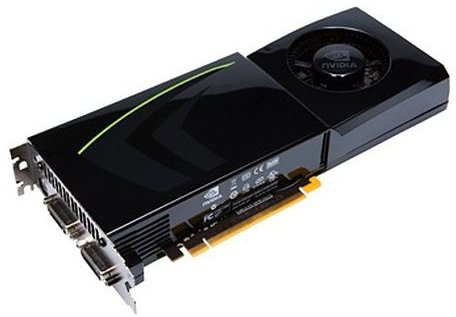
How do you know what graphics card to get? Find out how to interpret what is written on hardware boxes or specs you will find at an online retailer. Decipher the information so you know what you are getting.
This is not an all-in-one solution article for graphics card shopping. Rather, in this article you will find explanations on graphics processing units (GPUs), the amount of RAM on the graphics cards, the series numbers, associated drivers, and other listed specifications.
A graphics card is no more than a computer fitted on a piece of electronics circuit: It has a processing unit (GPU), graphics memory (RAM), inputs and outputs, just like your computer does. However, these small computers are specialized in processing graphics data which makes them a little different from a big computer. If you are interested in this kind of thing, you can learn more about how graphics cards work here .
- Dedicated graphics cards – Installed separately as a PCI Express (formerly there was AGP) in a PCIe (formerly AGP) slot,
- Integrated graphics – Permanently installed on the motherboard
Dedicated Graphics are more powerful and expensive than integrated graphics.
Graphics Processing Unit (GPU)
The GPU is the same thing as the Central Processing Unit on your computer, with two (main) differences: it is geared toward graphical computations, and it coordinates the work of the graphics card rather than the whole computer.
GPU is of the topmost importance when choosing graphics adapters (but not everything). The manufacturers NVIDIA and AMD/ATI have their own GPUs. The series to which the GPU belongs is displayed in big letters/numbers on the hardware boxes, such as Nvidia 9600 or ATI 4870. These numbers give a very detailed explanation of what’s inside.
In NVIDIA’s notation, the four numbers tell the following about the GPU (take 8600 for example).
- First digit: The chronological series to which the GPU belongs, for a 8600 card, this is 8000 series GPU. It came out after the 7000 and before the 9000.
- First digit: The series to which the GPU belongs, for a 8600 card, this is an 8000 series GPU.
- Second digit: The segmentation. Usually 1,2, 3 and 4 point to entry level cards, 5 and 6 mid-range, 7 and 8 in the high-end GPUs.
- Third and fourth digits: 99% of the time the last two digits will be 00.
When NVIDIA ran out of 4 digits with 9000 series, they switched to a 200 series. In the 200 series, the notation has changed slightly, 5 and 6 in the second digits point to entry-level cards, 6 point to mid-range and 8 and 9 point to the high-end.
In terms of features, the line-up is GS, GT, GTS and GTX in order from low performance to high performance.
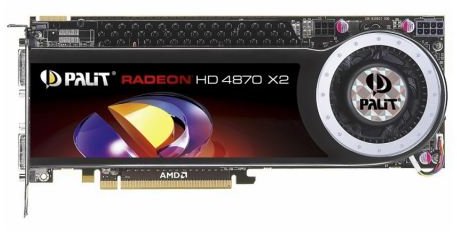
In AMD/ATI’s notation, the notation is as follows:
- First digit: The series to which GPU belongs, for example for a 4850, the card is in 4000 series.
- Second digit: Product category (segmentation). 0, 1, 2, 3 and 4 point to entry-level cards, 5, 6 and 7 point to mid-range and 8 and 9 point to high-end.
- Third and fourth digits: Relative performance. For example a 4870 GPU is a better performer than 4850 GPU.
AMD/ATI dropped the PRO, GT, XT, XTX suffixes and began to use the last two digits.
In some high-end cards, you will see an X2 suffix at the end, for example ATI Radeon 4870 X2. This notation means that there are two 4870 GPUs on a single card.
Memory
The GPU memory serves the same purpose as the RAM on computers. The work of the memory is to keep the data to be processed by the GPU as per the instructions received from the CPU. The memory is also used for the acceleration of polygon rendering, geometric calculations, texture mapping, interpolation, antialiasing and managing color spaces to name a few.
Shader Model
The shader model is actually a set of instructions to compute a large set of elements at a time in parallel, for example every pixel displayed on the screen. The latest model is numbered 4.
SLI & CrossFire
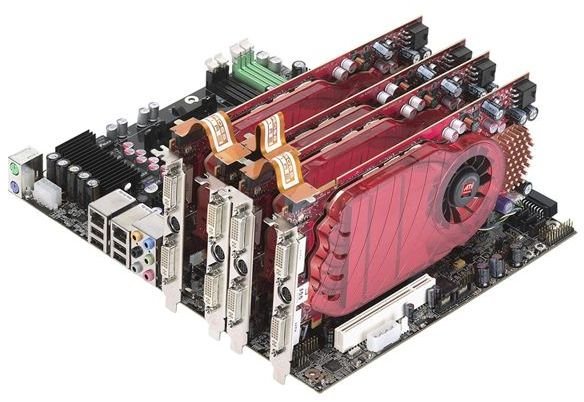
Graphics card manufacturers, due to demanding applications, have come up with a solution to deliver better performance. They simply asked “why not make more than one card do the work?” So SLI (Scalable Link Interface) and CrossFire were born (for CrossFireX see “Hybrid Solutions” below.) Both SLI and CrossFire involve more than one graphics card connected with a simple adapter. SLI is the notation used by NVIDIA and CrossFire is used by ATI.
But you have to note that putting two identical graphics cards in your system will not double your performance: 2 cards will multiply your performance by about 1,8 and 3 cards will multiply by about 2,8 and 4 cards about 3,4. So with and after the third card, you will have diminishing returns in terms of graphics performance. You can learn more about the costs and benefits of multiple graphics cards here .
Hybrid Solutions
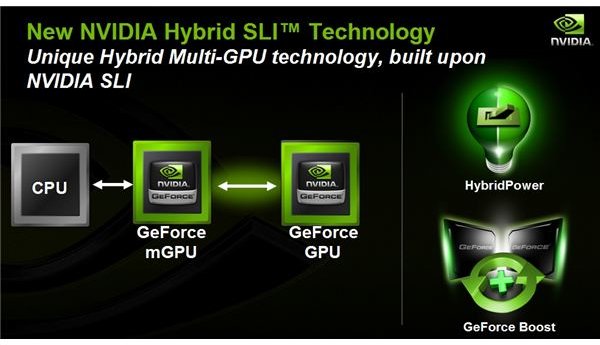
When users realized that working with word processing software does not need SLI/CrossFire power and became more environmentally conscious, hybrid solutions came to the scene. Hybrid solutions involve using the graphics adapter on the motherboard (integrated graphics adapter) when the system does not require much power, and increasing the performance by combining the integrated and dedicated cards together when required.
So, when you are writing an e-mail, only the integrated graphics card works, when you start Crysis, the systems fires up the dedicated graphics card, and uses it together with the integrated processor. NVIDIA calls this HybridSLI and AMD/ATI calls this CrossFireX. Note that usually, the integrated graphics are so weak relatively that they aren’t actually used in any demanding situation, unless the dedicated graphics aren’t particualrly powerful either.
Outputs
Again, depending on what you want to get from your graphics card, the outputs do matter. For example, if you want to watch HD movies on your computer/HDTV, then –depending on the input on your monitor- you will prefer HDMI or at least DVI. If it’s only displaying standard definition movies maybe S-Video will suffice. But the best connection to go with is HDMI to HDMI.
DVI is compatible with older VGA screens, but HDMI isn’t. There is more info on choosing between VGA, DVI, and HDMI, here .
Graphics cards are a totally different world and the manufacturers are always on the move to deliver the fastest, most optimized cards for consumers. They overclock the CPU, play with the amount of RAM, memory width and make over changes. Now that you know what the specs mean, you can compare them to your needs, as explained in this article on choosing a graphics card .


