How to Set Up Broadband Internet Connection in Windows XP

Written by:  • Edited by: Lamar Stonecypher
Updated Jul 2, 2010
• Related Guides: Broadband | Internet | Windows XP

Confused on how to setup your broadband internet to your XP computer? Just follow the simple steps enumerated here and you will be connected to the Internet in no time.

Once you have subscribed to a broadband internet service provider, the next thing you have to do is set up the internet connection on your computer. You just have to follow the provider’s instructions in installing the network equipment that came from them. After which, you will need to set up your computer with the broadband internet connection.

If you are using Windows XP, the steps are relatively easy as there is already a wizard that you just have to follow. The detailed instructions in setting up Windows XP for your broadband internet connection are as follows:

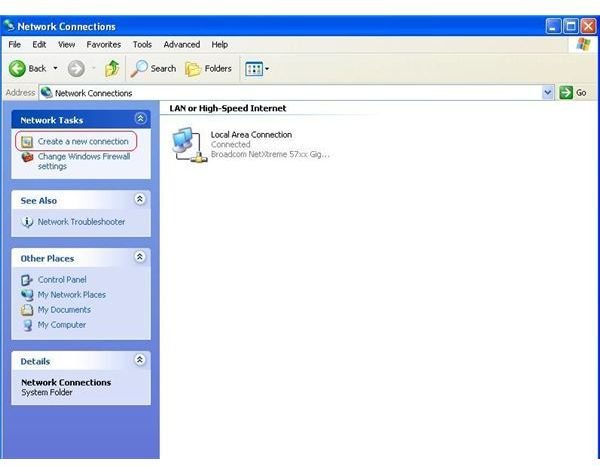
  1. Click Start > Control Panel > Network and Internet Connections > Network Connections. This path is true if Control Panel is in the Category View. If Control Panel is currently in the Classic View, just find Network Connections then click on it.
  2. In the Network Connections window, there are several category options on the left panel. Click Create a new connectionunder Network Tasks.
    Step 2
    click to enlarge
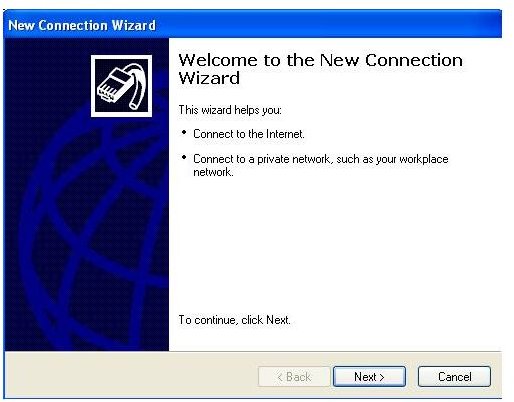
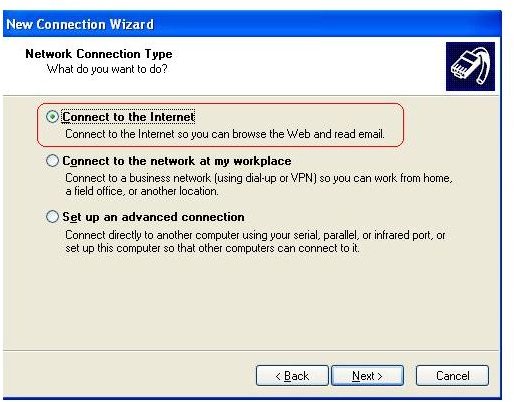
  3. The New Connection Wizard window will come up. Click Next. Under Network Connection Type, choose Connect to the Internet then click Next.
    Step 3a
    click to enlarge
    Step 3b
    click to enlarge
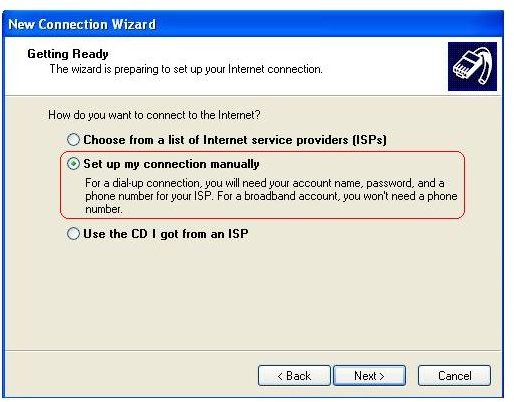
  4. Select Set up my connection manually. Click Next.
    Step 4
    click to enlarge
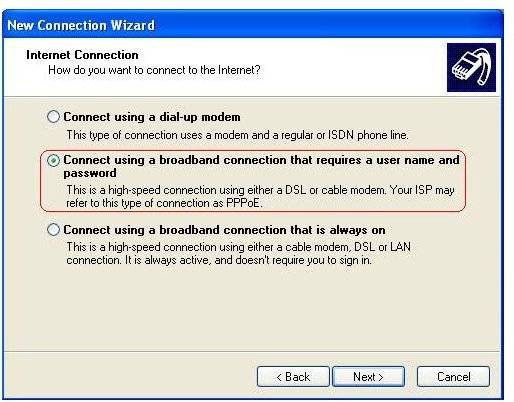
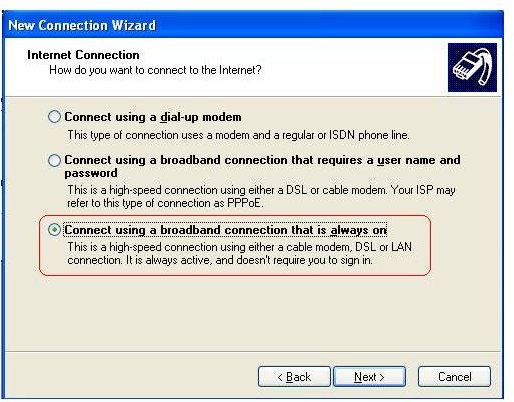
  5. Under Internet Connection, there are two options for broadband.
    • If you are using DSL connection, choose the second option (Connect using a broadband connection that requires a user name and password). Click Next
      Step 5 - DSL Connection
      click to enlarge
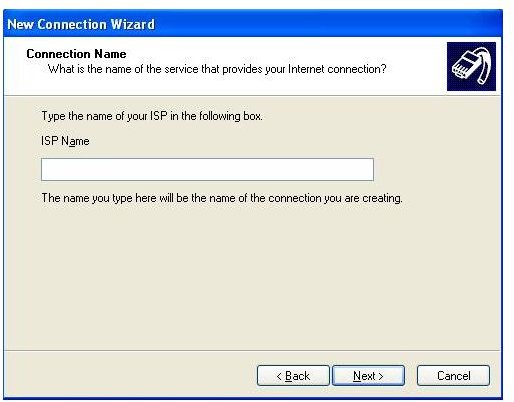
      • On the ISP Name field, type your preferred name for your Internet connection. Click Next.
        Step 5 - DSL Connection
        click to enlarge
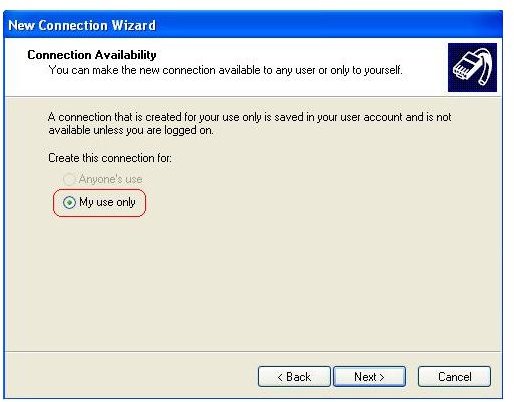
      • On the Connection Availability window, choose My use only. Click Next.
        Step 5 - DSL Connection
        click to enlarge
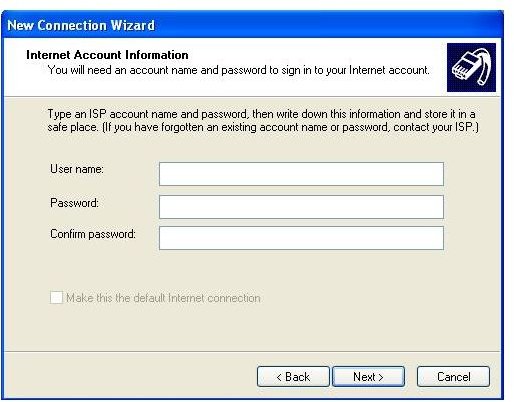
      • Enter your account Username and Password on the Internet Account Information window. Click Next.
        Step 5 - DSL Connection
        click to enlarge
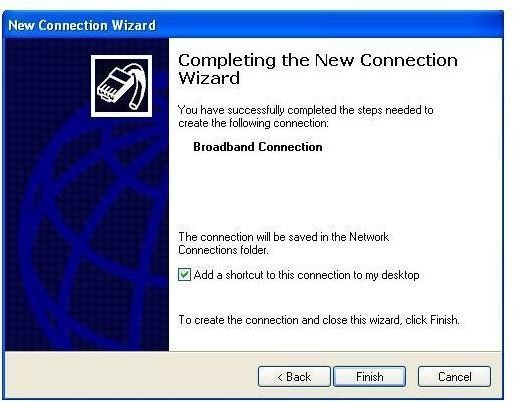
      • Click Finish.
        Step 5 - DSL Connection
        click to enlarge
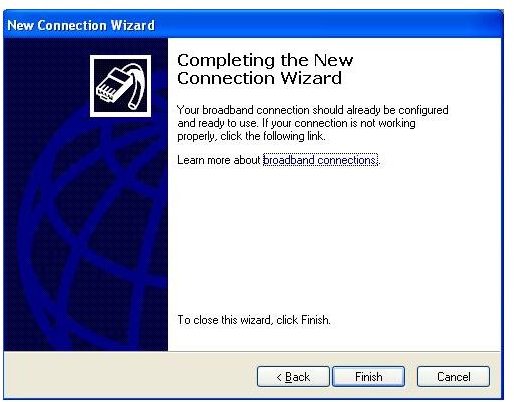
    • If you are using Cable modem connection, choose the third option (Connect using a broadband connection that is always on). Click Next. Click Finish.
      Step 5 - Cable Connection
      click to enlarge
      Step 5 - Cable Connection
      click to enlarge

Once the wizard is finished, you are now ready to use the Internet. If you set up using DSL connection, you just need to click on the new icon added on your desktop then login. For Cable modem connection, you should be ready to browse websites now without the need to login.



Comments

Showing all 17 comments
 
Bob Field Sep 29, 2011 1:56 PM
Error in connection
I have followed your directions. When I try to connect I get (on IE) "Cannot Connect to Server" error message. When I ask it to repair this it says its trying to refresh the IP address...Since this is a broadband connection is there such? How can I overcome this issue and get this laptop to connect to my broadband modem.

Note, do hae a second laptop that works fine so I KNOW the model, etc is quite function and operating properly.

Thank you for your assistance.
Anonymous Jul 23, 2011 6:53 AM
PROBLEM
nothing shows up, i cant connect the internet after this
PLZ help!!!
Dechen Dorji Mar 20, 2011 1:39 AM
Broadbrand errors
what are the major errors that we face when we are using the broadbrand??
Because i am plaining to connect broadbrand>
rex Feb 6, 2011 3:52 PM
old
i have an old computer with windows xp,and i have no clue what to do.ive plugged up the connection but cant configure it.and i know nothing about isp because my other computer has vista and dosent need it.idk what to do but i have verizon...and no account/password that it asks for
Manu Dec 11, 2010 1:52 PM
error in internet connection
i had set up the connection as u have instructed. the problem is that the web page display "the connection tine is out" in mozila and "page can not be display" in IE. what is the cause for this problem? the connection of network is pinging but the web page does not display.

Read more: http://www.brighthub.com/computing/hardware/articles/12909.aspx#ixzz17pZfKDvk
Venkata Alluri Dec 11, 2010 4:11 AM
Broadband internet connectivity issue
I am not able to establish the connection to my broadband throuh my LAPTOP (Toshiba Satillite M45-S269, Windows XP). It is recognizing when the network cord from the modem is plugged in. I have created the new network connection using New Connection Wizard.
DATTA Nov 28, 2010 10:03 AM
BB
NEWLY I GET BB CONECTION. AND I HAVE CREAT A NETWORK CONNECTIONON MY PC BUT NOW I WNT TO ATTACH ANOTHER LAPTOP TO SAME MODEN .HOW CAN I DO IT
addis w/senbet Oct 16, 2010 3:28 AM
hi
the step how How to Set Up Broadband Internet Connection in Windows XP nice
pls help me the step of how to share 1 printer 3 pc in dial up network
i have one hub 3 pc, uTp cable
Saleem Sep 24, 2010 10:45 AM
Connection Without dialing
How to configure broadband connect without dialing in my system
(now i am using to connect dial for connecting, psl inform me how tow connect computer to internet when i open my systme)
andros lim Sep 17, 2010 10:30 PM
problem connecting to web page
i had set up the connection as u had instruct. the problem is that the web page display "the connection tine is out" in mozila and "page can not be display" in IE. what cause this problem to happen? the connection of network is connected just the web page can not display.
fritzbueno Aug 4, 2010 7:16 AM
ISP Name
@Harvinder, you can type any ISP name that you want. You may type the name of the provider that you are paying for your internet connection.
Atlas Jul 8, 2010 10:44 PM
THNKS....!!!!!
VERY assist in solving problems that apply to broadband.....
Harvinder Jun 25, 2010 4:02 AM
RE: How to Set Up Broadband Internet Connection in Windows XP
Hi ca u tell me how to find your ISP name if u can just email me at sharvinderpal62@yahoo.com
sandeep Apr 7, 2010 4:13 AM
gprs
how to connect internet using mobail
faheem Mar 6, 2010 5:15 PM
RE: How to Set Up Broadband Internet Connection in Windows XP
How to Set Up Broadband Internet Connection in Windows 7?
moutasem Feb 1, 2010 4:15 AM
I can choose only 3rd in 5 picture
pranav Dec 19, 2009 10:12 AM
RE: How to Set Up Broadband Internet Connection in Windows XP
thanxxxxxxxxxxxxxxxxxxxxxxxxxxxxxxxxxxxxxxxxxxxxxxxxxxxxx reallyyy!!!!!!!!!!!!!!!1 it was very helpful!1
 
blog comments powered by Disqus
Email to a friend