Using ClamWin Portable to Keep Your USB Stick Virus Free
Introduction
Any mechanism for swapping data and applications from one PC to another provides an opportunity for the transmission of viruses or other malware. This is why the Portable Apps software suite includes the portable version of the ClamWin antivirus program. You can use this to ensure that your USB stick is not infected, and to ensure that any host PC is also clean. Think of it as making sure that your USB stick is practising the computer equivalent of “safe sex”.
How ClamWin portable works
The application itself is simply selected from the main Portable Apps menu (see https://www.brighthub.com/office/home/reviews/28335.aspx for more details). Any antivirus program is dependent on having an up to date database of threats. For this reason, the first time that you open the ClamWin application, it will prompt you to download the antivirus database.
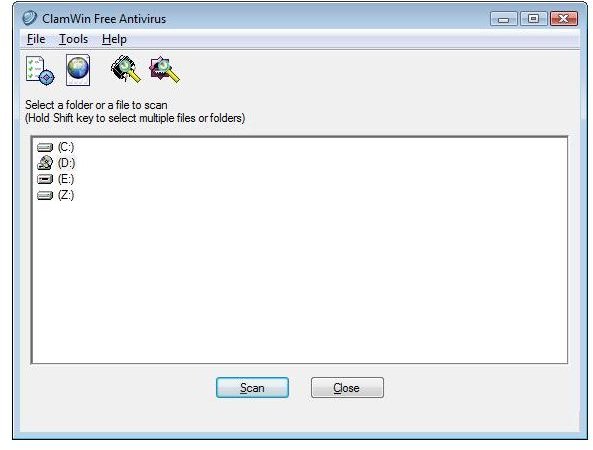
Once this step is accomplished, the simple opening screen provides the following features:
1. The Menu bar offering File, Tools and Help menus
2. A tool bar to allow you to set the preferences, update the database, or scan either files or memory
3. A list of drives which you may scan using the button at the bottom of the screen.
How effective is ClamWin?
The desktop version has been compared to other free antivirus programs in a number of internet forums. In general, it is suggested that itreports less viruses than its non-open source (but still free) competitors eg AVG 8.0 free described in . Its best reported feature is its rate of updating. However, whilst this can be set automatically in the desktop version, the portable version must be updated manually.
Conclusion
ClamWin Portable is an important tool as part of your portable application suite running on your USB stick. It appears almost unique as an open source antivirus tool. It has a simple interface which is very easy to use. It provides an effective way to keep your USB stick free of viruses provided that you remember to update your virus database on a regular basis. However, whilst it works well as protection for your USB stick if updated regularly, it is not a suitable substitute for a virus program on your main PC, where a program which automatically updates its antivirus database and provides continuous monitoring (such as AVG 8.0 Free) is a must.
This post is part of the series: Portable software for your USB stick
USB sticks can store much more than data these days. In this series of articles we shall focus on how you can carry around many of your favorite applications with you on one small inexpensive stick, how this can make you more productive, and show you the precautions you need to keep your data safe.
