Time Management Tools - How to Use Your Computer to Stay On Task
The Problem
As a home office worker, I have no problem staying on task 90% of the time. After all, home office or not, there are still deadlines, status reports, and project updates. The catch is that sometimes I drift off task so slowly that I don’t even notice. They say if you put a frog in a pot of boiling water, he’ll jump out right away, but if you put a frog in a pot of cold water and slowly turn up the heat, he won’t jump out at all because the changes are too subtle. That’s me sometimes with my home office focus.
In a regular office when this happens, sooner or later a tiny piece of your brain turns on and looks at the computer screen and analyzes it against what your boss would think if he walked in right now. When that happens, you hit the back button a few time and are back on task. When that happens in your home office, the rest of your brain makes fun of that tiny part because no one is going to walk in.
The Computer Hard Case
The great thing about computers is that they do what you tell them to do. They don’t care if you don’t like it or if you glare at the screen. So why not use that to make your computer be the bad guy to help you stay on track?
Imagine this. You are diligently working on that new marketing campaign. You pop onto LinkedIn to see if you can find a useful contact at the company. You come across someone who might be a good one, but you don’t really know them or their link very well. You notice that the person you link through has a Myspace page. Maybe that would help. So, you pop over to Myspace, only you are having some trouble finding their page. So you search a little bit. Hey, there is someone who went to your high school and they live right near you, and they like Smashing Pumpkins too! Cool. Just send them an email and…
Focus gone.
It happens to the best of us. That is where LeechBlock comes in. LeechBlock is a Firefox browser extension that allows you to block websites so that you can’t access them. Actually, that sounds like a pain in the neck. After all, you might want to go there after hours or on lunch.
That is what makes LeechBlock so great. You can not only set what sites to block, but you can set when to block them. For example, you could block Myspace from 9:00am to 5:00pm except from noon to 1:00pm. Does that sound too rigid? LeechBlock will also allow you to set sites to be blocked after you’ve been on them for a certain amount of time. After all, 5 minutes on Myspace isn’t a nightmare. So, set LeechBlock to block Myspace after you’ve been there for 10 minutes. Now, you can go to Myspace, but you can’t get lost.
Sounds great, but you need to be able to block some sites faster than others or during different times. Again, LeechBlock has you covered. Is allows up to six block sets, so you can set some sites to be blocked for 8 hours, some to be blocked after 15 minutes, others to be blocked in the morning but not the afternoon, and so on.
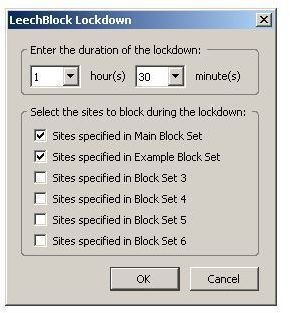
But wait, there’s more. What if you have a crazy deadline coming and you have to stay completely focused. You can waste time reconfiguring your block lists. No problem. LeechBlock comes with a lockdown mode. During lockdown, you don’t get access. Just pick which of your six lists you want locked down from one of them to all of them and you’re done.
Now, if we could just find some software to block the coffee pot.
