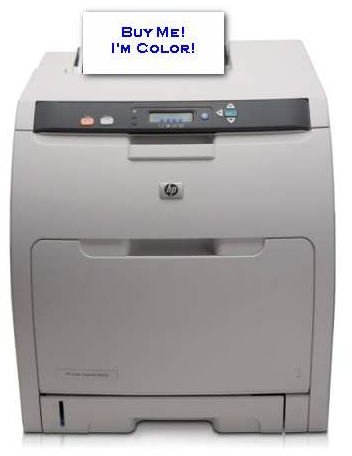
If you work from a home office, but your printouts still have to be high quality and color, you may appreciate this printer.
Color, Laser, Network, Satisfied Clients
Ok, let’s start at the beginning. Before you even look in the direction of this printer you want to make sure that you need it. This printer is a color printer. If you don’t need a color printer, look somewhere else. This printer is a laser printer. If you are fine with an inkjet printer, then go get one of those. This printer is a network printer. Note, that this is different than sharing your printer on your network by attaching it to another computer. This printer plugs into the network by itself so that none of your computers have to be on and ready for you to print to it over the network. If you don’t need the network functionality, get the cheaper non-networked one.
Now, that we are all on the same page let’s jump in. I run a freelance writing business. As one way of differentiating our business in a crowded marketplace, we not only right company newsletters, we also design and do the layout for them, and we create the desktop publishing files for them as well. Then, the client takes that file to a Kinkos or whatever and has them printed. But, for one client, we also maintain their website (another value add) and as a result, we have access to recent additions to their newsletter mailing list. The client doesn’t want to waste any printing costs by guessing how many extra to have printed, and they don’t want to go back to the print shop and re-pay for a setup for the newest newsletter subscribers.
Well, at ArcticLlama, LLC, “We’re Different.” We expect to exceed our customer’s expectations, so when we heard about the client’s delimma, we did some math and offered to handle the printing and the mailing of the “extra” newsletter subscribers each month whether they are new or they were missed. The client was happy. But, we had a problem we didn’t know about, yet.
Get Me a LASER!
We have a black and white laser printer and we use it 99% of the time. After all, as a writer, people want your words, and your words are the same in black and white or color. For the 1% of the time we need color, we have a nice color, networked, INKJET printer that prints great quality and we are very satisfied with for everything from samples, to fliers, to signs, to pictures for my daughter to play with.
So, when we decided to help out our client, we gleefully printed around 83 extra newsletters. It took a long time, but we just did other things while the printer worked away. The next day, we folded, stuffed envelopes, and dropped 83 newsletters in the mail. Then, a few days later, we got the phone call.
You see, inkjet printers are “wet” printers. The inks must dry. That is why we waited overnight. But, there is a catch, 83 six page newsletters makes a stack of 249 double sided pages. The ink doesn’t dry very well, even overnight, on printouts 2 through 249. So, when we folded, they smeared. When we mailed, the ink transferred across the folds to the facing area of the page. When they opened, they were a mess.
In the past, we’ve never printed so many pages at once, so we laid them out on the table or counter to let them dry. That isn’t practical with so many pages, so the answer is LASER. So, now that we need laser, we meet all of the above criteria.
LaserJet 3600n - Good or Evil?
HP has the best name in the business when it comes to printers. We got a deal on a 3600n and jumped on it. So, how is it?
The print quality is solid. I understand that early models of this printer had muddled text, we have no such issues with ours. The text (mostly black) is clean and it doesn’t smear. The graphics are where this printer really shines. The color, of course, is in the graphics not the text (though we use a little there). The graphics are bright and sharp. So, the red line on the blue graphic stands out like it should and the quality is solid. When we got around to printing actual photos, the weaknesses started to show through.
This is not a photo printer, so the expectation should not be that its photo prints are amazing. They are not. A 4x6 run through from Adobe Lightroom onto high end photo paper is crisp and sharp, but when you really look, you can see horizontal lines running through the image. So, we won’t be selling our photo printer.
But, what about photos in something like a newsletter. The grade here, is “good enough.” I can’t imagine anyone would ever complain, but that isn’t really the standard for a professional home office user. The key is to keep in photo images small. A photo of the company picnic is fine at 3x2" or even 3x3", but much more than that, and you are pressing the quality issue to the breaking point.
And, when it comes to toner, expect sticker shock of gigantic proportions. Each toner runs over $100. That is per toner, and there is one per color (3) and a black one, so a full replacement of toner will cost you more than the printer did. If you are willing to go non-HP brand, then there are some savings to be had, but so far, we haven’t done it.
Specs
- HP says 600 x 600 dpi for black and color prints.
- 2 Paper Trays means no switching between letter head and regular paper (yeah!)
- Handles all the usual paper sizes
- Memory: 64MB
- Connects via Ethernet to the network or USB 2.0 to a computer
- Note: You can get wireless connectivity by buying a wireless adapter that connects to the Ethernet port. To use USB, you not only need wireless, you need a printer server, don’t bother.
- Size: 15.5" x 20" x 15.5"
- The footprint is fine, but it is TALL. If you are thinking bookshelf, think again.
- Speed
- Officially 17ppm
- Our office gets around 14ppm to 15ppm
- Before you compare, know that this printer does not have a sub-best print quality setting. This ppm is at BEST setting. Other printer manufacturers sometimes report the speed of their STANDARD setting which is one faster than their BEST setting. If you care enough about your printouts to get laser, then you need the best setting, so don’t fall for this trick.
- Warmup time seems longer than it should, but it is tough to tell the difference between what is the delay for the network versus what is the warmup time. I count from when I hear it start to make noise. From noise start to first page seems like 30 seconds sometimes.
- Cartridge Yield
- 4000 pages is the official number
- 4000 is going to work out to be about ballpark. We go through blue (excuse me, cyan) faster because our logo is blue and so is our main printing client.
Overall Recommendation
I could write up something snazzy and persuasive, but I think this sums it up best:
We have decided to offer this service to other clients both current and future using this printer. So, we like it.
There is one bad thing and that is that the printer does not do duplex printing, so you have to turn the pages over and reprint the other side. Once you have it ironed out how the pages go in that isn’t a big deal, but if you are going to print tons of double sided, you might want to look at the 3600dn which prints duplex without any user help.


