If your home office setup requires you to have multiple email accounts across several systems and sites, managing those accounts can sometimes be a pain. A new solution from Yahoo! owned Zimbra might be the answer. Learn how Zimbra can help manage your information overload.
The Business Owner Email System
Long after its rivals began offering free IMAP or POP access to their email services, Yahoo! held out, requiring users to upgrade to a paid email account for such access. But, with the release of Zimbra Desktop, home office users can now manage their Yahoo!accounts without having to use the web interface.
As a small business owner working from a home office, I need a lot of different email accounts. I don’t want my personal email mixing with my work emails, and I don’t want my inboxes for prospecting and posting on boards mixed with my accounts for paying clients which I don’t want mixing with my accounts for billing, taxes, and so on. Since I have neither the time nor inclination to setup my own email server, the answer is a mix of Yahoo, Gmail accounts along with the email accounts attached to my website through my domain host.
Gmail lets me access my accounts via IMAP, and I can access my hosted accounts via POP (maybe IMAP I haven’t checked). But, how do I know which accounts have new mail in them? How do I make sure I don’t accidentally reply to an email using the wrong account and confuse a client? How do I just manage all of this email?
A potential new answer has arisen in the form of Yahoo’s Zimbra Desktop which I recently downloaded and tried out with a couple of my inboxes to see if this is a possible solution.
Pros:
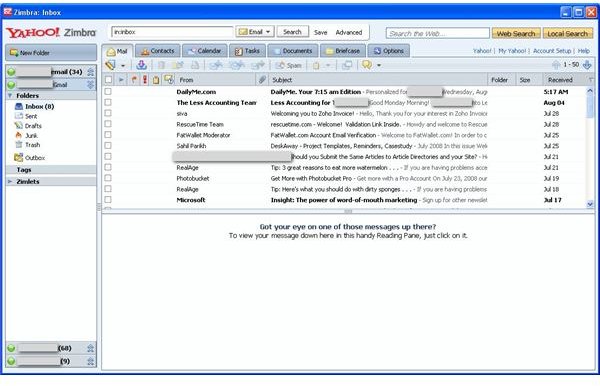
The Yahoo Zimbra Desktop interface looks a lot like the Yahoo Mail web interface, so users should have no trouble picking up the new software. Setting up your Yahoo Mail account is easy. Just enter your username and password and it does the rest. You can select how often Zimbra looks for new mail ranging from every 5 minutes to every couple of hours. Zimbra uses the IMAP protocol for communication with your Yahoo Mail account which means that whatever you do on your desktop software gets reflected on your main web based Yahoo account as well, so you don’t have to worry about deleting a bunch of messages only to see them when you log back in.
In a nod to the reality of users with multiple email accounts, Zimbra allows you to setup and connect to multiple accounts including Google email accounts. Again, the settings come pre-installed with the program so adding a Google Email account is just as easy as adding a Yahoo email account. Gmail supports IMAP as well, so you can manage your Gmail account from the Zimbra interface. Switching between email accounts is a snap, and when you send an email, it sends from the account you have open so you don’t have to worry about accidentally replying from the wrong email account.
Zimbra also integrates with Calendars, Tasks, and Contacts (Yahoo and Gmail) with the same interface making this heaven sent for those home office users who end up with Contacts and Tasks across both email systems.
Most importantly, it is all so very easy. The accounts are set it and forget it, and I didn’t have to go through the trouble of entering in server names and port numbers for the Yahoo and Gmail accounts which are ready to go from the start. My hosted accounts, of course, took a bit more setup but no more than any other program, and much easier than most.
As an added bonus, Zimbra runs on Macs and Unix too, so if you are a home office user with not just multiple email accounts, but multiple operating systems as well, you are in business.
Cons:
The Zimbra Desktop is a resources hog. On my system the “zdesktop” process uses nearly 120MB of memory while running. The “prism” service which runs in the background to check and download your mail uses almost 40MB giving the program a very big footprint. Still, to Yahoo’s credit, they allow the user to shutdown both the program and the associated service easily unlike other programs that require digging deep into the menus, or worse requiring you to stop the process manually in Task Manager or the Services Control Panel. With Zimbra you can shutdown the background service by simply right-clicking the system tray icon and choosing Shutdown Service.
So far, that is the only negative I can see. No, Zimbra is not a full contact manager or scheduling system, but frankly, I’d like those pieces to be separate from my email. Email is a quick and dirty tool for me, while my calendar and contact management systems are critical resources, so it makes sense for me to keep them separate. At least, I would like to have a choice in the matter. (I’m looking at you Microsoft Outlook.)
Overall
If you are not satisfied with your current home office email setup, I would highly recommend taking a look at Zimbra. Zimbra will work best for users that power through emails by taking them one at a time and moving on. It will probably work less well for you if you are one of the people that likes to sort and categories your emails before dealing with them.
Zimbra is free for home use. You won’t see it splashed all over Yahoo’s website, probably so they can ramp it up at a measured pace. Instead, you’ll need to head to the Zimbra website at www.zimbra.com


