Sometimes once-a-day backups are not enough. If you’ve just written a very important memo or created a critical spreadsheet, don’t take a chance on losing it just because you forget to make a copy. Add-ons for backup software automatically can create secure backups on a hard disk or external drive.
EMC Continuous Backup Software
Years ago a company named Dantz developed an inexpensive backup software product called Retrospect Express for Windows or Macintosh for one computer. A version of this named Retrospect Express HD is still available through stores. The product grew into a professional version, Retrospect for Windows (or Macintosh) Professional. This version can be licensed for one or more computers. The product was bought out by EMC2, whose EMC Insignia Division handles a full line of enterprise and small business data backup and storage, protection and sharing applications. Now there is an add-on for the professional version that provides continuous backup.
How It Works
The Retrospect Continuous Backup Agent uses a policy server running on your computer and a desktop agent (client) to provide automatic backups of critical files on desktops and laptops. When desired files are included in the data backup policy, every time you create, change or save one of these files, the version is backed up immediately to a hidden, compressed folder called the Version Store on the same computer. Usually only the changes are stored so space is minimized. In my case, the Version Store currently holds 486 versions of 150 files and uses only 2.8 GB of a 150 GB virtual drive. If available, a second copy is made on a networked computer or an external drive (including flash drives) in a “Data Vault.” Otherwise, the Data Vault is stored in a hidden partition on the user’s computer. The user sets version retention (length of time) policies. All files or specific ones can be recovered based on criteria such as a specific time, version, or by searching by name including truncated names. Data Vault files can be encrypted if desired so that, for example, you can protect files on an external drive.
Setting Up Backup Policies
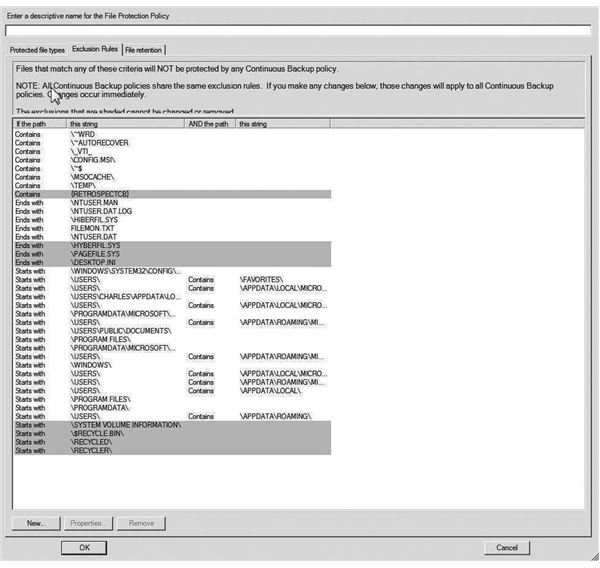
Default backup templates come with the software, which only need to be edited a bit to add additional folders. The Windows version includes by default Office Documents (Word, Excel, PowerPoint, etc.) even open Outlook files. This is based on file types registered with Continuous Backup. Even more important than adding folders and files to the continuous backup software options is choosing what to exclude. If you are storing a lot of photos on your computer in additional to business files, you may not want to keep backing up edited versions of these on a continuous basis. There is probably no good reason for including files in temporary folders either. Instead, exclude files by creating exclusion rules. These are accessed from the Exclusion Rules tab on the backup panel. Choose NEW. At that point, browsing to the folder(s) to be excluded will select them. Alternatively, you can define an exclusion rule by providing the path to files or types. A rule like this: “ \my documents\my outlines\*.docx” would exclude all files ending with the .docx extension but not other files in the my outlines folder. The included image here is a partial list of some possible exclusions. If you do not take a little trouble with this during setup, the Version Store and Data Vault will include a considerable amount of data backup that you will never need.
Keeping the Backup System Healthy
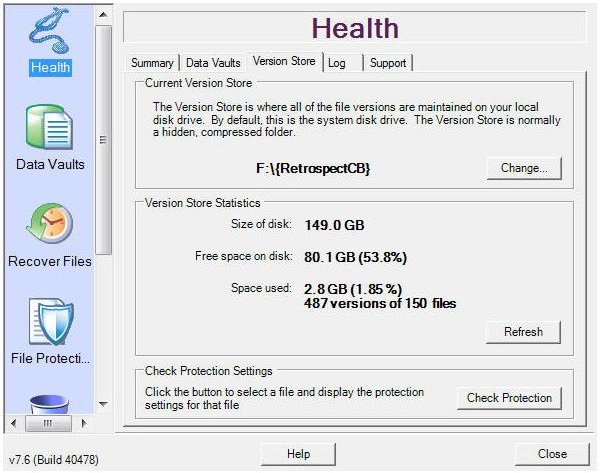
The control panel for EMC Continuous Backup displays under a Health tab a summary of data backup status or more detailed information on the Version Store and Data Vault including how many files are protected, how many are waiting to be copied to the Data Vault (because the latter operation can be done when system resources usage is low), how much space is being used, a log of informational, warning, and error messages, and a link for Tech Support. Do not just setup the software and policies and then ignore it forever. Check on the status of the various possibilities described above.
The log file is particularly important because you may find that Continuous Backup is failing to copy some specific file you thought it was. A typical reason for this is an already compressed file. Some programs create these as a matter of course—some Quicken file types for example. In this case, you need to use some other backup method for these files or expand them.
For anyone concerned about losing important information due to sudden problems, Retrospect Continuous Backup Software provides a painless way to ensure against this possibility.


