Do you wish you could keep notes about everything? Wish you could save the events and images that you experience each day? Evernote can help. The latest version has a web interface as well as PC version, and they all interconnect to share your data. It even works with your smart phone.
What is Evernote?
Evernote is the best personal information keeping and retrieval application and service currently available. It’s the popular answer for Microsoft’s “One Note,” it’s actively in development, and is improving rapidly.
Let’s look more closely at Evernote’s features and options.
The Calculator and the Scrapbook
Imagine that you crossed a tape calculator with a scrapbook. The tape would have to be large enough to contain the clippings that you wanted to paste in and keep.
The disadvantage, of course, is that your tape would eventually become huge and searching it for data that you remembered putting there would be very time consuming.
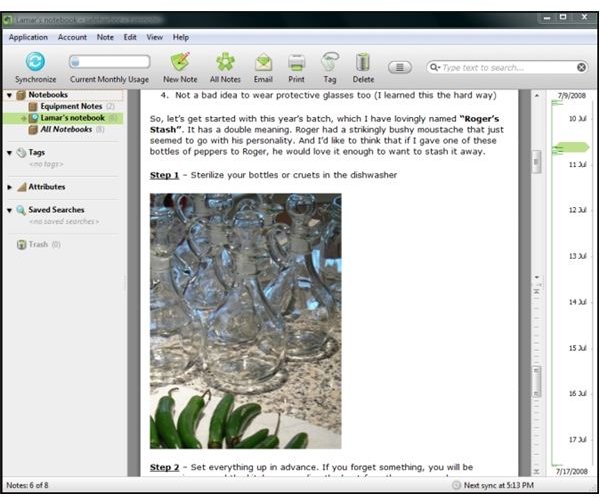
Evernote is the computerized equivalent of a tape calculator and a scrapbook. Basically, it has a long tape that’s like a continuous notebook. You clip and paste the data that you wish to include in your note to make up the “pages.” As you scroll through your notes, a slider on the side shows the dates and time the material was added. It also contains a powerful search facility to let you find your data. So powerful is the search feature, in fact, that it knows how to look for text inside images.
Evernote for Windows
The Multi-talented Tape
Adding information can be done in several different ways. One way is to drag the mouse to select the material that you wish to add to your notebook, then right-click the selected text and select “Add to Evernote.” This works on web-pages as well as in other applications. Image files like jpeg pictures can be dragged into the notebook. The newest version allows you to include and search inside of PDF files. You can even type in your own notes in your notebook.You can create as many separate notebooks as you need to feel sufficiently organized, and you have the option of making your individual notebooks strictly local to your PC or synchronized with Evernote on the web.
And that’s what’s new in the Evernote – Evernote Web service - and that’s how Evernote gets to be everywhere.
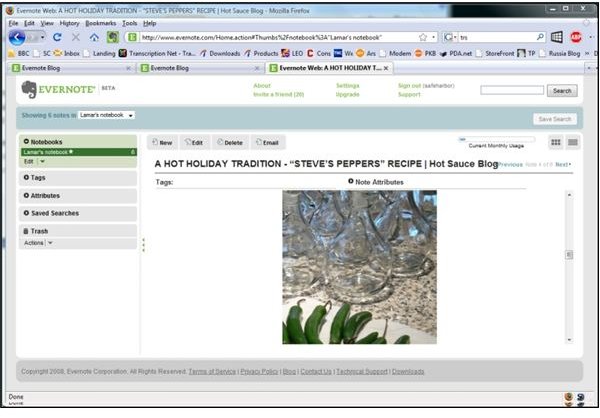
Evernote Web
It Runs on What You Have
It runs on your PC (Windows XP or Vista) or Mac (currently Leopard only) desktop or laptop. There’s a version that works with Windows Mobile (phone) devices and a new version that runs on the Apple iPhone. Thanks to the Evernote online, you can also connect to your data from any web-enabled computer capable of running Internet Explorer or Firefox.
Your home PC or Mac synchronizes the notebooks that you select with Evernote on the internet. Two plans are available. One is free and gives you 40 MBs of online storage. For $5/month or $45/year, you can increase that storage to 500 MB.
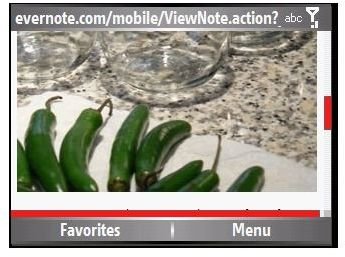
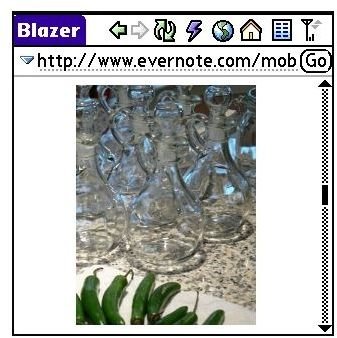
You don’t even need to be running the Evernote application on your mobile phone. There are at least three ways to use your phone with your Evernote web service. One way is to use the special email address that Evernote gives you when you sign up for the service. This means that you can send photos, audio files, and notes from your mobile device and then sync them to Evernote at home when you connect later. (Evernote suggests that you add the email address as a contact on your device.)
There’s also a web interface at https://www.evernote.com/m/ that you can access from your device’s mobile browser. In fact, the Evernote application running on my Windows Mobile Smartphone is simply an interface to the mobile website – it starts Internet Explorer in order to show the note. The first two images are taken from a Smartphone. The third is a screenshot from a Palm OS Treo 755p.
Mobile Device Website

A Little Brainstorming
I mentioned previously that Evernote looks for text inside images. This is more sophisticated than “You are here” obligatory photos of signs at Yosemite. It means that you can photo and then search for the content of blackboards, whiteboards, and business cards. With a little imagination, it’s hard coming up with things that Evernote can’t do.
Interested in the song on the radio? Record some of it and send the snippet to Evernote Web. At home, on your PC or Mac, start the free Tunatic program and play it using the stereo mix feature of your computer. Tunatic will then try to tell you what the name of the song is.
Compulsive about saving every penny when shopping? When you clip and save information from a web page and add it to a note, Evernote preserves all the links (except Javascript-driven links) in the original document. This means that you could add a folder called “Deals” or similar and update it using clippings at home or even send back photos of price tags (via email to Evernote Web) from your favorite big box stores.
Better bookmarks? Why save a link when you can save the entire page and later search for it by keywords for content rather than the page name? This also works great for research projects. Rather than save a list of web pages related to your topic, just clip and save the relevant parts of each to a project folder.
Photo archive? If your digital camera syncs to your PC, select the photos that you want to save and put them in an Evernote folder.
And don’t forget actual scrapbooking. If you have a flatbed scanner, you can use Evernote to organize and save your images and clippings.
How I Use Evernote
Although I do use the web interface of Evernote, a primary usage is on my office PC. I keep folders for industry news items - little snippets from web sites - that I want to preserve with their links. I have a folder that has the full text of every article that I’ve written for Bright Hub. That makes it very easy for me to find information that I’ve written about before and identify which article it’s in.
On my home machine, I actually do have a folder about pepper sauce recipes, as shown in the images on the first page. I also have the components listing for my ThinkPad from the Lenovo website, a PDF parts list for our lawn mower, pictures of old tractors from shows, and notes about iTunes and music that I want to look for.
My usage of Evernote is about 50/50 work and play.
And Finally a Word About Security
Evernote wants be your “external brain.” Dave Engberg says they “would like to provide a single service to manage your memories for many years.” (Evernote Blog )
The basic level of security is similar to that of email with a trusted provider. Another level of security is choosing what material we leave in our local folders and don’t sync. Evernote wants us to know that their service is safe. The Windows client (and soon the Mac client) offers the ability to select and encrypt text that you want to protect. The password for this is not sent to Evernote.


