Despite the “paperless” office, writers still need to print out copy at times. No one would take a disk with a few pages on it to a copy shop for printing. What about printing out a 40-page user manual or 90 pages of sample chapters for a book proposal? Do you print at home or take it to a shop?
What Does Your Laser Printer Really Cost You?
It’s easy to determine the print cost at the print shop. Just call them and ask. However, if you want to print on your laser printer , what is the cost for that? There’s only one way to know the answer to that question. Keep a spreadsheet that calculates not only the paper cost but includes the toner. It’s not that hard to do. The best time to set up the spreadsheet is when you replace the existing toner because that gives you a longer time period for more exact results. It can be done just about any time, though, but you will need to do some estimating.
Getting a Handle on Laser Printing Costs
Before changing the toner , use the printer’s status print out to see how many pages printed with the current cartridge. The printer documentation should tell you how to get that report. Alternatively, if it is a network printer, you should be able to see the status page by using a Web browser. Just enter the IP address in the browser URL bar. The network router probably has an IP of 192.168.1.1. If the printer is assigned a dynamic address the printer most likely has an IP of one number higher than your computer(s). With one computer on a network, the PC often will be at 192.168.1.100. In this case, the printer likely is at 192.168.1.101. Two computers on the network? Then try 192.168.102. With a static IP address, you should already know the printer’s address.
Use the same technique to get statistics if beginning part way into the toner cycle. In this case you will have to estimate full toner use based on the claimed average pages printed (from the printer manufacturer details) and a ratio of current printouts for the known time length of printing.
There is a slight disadvantage in this case because the use to date may not represent typical use, but it is probably not significant enough to make a difference. For example, if the printer is supposed to do 5,000 pages of normal printing per toner and you’ve used it for six months. So far, 3,000 pages have printed. If the best price available for toner is $85.00 then divide 3000 by 5000. Multiple the result, 0.6 times $85.00 for a cost to date of $51.00. Start the spreadsheet with either the full cost of toner or the partial cost.
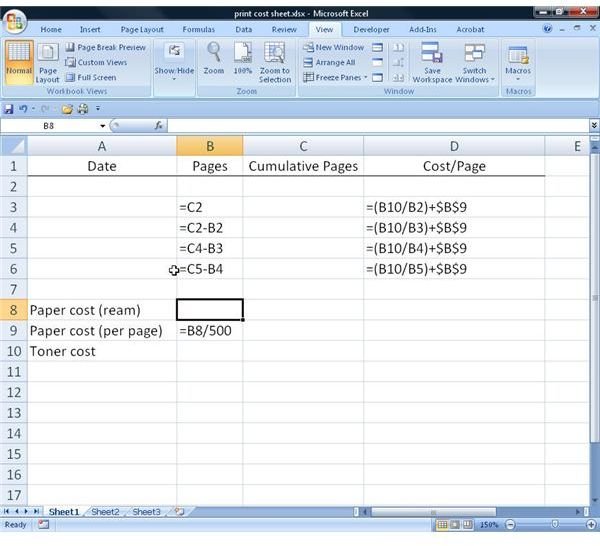
Create the Spreadsheet
to see the labels and formulas used in the setup. Labels are typed as is. Precede formulas with the equals (=) sign.
Setting up this spreadsheet takes a little time in the beginning, but it is a one-time step. After that, it’s just a matter of updating the sheet when a new toner is put into service. It will pay of in the long run because it provides useful information about your printer use.
Now all you have to do is fill in the date, cumulative pages printed from the printer report, what the last ream of paper cost and the price of the toner. Update the toner and paper cost at each toner change and the current per page cost will appear. Until those numbers are entered, the formula cells will show either #DIV/0! or a negative number—ignore this.
Once you have reliable cost figures, you can decide whether a visit to the local shop is cost effective or not. One caveat: These calculations do not include the wear and tear on your laser printer. With a little more work, this could be factored in by amortizing the cost of the printer over a chosen time, say four years. Even the real cost of the printer (after a tax deduction) could be included for extra precision.


