Using a patented technology known as “super-resolution,” vReveal promises to be able to dramatically enhance videos that many people would consider to be unsalvageable with methods adapted from those used by crime labs and intelligence agencies. How well does it work?
What Does vReveal Do?
We’ve all seen those crime shows like CSI in which technicians take video footage that looks like nothing but a reel of blurry, shadowy blobs and turn it into something that’s actually clean enough to be used as evidence. Even if this is realistic, is a typical home computer powerful enough to enhance videos that dramatically?
While it may not be able to fix every video problem, vReveal does use a special technology based on the same algorithms used by software in government and law enforcement. Rather than act as a full-featured video editing application, vReveal focuses on cleaning up and enhancing video footage captured by digital cameras, cell phones, and other “not so professional” devices. The software also includes tools that will upload your final videos directly to YouTube or Facebook, making it easier to share your productions with others.
These are vReveal’s claims, but does it really work?
Ease of Use (5 out of 5)
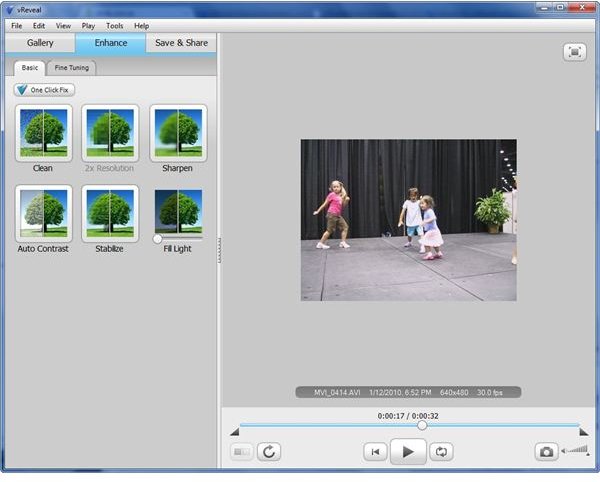
Before getting into the nuts and bolts of the application, let’s take a look at vReveal’s main interface and usability. In terms of ease of use, you’ll be hard-pressed to find video editing software that’s laid out in a more intuitive and user-friendly manner.
The major functions of the software are divided up amongst three tabs: Gallery, Enhance, and Save & Share. Within the Gallery tab, you can view your video collection and import new footage. You can also select any video and play it in the side preview panel.
After selecting a video that you want to enhance from the Gallery tab, you move over to the Enhance tab. Here, you can either use any combination of vReveal’s one click fixes or manually adjust the settings of any of the enhancement tools. Again, you can preview the video with these corrections in place. You can even select a “split” preview that shows half of the video in its original state and half with the modifications applied to see how much of the video has been enhanced as you watch the preview.
Finally, when you’re satisfied with the result, you can move to the Save & Share tab and either save the enhanced video to our computer or upload to YouTube or Facebook.
Performance and Features (5 out of 5)
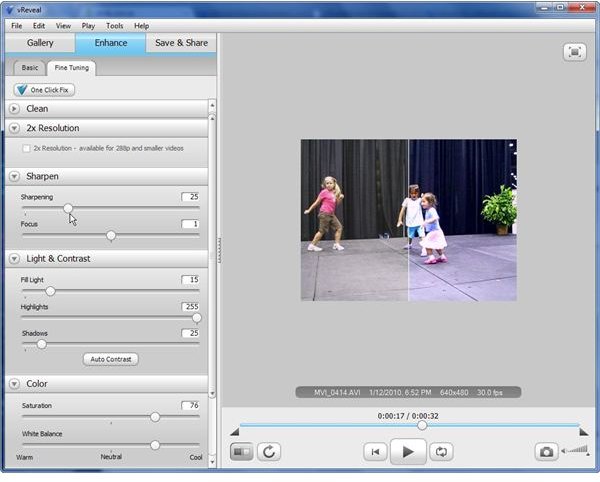
The first time I tried vReveal, it was to try to clean up some shaky footage shot with a cell phone. I was immediately impressed and went searching for other “bad” videos to see if vReveal could help them, too. In each instance, the software was able to give some degree of improvement, but the results were very dramatic in many cases.
The one click fix settings found under the Enhance tab are actually quite smart, especially for the Clean and Stabilize tools. Most of the time, these basic settings are all I need, but I still like being able to manually customize the settings – not only to get the “perfect” correction, but also to sometimes “over correct” in order to get a more artistic effect.
Natively, vReveal supports AVI, MPG, WMV, and ASF formats. If you have QuickTime installed, the software will also handle MOV, MPEG 4, and 3GP files. Additional codec packs from third-party sources are also available.
For a video editing program, vReveal actually has pretty basic minimum requirements. According to the official site, vReveal requires Windows XP or Vista, but I’ve had no problems with the software on Windows 7 PCs. Also, vReveal requires:
- Intel or AMD 1.6 GHz CPU (SSE2 Compatible)
- 1 GB RAM
- 50 MB hard drive space
Although vReveal doesn’t require a GPU, the software does support GPU acceleration if you have a CUDA-enabled NVIDIA graphics processor.
Price to Value (5 out of 5)
When vReveal first came out, it was priced at $49. That was still a pretty decent deal, considering the software’s capabilities. However, MotionDSP has recently lowered the application’s price to $39, making the deal an even better value.
With that being said, it’s always a good idea to test out video editing software on your own computer before you buy it – if at all possible. Thankfully, vReveal has a 30-day free trial that you can download from the software’s website .
Overall Rating (5 out of 5)
While vReveal may not be able to replace a full-featured video editing program, it is an excellent supplement that really does live up to its claims regarding video enhancement – especially for footage shot on hand-held devices like smart phones and digital cameras. At a price of $39, it’s definitely worth the investment.


