Review of Cyberlink Power DVD 7.0 - High Quality Playback
Introduction
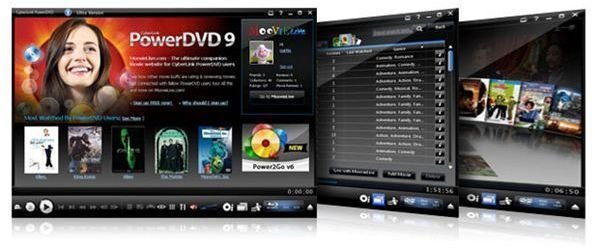
If you like to watch DVD movies on your PC or laptop you’ll find that there is a wide variety of software packages to choose from. One such program probably came pre-installed on your PC when you purchased it. If you own Windows Media Center Edition or Windows Vista then you already have a built-in Media Center that will do a decent job with video playback. However, if you really want a high quality program then PowerDVD by Cyberlink is the one you’re looking for.
I have three kids and I’m always the low man on the totem pole when it comes to getting to use the TV so I watch a lot of movies on my PC. I’ve been using PowerDVD for years and I’ve always found it to be a very reliable and easy to use program for watching DVD movies or other video files on my computer. CyberLink PowerDVD 7.0 provides one of the finest quality video pictures I’ve ever seen whether I’m using my PC monitor or connecting the computer directly to my big screen TV.
In addition to high quality video, CyberLink PowerDVD 7.0 also offers outstanding audio quality with cinematic surround sound. The program has a number of advanced features that allow you to configure it for your desired output and your home theater environment.
CyberLink PowerDVD 7.0 will play all DVD formats including DVD-ROM movies and VCD titles. The higher end version, PowerDVD Ultra, adds support for the Blu-ray disc or HD DVD formats. You can also play video files or DVD movies that are on your hard drive.
Price to Value (5 out of 5)
What’s Hot:
CyberLink PowerDVD 7.0 comes in four different versions; Standard, Deluxe, Max, and Ultra that range in price from $49.95 to $99.95. Although pricier than some of its competitors, the high quality of this program, combined with a rich set of features, makes it well worth the money. If you don’t need all of the features you can select one of the cheaper versions of PowerDVD 7.0 and still enjoy one of the best video playback programs available. I’ve found that the Deluxe version has more than enough features to satisfy most people. However, if you want high definition quality using HD DVDs or Blu-ray Discs then you’re better off with the Ultra version.
Cyberlink also sells different Add-On packs for notebook power saving plus enhanced audio and high definition options to boost your playback experience. You can even get free skins to customize the look of your player.
Cyberlink offers a 30 day free trial that you can download before deciding if PowerDVD 7.0 fits your needs.
Installation & Setup (5 out of 5)
What’s Hot: 
CyberLink PowerDVD 7.0 is easy to install and setup. The installation wizard runs with very few prompts and after entering the CD key you’re ready to start using the program. The program installs well on Windows XP or on Windows Vista. After installing PowerDVD you can customize a number of different options for your video and audio needs.
Product Features (5 out of 5)
What’s Hot: 
Cyberlink’s web site states that PowerDVD 7.0 is “The No. 1 DVD Experience on the PC” and they have good reason to make that claim. Despite the higher cost than similar products, once you’ve seen the quality of the video image there’s not much to complain about. PowerDVD 7.0 is also packed with features to enhance your viewing experience.
PowerDVD 7.0 supports a wide range of DVD formats including H.264 playback, DivX Pro, WMV-HD, DVD Audio, CPRM, VCPS, DVD-VR, DVD-RAM, HD DVD, and Blu-ray disc. However, some of these are only available with the higher end versions, like PowerDVD Ultra or through the purchase of an add-on pack. You can also play DVD video or media files that are on your hard drive. You can quickly access video object files (VOB files) by dragging them from Windows Explorer right onto the player screen.
CLEV-2 (Cyberlink Eagle Vision – 2) is a video enhancing technology that gives you a brighter image with more natural colors. CLEV-2 automatically adjusts the video quality so you’re seeing the best possible image whether it’s on an LCD or CRT monitor. CLEV-2 technology helps balance darker scenes by optimizing the color and contrast to provide you with the most vivid images possible. Of course, having a good quality video card also plays a big factor.
CyberLink Pano Vision (CLPV) is another excellent feature that adjusts different movie formats, such as 4:3 or 16:9 ratio images, to fit the size of your monitor. Whether you have a wide screen or standard sized monitor, CLPV will adjust the image accordingly, without any loss of quality or annoying stretching or distortion of the original format.
PowerDVD 7.0 doesn’t skimp on the audio features either. CLMEI-2 (Cyberlink Multi-Channel Environment Impression) turns a two channel audio source into multi-channel audio. The technology makes use of Dolby Pro Logic features for providing audio output level strength on each channel. CLMEI-2 supports Cyberlink Headphone (a version of the Dolby Headphone technology), Cyberlink Virtual Speaker, Low Frequency Effects and Dynamic Range Compression.
CyberLink Virtual Speakers (CLVS) simulates the feeling of surround sound when multi-channel audio is played through two speakers, while Dynamic Range Compression settings allow you to configure audio modes that are best suited for quiet, noisy or normal listening locations.
In addition to Cyberlink’s proprietary features, PowerDVD 7.0 also supports all of the major audio technologies such as Dolby Digital EX 7.1 Surround Sound, Dolby Digital 5.1 Surround Sound, Dolby Pro Logic II multi-channel surround, and SRS TruSurround XT. Also included is support for Dolby Headphone, which gives you a surround sound feeling while wearing your headphones, and the ability to decode DTS (Dolby Theater Sound). Depending on the version of PowerDVD you purchase, these features may all be included or you may need to buy the audio enhancement add-on pack.
Included in its feature set are a number of additional utilities for enhancing DVD playback. Some of these are:
User Interface (5 out of 5)
What’s Hot: 
CyberLink PowerDVD 7.0’s user interface is very straightforward. You can access all of its features from the icons on the toolbar or by right-clicking your mouse on the screen. From there you can bring up the context-sensitive menu that allows you to find what you need fast. PowerDVD 7.0 also supports the Windows Media Center remote control.
There are several different UI modes you can choose from. These include the ability to dock and undock several of the control panels and a mini-mode that puts the controls on your taskbar. Also, the player mode that puts all the controls on the same screen and a full screen mode.
Cyberlink PowerDVD 7.0 also offers a few different skins to customize the look of the player, although there aren’t many to choose from.
What’s Not: 
The only thing that annoyed me about the user interface is that it won’t remember the window size and position from a previous session. On a 1280x1024 display the playback window is rather small. You can adjust the size and position by dragging the corners but PowerDVD 7.0 won’t remember these adjustments the next time you play a movie, like Windows Media Center.
Images


Suggested Features
CyberLink PowerDVD 7.0 has so many features that it’s hard to recommend anything more. If I had to pick something I’d like to see more features for video capture added.
Conclusion
As I’ve said several times, CyberLink PowerDVD 7.0 is clearly the best DVD player software there is. I’ve never seen a better quality video image on a PC. The video and audio enhancement technologies make this the finest DVD playback software hands down.
Whether you’re watching DVD video from your PC, connected to your television, or on your laptop, you’ll appreciate all of the features that PowerDVD has to offer.
Related Products
CinePlayer Surround, Windows Media Center, WinDVD
