If you want to watch and record television programs on your PC and your computer isn’t television-ready, you have a bit of work to do. This handy reference will walk you through the process.
How to Get Started
TV tuner cards are the latest hardware option for the media-savvy. With most TV tuners, you can watch over 100 channels of high-quality television, rent online movies, and even plug in S-video, DVI, HDMI, or composite hardware. Most cards come with remote controls too, and Vista Ultimate and most editions of Windows 7 come with Media Center , which allows you to surf through TV channels just as if you were sitting in front of an actual television. You can even schedule and record TV programs, and zoom in, pan, or freeze video action.
Installing is generally touted as something like this on the manufacturer’s Web page: “Simply install the card and the user-friendly software, connect the TV cable, and sit back and enjoy high-quality video right from your PC.” Now, installing the card is actually pretty easy, I have to give them that. However, there are thousands of Web pages devoted solely to FAQs, technical help, and troubleshooting tips for getting the TV cards working properly, as well as thousands of forum entries from those lost in the process.
In this article, we’ll discuss just how to go about installing and configuring a TV tuner card, the software, and the remote control, and how to avoid the pitfalls that cause most problems along the way. If you’re thinking of installing a TV tuner card, read the manufacturer’s instructions first, and then read this. After that, you’ll be ready for the installation.
Meeting System Requirements and Installing the Card
There are specific system requirements for all hardware products, and TV tuners are no exception. For the most part though, if you have Windows Vista or Windows 7 on a new machine, you’ll probably meet those requirements easily. However, you should make sure by reading the information on the box very carefully. If you need to upgrade something, say RAM or the video card, do so before continuing.
Open the case. As with installing any card, make sure you are properly grounded, and then seat the card into the proper PCI slot. Press firmly and secure the card with a screw. Again, by reading the manufacturer’s instructions you can make sure you do this properly. Some may require the card be placed in the last slot, away from the other cards, and some may require just the opposite. Once installed, close the case, and start the PC.
Installing the Software
Software differs from manufacturer to manufacturer, but for the most part, you’ll pop a CD in the CD ROM drive and follow the prompts. It’s important to install the software and the driver, if both exist. The most common problems with installing TV tuners are either the driver installation or the failure to install and configure the included software.
Note: If you’re running a version of Windows that offers Media Center, you’ll use that to watch TV. In this case, try only installing the driver and not the software. If the TV tuner doesn’t work, install the software too.
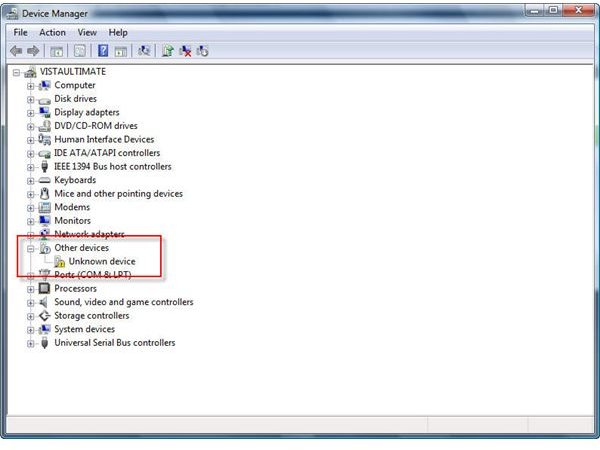
If you find you are having problems after installing both, open Device Manager and verify that the TV Capture and TV Tuner entries are there and functioning correctly. If you see a yellow exclamation point or a red x, visit the manufacturer’s Web site for help, and most likely, an updated driver or software.
To open Device Manager in most Windows editions:
1. Right-click My Computer and choose Properties.
2. Select the Hardware tab, and then click Device Manager.
3. Any hardware with a red x or yellow exclamation point is hardware that is not functioning properly.
4. Double-click any red x or yellow exclamation point to begin the troubleshooting process. Click Troubleshoot This Device from the available options.
Configuring and Troubleshooting the Remote
When configuring the remote, you’ll need to plug in the remote control sensor to the TV card and verify it is a secure connection (if required). You’ll also need to put the batteries in the remote. These two issues are the most common problems found when remote controls fail. Some manufacturers also require you to install additional software for the remote, and some remote controls require you to press a “connect” button, as you would with a wireless keyboard or mouse, to initially make the wireless connection to the TV tuner card.
Beyond that, there should been a green IR (infrared) icon in the Notification area of the Taskbar, which often turns read when the remote is used. Problems can occur if the driver is not installed properly, if other IR signals are nearby. Microwaves are notorious problem causers. Although there’s a lot to it, you can install a TV tuner card, and it’s well worth it.
References
- Image credit: Screenshot captured by author on her own Windows Vista PC.
- Author’s own experiences: It’s been my experience that the newer the OS, the easier the hardware and software installation goes. So, if you want to record live TV at home on your computer, choose the newest computer you own, and the one that has the most recent Windows OS. If you’re in the market for a new computer, go ahead and spend the extra money required to purchase a computer with the hardware and software already installed.


