Microsoft Publisher 2007 Review: Excellent Software For Desktop Publishers
Starting Out with Publisher 2007
When Microsoft Publisher 2007 starts up, it displays a screen offering a selection of publication types. The complete list is in the left hand margin, and the most popular ones are displayed as icons in the center of screen. (Initial Page.jpg)
Having selected the type of publication that you wish to design, various templates are then offered (Postcard Design Selection.jpg). There are many more templates available online. If you have already stored your business information with the name, address, business logo and such, then the design templates will already show this data. In this next screen shot, you can see I have put in a logo which is the word ‘Laura’
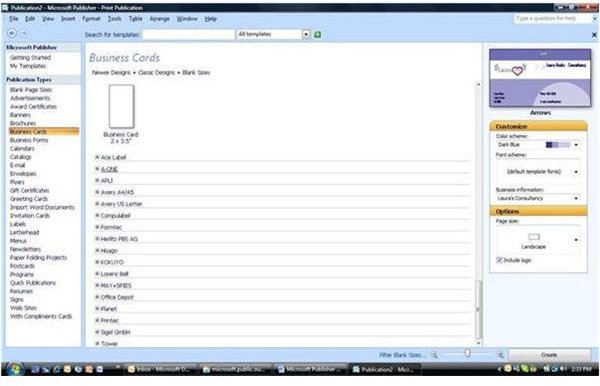
with a pink heart on the right hand side. You can then use this business information, change parts of it or enter completely different data. (Change Business Information.jpg)
You can select a default color scheme and font scheme or select a different theme. You select page size, and if the publication calls for it, you select one or two sided paper. Paper size is specified by the actual size or by the manufacturer’s code. There is a large assortment of paper types to choose from.
Price to Value (5 out of 5)
What’s Hot:
Microsoft Publisher 2007 is part of Microsoft Office Professional 2007, or can be bought as a standalone product. The cost on its own is $105, which could be considered fairly costly. But if bought as part of the Office Professional package, which is around $400, and includes OUTLOOK, WORD, EXCEL, POWERPOINT, PUBLISHER, and ACCESS, then this package seems very reasonable considering the power of all these products.
Product Features (5 out of 5)
What’s Hot:
Microsoft Publisher 2007 makes it easy to create a standardized design that can be used for all your stationery. A business could produce invoices, quotes, and such, with a consistent design and company information. Once this information is stored in Microsoft Publisher 2007, then it will use the correct data in the appropriate places as called for by the document.
You can create a master page which contains elements that you want seen on each page of your publication. There can be multiple master pages in a document. For example, the first and last page might have one master design, and the inside pages would have their own design.
If you are producing labels, you can do a mail merge with your OUTLOOK contacts. You first design your label, and then select the contacts you want to produce labels for. You then have a further choice of printing one page of labels for one contact, or one page with one label per contact. Both these options are extremely useful. (Labels Print.jpg)
The mail merge and email merge are powerful features especially for businesses that need to send out various publications to their clients. They can be individualized for each client. So if the business was sending out say appointment cards, these cards could have a standard layout. But if you wanted to add the person’s name, or appointment time, then this is easily and automatically added for each person who is selected to receive this publication. The name and appointment time can be created in an excel file or publisher file that can be then merged into the publication.
If you have product lists, there is also a Catalog merge. I did not try this part of the product but it looked similar in power and method to the mail merge.
There is a design gallery from which you can select a number of different design objects such as boxes, borders, calendars, and logos. Any of these objects can be added to your own design and modified to suit. (Design Gallery.jpg)
The Design Checker can be run to pinpoint possible flaws in your design. These flaws could be a line of spaces, or text that overflows a box. It will also check for flaws in a design that is intended to be emailed or a design that is to be taken to a commercial printer. If the design is for a web site, there is another design check for that. (Design Checker.jpg)
The finished design can be saved as a .pdf or .xps file. This is especially useful if you need to email the finished design or take it to a print shop for commercial printing. This option, though, has to be added to Microsoft Publisher 2007 as an OFFICE 2007 add-in.
The Colors dialog box now has a PANTONE® tab, so it is easy to get exactly the right color. Plus, when your publication is printed by a commercial printer, the colors will be the same colors that you selected.
What’s Not:
The email and mail merge are powerful features and there is a video in the help section that makes it look very easy to use. When it came to it though, it wasn’t so easy, and it took me a number of tries to achieve it. You can merge data from different sources; Outlook Contacts, a file previously set up with publisher, or an EXCEL file. This feature is great if you want to do mass mailings with a personalized touch.
User Interface (5 out of 5)
What’s Hot:
All the Publisher Tasks are in the side margin to the left of the design screen. If you want to add clipart or set up the standard business information, this is selected from the side margin. (Side Margin.jpg)
Microsoft Publisher 2007’s formatting tools, such as line color, fill color, and line/border style are the same as in other Microsoft Office 2003 products. The 2007 ribbons used in these other products have not been used in Publisher even though it has a 2007 tag. Not sure if this is a good
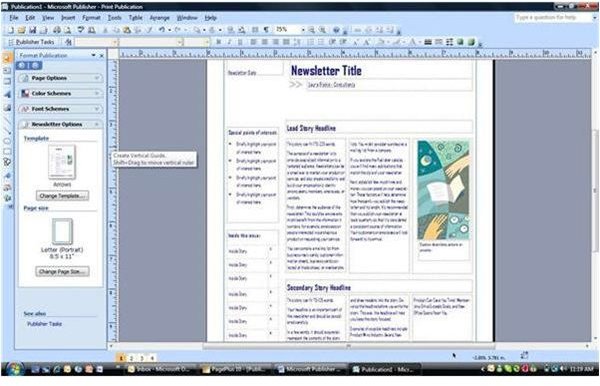
thing or bad thing, it depends on if you like the ribbons. The editing and moving of text boxes and picture boxes is the same as in other OFFICE products such as POWERPOINT and WORD.
I like the way that when you are presented with a new template, it comes with text that you need to overwrite. This text guides you as to what you should write and where. I found this very useful.
What’s Not:
I found that when I produced postcards which were to be printed on paper containing four postcards, the print on the far right hand side was lost. You will see this in this screenshot, the right hand side of the text box is missing. This can be adjusted, but it shouldn’t have to be. (Lost Right Part of Print.jpg)
Help and Support (4 out of 5)
What’s Hot:
The help and support for Microsoftt Publisher 2007 is extensive. It includes four videos explaining the steps of more complicated tasks such as email merges.
What’s Not:
Like the other OFFICE 2007 products, there is only online help available.
Suggested Features
The mail and email merge are extremely useful features of Microsoft Publisher 2007, but I wish the UI was simpler.
Conclusion
I have owned Microsoft Publisher since Office 2007 was released as a beta, but I never realized its full potential, until now. I knew it was useful to design with, but I didn’t know just how useful it was when it came to printing special stationery. This is especially true for stationery such as postcards or labels, where you have multiples on one page. You just have to worry about the individual design itself. After selecting your stationery type by its manufacturer and number, Microsoft Publisher 2007 looks after laying out the page. I shall definitely use this program in the future for all my publishing needs.
Publisher 2007 Screenshots


