Using the Adobe Illustrator Text Tool and Text Options
Getting Started
In this tutorial you are going to learn how to use the text tool in Adobe Illustrator. With the text tool, you can do things like change the color, size, font style, add drop shadows, and more. This tutorial will show you how to do all of that and more. Start out by creating a new document to work on.
How To Type Text in Adobe Illustrator
**
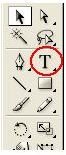
First, I will show you how to type text. Select the Text Tool from your main toolbar on the left. Click the document that you created. Type your name or some kind of text. Then grab the pointer tool from the toolbar (black arrow). Click the text to select it.
How to Open Your Text Options Box
Now we will open the text options box so you can edit the text options. Right click on the text that you just created. When the menu drops down, click Size > Other. That will open the text options box. In this box you can change the size of the text and the font style. You will see the two boxes that you can drop down. Drop those boxes down and select the size and style that you want. If the size that you want to use is not in the box, you can delete the number in the box and type your own size.
Changing the Color of the Text
You can change the color of the text by doing the following. Click the text to select it. Double click the color fill box in the toolbar. Select the color that you want for the text. Then click the OK button. To change the stroke color, double click the stroke box in the toolbar and change it to what you want. That’s how you change the color of your text.
Adding Drop Shadows to your Text
Adding drop shadows to your text will set the text off. You can add drop shadows by doing the following. Click the text to select it. Go

to the top of your window and click Effect > Stylize > Drop Shadow. When the drop shadow box opens, you will need to change the options to what you want. You can click the preview box and watch what you are doing. Once you have the drop shadow the way that you want it, click the OK button to apply it.
Adobe Illustrator Tips
To change the size of the text with out changing it in the text box, use the transform tool in the toolbar.
Image Credits
All screenshots were taken by the author for educational purposes only.
Image and Graphics created for this tutorial belong to the author.
