A great way to store and share your photos is to use a photo sharing website. The options abound, though, making it difficult to narrow down your choices to the very best one. Learn about the tools, features and capabilities of MyPhotoAlbum in this review to help you make an informed decision.
Storage Features (4 out of 5)
One of the reasons many people use photo sharing websites is for online photo storage . There are two types of accounts from which you can choose on MyPhotoAlbum, and the storage features vary depending on which account you select. The Standard Membership is free. With this membership, you can store up to 500 photos and 10 video files. Your files remain intact and you have the benefit of password protection for them.
You can also opt to go with the upgraded account, which is the Club Membership. With this membership, you have an unlimited amount of storage space for both photos and videos. In addition, you also get the added protection of passwords and all of your files remain intact.
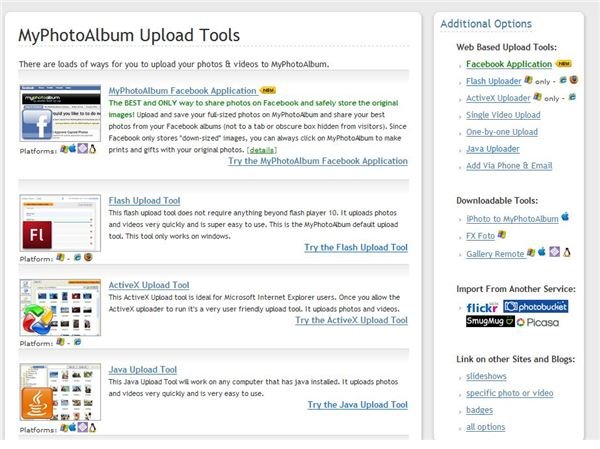
Creating a photo album and uploading photos to it on MyPhotoAlbum is tremendously easy. To make an album , point to the Upload tab at the top of the page and select Create New Album. Enter a title and description, then click the Create Album button. That’s all there is to it! Adding photos to the album is just as simple. Point to the Upload tab and select Add Photos and Videos. You can create a new album there as well, or select an existing album to which you want to upload. All you need to do then is browse to the photos on your computer and open them. MyPhotoAlbum provides a number of other uploader tools, such as the Java uploader, which is also super-easy to work with, and the Migratr, which allows you to upload your photos from other sites.
Photo Sharing Features (5 out of 5)
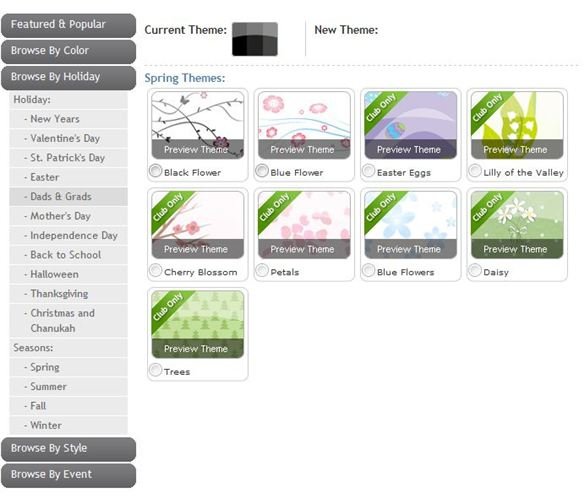
Once you have created an album or two, you can get to the business of sharing your photos . MyPhotoAlbum offers a nice selection of album personalization options so that you can display your style and personality along with your photos. Choose a page layout, decide how your photos and thumbnails will appear and customize the theme and colors for each album. You can opt to allow your visitors to vote and comment on your photos as well.
While there are a few different customization options available for Standard members, Club members have a much wider selection of options such as frames for thumbnails and photos, colorful sub-albums and themes for every occasion.
There are many ways to share your photos. You can share a slide show, a photo, an entire album or a video. You can also embed your photos and videos on other sites. Importing your contacts is a breeze, making it simple to email invitations to share your photos with friends and family.
Other ways that you can share your photos using MyPhotoAlbum is by creating photo gifts from your own images. Order prints, make a mousepad or create a calendar if you choose.
Pricing (5 out of 5)
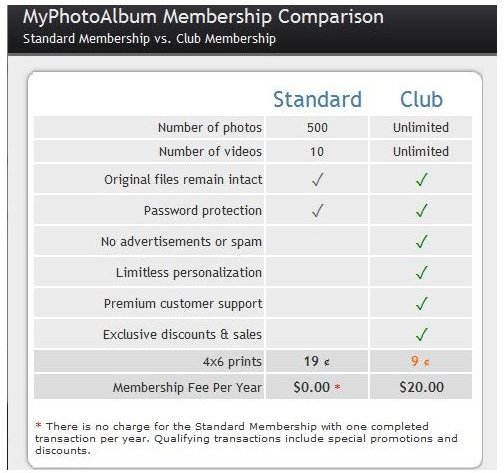
The Standard Membership is ideal if you are seeking a free photo sharing site , you don’t take a lot of pictures and simply want to store and share some important or favorite family photos.
While the Club Membership is not free, at only $20 a year it is an excellent value with lots of features for the price. When you upgrade to this type of account, you don’t have to deal with advertisements or spam, you have access to customer support and special deals, plus you benefit from the premium features and unlimited amount of storage.
Overall Recommendation (5 out of 5)
Overall, MyPhotoAlbum is a great place to store and share your precious photos. Start out with the free account and see what you think. That way, you have nothing to lose. Even for the premium account you can’t beat the price, it’s easy enough for anyone to use, and there are lots of fun customization options available. This online photo sharing site is definitely recommended.


