The desktop version of Vector Magic allows you to transform digital photographs into vector art without the worries of uploading or downloading images. In this review, we’ll concentrate on the additional features found in the desktop edition that make the vectorization process more customizable.
A Quick Overview of Vector Magic Desktop Edition
Vector Magic is a graphics manipulation tool that specializes in transforming raster images, such as digital photos and scanned artwork, into high quality vector drawings, which can then be edited and rescaled in other applications that support vector graphics. In a separate review, I looked at the online version of Vector Magic and was impressed with its capabilities. This review will focus on the desktop edition of Vector Magic, which includes all of the features found in the online version along with quite a few extras.
Vector Magic Desktop Edition is available for both PCs and Macs. In particular, the application is compatible with Windows XP, Windows Vista, and Mac OS X 10.4 and higher. It’s also recommended that you have at least a Pentium III (or equivalent) processor and a minimum of 512 MB of RAM. If you plan on working with a number of large images, it’s best to have more RAM – at least 1 GB.
Now that we have the program’s specifications and requirements out of the way, let’s take a closer look at its actual capabilities.
Download and Installation (5 out of 5)
For the purposes of this review, I tested Vector Magic on a Windows Vista PC with 4GB of RAM. The download and installation of the software was pretty standard, and no problems were encountered. If you’ve already purchased a registration key, you’ll be prompted to enter it after installation. However, if you want to test out the software before actually making the purchase, you can download a free trial version of the software from the Vector Magic web site. The only function missing in this trial version is the ability to save the results of your vector conversions. So, the trial version is a great way to see if you like the features of the software and to test how well it runs on your computer.
Ease of Use (5 out of 5)
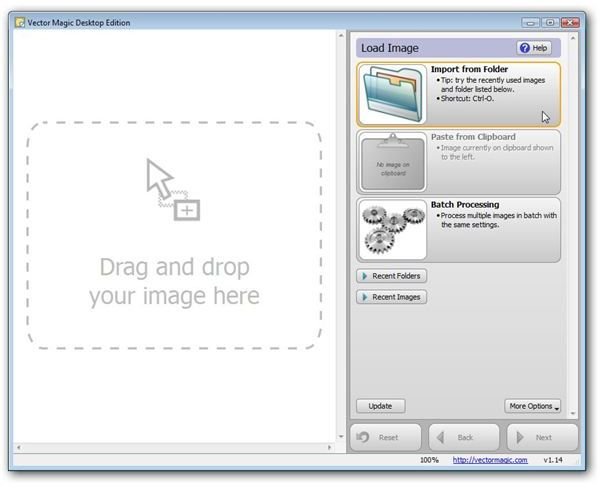
Even though there are a number of training guides available for Vector Magic, the interface of the application is so straightforward and easy-to-use that you can start tracing images almost immediately without having to read through a lot of instructional material.
When you first start up the program, you’ll be met by a screen where you can browse folders on your PC to locate the digital photograph or other image that you want to trace. The software also keeps track of recent folders and files opened, so it’s easy to find images that you’ve converted in the past. There’s also a handy batch processing option that allows you to open several files at once and use the same settings to convert them all to vector images at once.
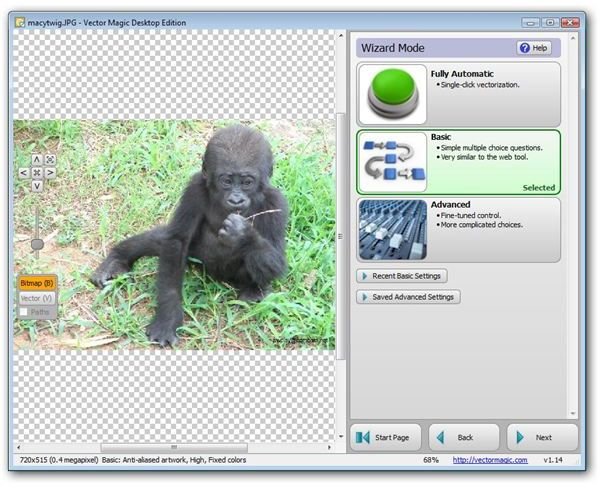
After selecting a photo to trace, you can proceed in one of three ways. There is a fully automated option that applies the most common vectorization options and allows you to trace the photo with a single click. As with the online version, there’s also a basic conversion wizard that gives you a bit more control over the software settings used to create the final vector image. This choice is still quite easy to use as the wizard walks you through a series of questions that will help you pick the best choices for your particular image.
However, unlike with the online version, the desktop edition of Vector Magic offers a third more advanced method of vectorizing your image. This third mode should be of particular interest to graphics professionals as well as anyone else who wants to create a truly amazing vector representation of a digital photo. Working in this mode will require a bit more practice and training than the other methods, but not quite as much as you may think. Even if you’re not that familiar with vector terminology, the wizard that walks you through this advanced mode is very detailed and self-explanatory. This extra feature alone should be enough to convince any graphics lover, professional or hobbyist, to give the desktop edition a try.
Continue on to the next page to find out more about the features, performance, user documentation, and price of Vector Magic Desktop Edition.
Features and Performance (5 out of 5)
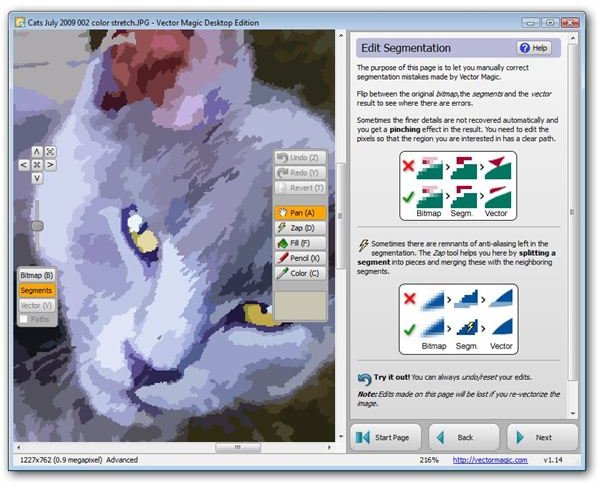
As mentioned earlier in this review, the desktop edition of Vector Magic includes a number of additional features not found in the online version of the application, such as the advanced vectorization mode. When using this option to trace a photo, the amount of control you have over the vectorization process is enormous – you can even zoom into specific areas of the resulting vector image and make manual segmentation edits. You can use this feature to make sure that fine details are preserved accurately or even to “get rid” of certain details so that the resulting image will have a more cartoonish look about it.
Other added features include:
- The ability to save tracing results in AI and DXF format
- Drag-and-drop interface
- A copy-paste feature that works in conjunction with your computer’s clipboard
- The ability to trace very large images (This is subject to the constraints of your computer.)
- Batch processing capabilities
- Transparency support
- The ability to group shapes by color
Again, the intuitive interface of Vector Magic makes it easy to use all of these tools even if you haven’t spent a lot of time with the software’s documentation and training guides.
User Documentation and Support (5 out of 5)
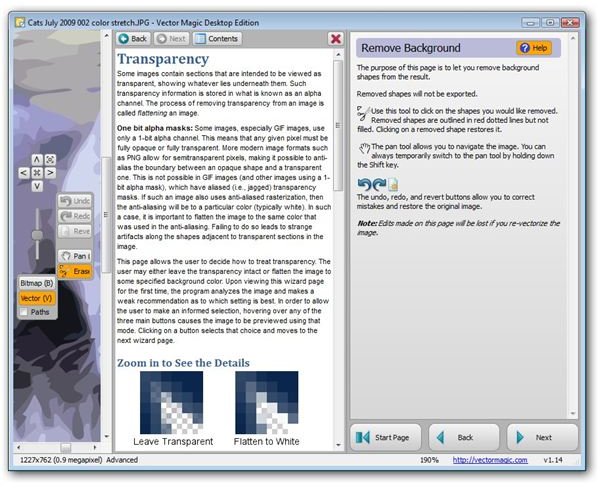
The desktop edition of Vector Magic has a built-in help system that you can access from any point in the vectorization process by clicking on the large Help icon found in the upper right corner of the application. The directions and explanations in this offline user manual are extremely clear and very easy to follow. However, if you’re looking for more assistance, there are some other alternatives.
On the Vector Magic web site, there are several short video tutorials that will walk you through some of the application’s main features, including how to use the tools found in the advanced vectorization mode. If you’re still trying to decide whether or not to purchase the software, you may want to watch a couple of these tutorials first to get an idea of how easy the software is to use.
Additionally, there are a number of text-based tutorials found on the product web site that are quite well-done and can give you some insight on some of the more advanced capabilities of Vector Magic, including different options you can use when vectorizing digital photos that will give various types of results.
If you need to contact the developers directly regarding a software issue or question, you can do so through a contact form on the Vector Magic web site or use the toll free phone and fax numbers found in the customer support section of the site.
Price to Value (5 out of 5)
Vector Magic Desktop Edition currently runs $295 per license. With the purchase of one license, you can use the software on up to 2 machines. The same license works for both the PC and Mac version of Vector Magic, so if you’re one of the crowd that uses multiple operating systems, you’ll only need to make one purchase to register the software on each computer.
If tracing digital photos isn’t something that you do on a regular basis, you’re probably better off sticking to the online version with its much lower subscription fees even though that version does not support nearly as many features as the desktop edition. However, if you’re a frequent user or even a more casual user who wants more detailed control over the vectorization process, this is an extremely fair price for the application, considering its power and ease of use. I definitely recommend giving Vector Magic a try before shying away from what some may consider a high price.
Overall Rating (5 out of 5)
Before trying the desktop edition of Vector Magic for myself, I was a little leery and thought that I would need to read a ton of documentation to be able to use the software effectively. I was both surprised and happy to find that the desktop version was just as simple to use as the online version, despite all the added features and options. Plus, I was thrilled with the results obtained while using the advanced wizard.
I still believe that the online version of Vector Magic is superior to other tracing applications I have tried, but the desktop edition goes even further in this regard. It’s definitely an application that every graphics professional should have on their desktop, and it’s one that most hobbyists will enjoy as well.


