Image Skill’s Magic Denoiser is a photo editing plugin that claims to be able to remove noise from digital photos while preserving the details of other items in the image. This review will take a close look at the plugin’s capabilities and see how well it performs.
Overview of Magic Denoiser v. 1.5
Although most major photo editors have some type of built-in noise removal feature, these tools are not always as helpful or as easy to use as we would like. Because of this, several independent applications and plugins have been developed solely for the purpose of handling this task. One of these applications is Image Skill’s Magic Denoiser – a Windows-based image editing plugin that is compatible with Photoshop Elements , Paint Shop Pro , and most other major photo editors.
One of the problems that is often seen in noise removal tools is that they remove too many details from the photograph along with the unwanted noise. That is, the applications can sometimes have trouble distinguishing between actual noise and sharp details so they end up getting rid of both. In this review, we’ll see how Magic Denoiser handles this situation in addition to looking at the plugin’s ease of use and other features.
Installation and Setup (4 out of 5)
The download file for Magic Denoiser includes an automated installation wizard that makes setting up the plugin quick and simple. The wizard recognizes most preinstalled photo editors and offers you the option of installing Magic Denoiser in the path of one of these applications. You can also elect to install the plugin in a more general location, but this may require you to take additional steps after the installation process in order for your photo editor to recognize the new add-on. For more information, refer to these articles on installing third-party plugins in Paint Shop Pro and adding new plugins to Photoshop Elements 7 .
Features and Performance (4 out of 5)
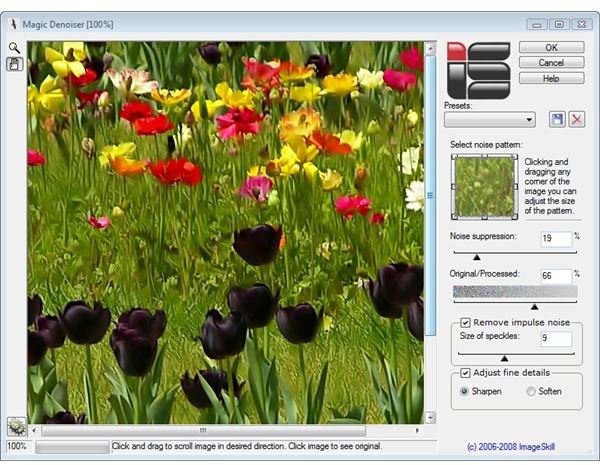
Magic Denoiser has a very simple user interface that is fairly intuitive and easy to navigate. All of the tools in the plugin are straightforward and well labeled. If you need more information on how to use any of them, you can access the included user manual by clicking on the Help button located in the upper right corner of the application. This document also includes a well-done tutorial with screenshots to help new users get started.
A very nice feature about Magic Denoiser that you don’t see in a lot of other plugins of this type is that you can mark the noise pattern in the photo before applying the tool. This gives you a lot more control over which elements in the photo are “smoothed” and which ones stay sharp.
On a side note, you can also use this plugin to create some very artistic simplified images that resemble watercolors and other types of paintings by choosing larger areas of the photo to smooth out. So, even if you don’t have many problems with noise in your digital photos, you may still want to check out Magic Denoiser for its creative capabilities.
Price to Value (4 out of 5)
The list price for Magic Denoiser is $29.95, and the plugin can be purchased and downloaded from the Image Skill web site. Currently, this price also includes free upgrades for register users, which adds a lot of value to the deal.
Overall Rating (4 out of 5)
Magic Denoiser may not be the absolute best noise removal tool on the market, but it does rank among the top products for software in the same price range (other noise reduction applications can cost well over $100). It’s definitely worth trying out for yourself, and Image Skill offers a free demo of the product that you can download at their web site to do just that.


