There is no shortage of digital photo sharpening tools on the market, and most photo editors already include this feature. What makes Magic Sharpener unique? In this review, we’ll take a look.
Overview of Magic Sharpener 2.0
Magic Sharpener is a photo editing plugin developed by Image Skill that allows you to sharpen details in digital photographs without introducing further problems such as noise and unwanted posterization. One of the unique features found in this particular application is that it allows you to modify a photo both globally and locally through the use of a sharpening brush. This latter option gives you a lot more control when editing photos, whether the editing is for technical or artistic reasons.
Since Magic Sharpener is a plugin, you will need a host photo editing application to use the software. However, the tool is compatible with most major image editors – including Photoshop Elements , Paint Shop Pro , and the free photo editor XnView. This compatibility with XnView is particularly nice for those who currently don’t own photo editing software since it offers a way to use the plugin without making any additional expenditures.
Installation and Setup (4 out of 5)
The installation of Magic Sharpener is typical for a Windows application. The only real decision that you have to make is selecting a directory in which to install the plugin. If you choose a directory that’s not already in the current path of your photo editor, you may need to add that path manually after the installation process. For more information, refer to these articles on installing third-party plugins in Paint Shop Pro and adding new plugins to Photoshop Elements 7 .
Features and Performance (4 out of 5)
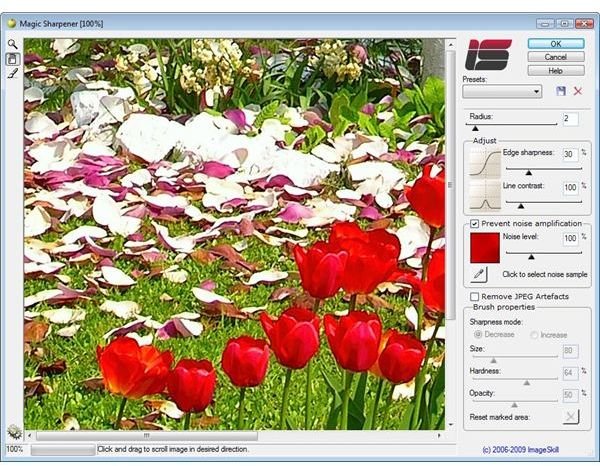
The user interface for Magic Sharpener is pretty straightforward, and it shouldn’t take that long to get acquainted with the application’s tools. It may require a little practice at first, but if you have any questions about the various options and settings, you can click on the Help button to access the included user manual. This manual includes a tutorial with screenshots that should help familiarize you with the basic functions of the software.
As mentioned previously, one very nice feature of this application is that you can sharpen or smooth details locally with the help of a brush-like tool that lets you “paint” across areas of the photograph that you want to modify. Not only is this nice for correcting technical flaws in specific areas of the photo without affecting others, but it can also be used to create some beautiful artistic effects in the photo.
Price to Value (4 out of 5)
Magic Sharpener lists for $29.95 on the Image Skill web site, and this price currently includes free future upgrades for registered users. This price is very much in line with competitive products that have similar capabilities.
Overall Rating (4 out of 5)
When it comes to general sharpening capabilities of an entire digital photograph, Magic Sharpener performs about average when compared to other applications of a similar nature. However, the plugin really shines in the localized sharpening category, and it’s a great tool for those who like to create customized depth of field and smoothing effects in images.
A free demo version of Magic Sharpener is available for download at the Image Skill web site, so take a few minutes and try out the plugin for yourself.


