What is Vignetting? Add Vignettes to Photos with Your Digital Camera or Photo Editing Software
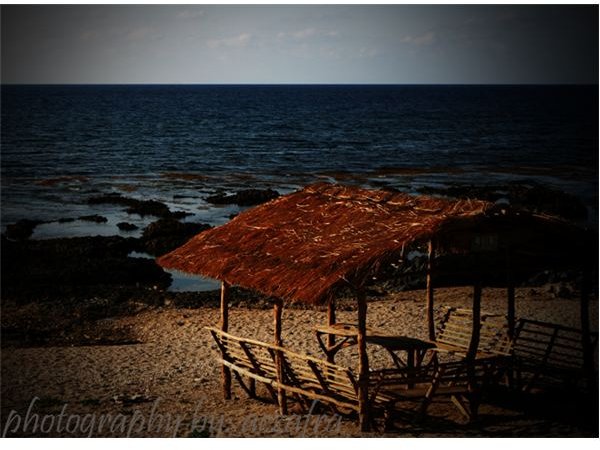
What is Vignetting?
In photography, vignetting is technically described as the reduction of an image’s brightness or saturation at the periphery compared to the image centre. It’s a great way of emphasizing the subject provided that you have placed it at the center of your photo. In the past, vignetting was not a desired effect in photos. But as technology evolves and as the digital photographer’s creativity goes wilder, vignetting effecting has become a widely accepted practice in creative photography.
(Click on image to enlarge)
How to Achieve a Vignetting Effect During a Photo Shoot
Vignetting can be achieved either by the use a special lens or during post-processing, where even normal looking photos can be re-created with vignetting effects.
To create vignetting directly from your camera, you’ll either need to use a lens filter that is too small for you DSLR camera, or use an ultra-cheap lens and shoot at close range to your subject with the lens wide open. You may have noticed that when using cheap digital point-and-shoot cameras or even your camera phone, you often get distorted images if you take the portrait shots of people at close range. That is basically the effect that you’d get when using an ultra-cheap lens filter at its widest setting.
Quick Tip: If you don’t want to purchase another lens or filter for vignetting purposes, you can try creating your own filter using a cardboard with a thin hole at the center. Place this cardboard over your lens when taking photos and you’d get a decent vignetting effect.
How to Produce Vignetting During Post-Processing
If you don’t want to bother buying lens filters or making your own, you can still produce vignetting effects with your normal photos using post-processing software. There are various custom tutorials on how to achieve this, but if you want a quicker way, although with limited capability, you may use Adobe Photoshop’s Lens Correction Filter Tools.
To do this, open a sample photo, then select Command - Filter - Distort - Lens Correction. A new dialog box will appear and you can see one option as vignette. Simply adjust the slider whether you want to increase the darkening or lightening effect on your photo. You can also adjust the Midpoint to adjust the vignetting effect at midpoint.
For more advanced vignetting process, you can find tons of resources on the web featuring tutorials and workflows on how to achieve vignetting effects on your photos.
