How to Enhance Contrast by Adjusting Levels in Photoshop - Photoshop Tutorial
Levels Tool
Related article: Understanding Histograms
Levels is a simple post processing tool available in most photo editing software, used to improve contrast in an image. A dull picture can be transformed into a colorful image in no time by making minor adjustments with Levels tool. In photoshop, you can open Levels tool from the menu Image » Adjustments » Levels or by the shortcut key Ctrl+L. In Gimp, Levels tool can be found at Colors » Levels.
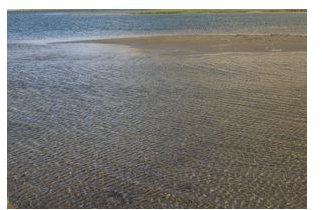
First, let’s open the target image in Photoshop. For this exercise, I am using this picture of a lake surface shown below.
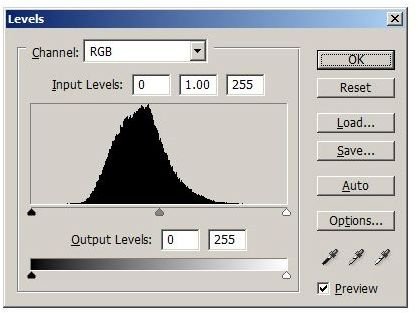
Next, open the Levels tool. As shown below, the Levels tool displays the histogram for the image, with three sliders at the bottom. Let’s look at each of these sliders and adjust them.
Adjusting the Black Point
Of the three sliders below the histogram, the one to the left determines the black point of the image(brightness value zero). If the slider is moved to the right, the new location of the slider becomes the new black point. All the pixels that fall to the left of the slider will be made completely black. The histogram will be re-adjusted for the new position of the black point, effectively reducing the brightness of the whole image.
In the above histogram, move the black point to the right until the point where the graph starts rising. Preview the change in the image and see that it gets darker.
Adjusting the White Point
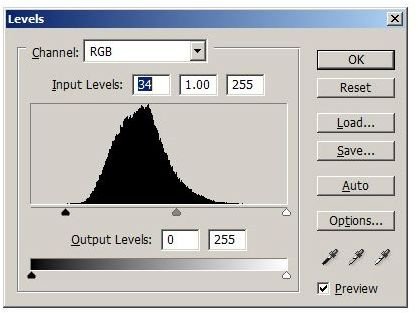
The slider to the right determines the white point of the image. When the slider is moved to the left, all the pixels to the right of the slider will be made completely white(brightness level 255), and the histogram will be re-adjusted for the new white point. The resulting image will be brighter than before.
Move the slider to the left close to the point where the graph starts rising, as shown in the picture below. See that the image gets brighter.
Adjusting the mid-tones
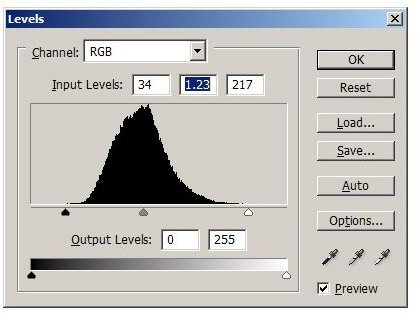
The position of the slider in the middle determines the mid-tones, also called the Gamma. Adjust the slider to the left or right until you get a pleasing tone. Moving the slider to the right decreases brightness, and moving to the left increases brightness. Note that the black point and white point remain constant while the mid-tones get adjusted.
In this picture, I have moved the slider to the right.
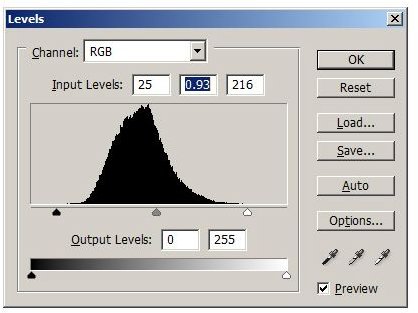
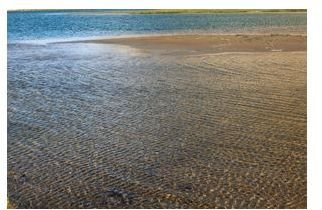
This concludes adjusting the levels. Below is the final image after adjusting all three sliders. Compare this with the original image and see the evident change in contrast.
Conclusion
The Levels tool enhances the contrast of an image by expanding the tonal range of the image.
For most images, it is recommended to adjust Black Point and White Point until the point where the graph starts rising. However, this is more of a guideline than a rule. Use the preview and play with the sliders to get best results for each image.
If you move the black point to an extent that some pixels fall to the left of the black point, all these pixels will be made pure black(brightness zero). Similarly, when you move the white point, any pixels to the right of the white point will be made pure white. The color information in these pixels will be lost. To ensure that no color information is lost, hold the Alt key when you move the black slider or white slider. Any colors that get clipped will start appearing on the screen.
