Review: Sony Ericsson Xperia X1 - Design And Display
Design / Walkaround (3 out of 5)
The Sony Ericsson X1i from a functional standpoint looks fairly similar to many of the HTC Pocket PC devices already on the market, the devices 3.0" touchscreen takes up a good deal of the units frontside realty with “diamond” shaped frontside keys located directly below it. The keys unfortunately feel very plastically, and every time I touched one of the keys I felt as if I was going to break them, it was the first pitfall I noticed on the X1. Aside from the cheap plastic feel of the buttons I was impressed with the devices stainless steel finish and chrome accents which definitely felt well made. The top part of the frontside was also well put together with a very nice slim yet functional earpiece and the VGA camera for videoconferencing plus ambient light sensor, both which blended in well with the other frontside components.
Below the screen users will find two dedicated buttons for making and ending calls, along with several soft keys which can be programmed to open different applications and a D-pad in the center that also acts as an optical trackpad with the swipe of a finger.
Sliding the device open users will find the Sony Ericsson Xperia X1 qwerty keyboard. Unfortunately unlike HTC devices and Blackberry units the X1 does very little in terms of added shortcut keys and the keys didn’t offer the best feedback when being pushed, with that being said they were well spaced which made for slightly easier typing. I personally would have liked the keys to be slightly more raised as well. For basic users who haven’t used many of the more competent Sliding Qwerty keyboard devices the X1 keyboard will seem great, for more advanced users the typically included shortcut keys on many devices currently available will be sorely missed.
The right side of the X1 features the devices volume rocker at the top right side, the volume rocker is pretty standard in comparison to other units, with nice feedback, its slightly stuck out as well which means you’ll have no problem pushing it. The very bottom of the device them features the shutter key, which was very responsive, although slightly smaller than I would have liked it to be.
The left side features the miniUSB port for charging and data syncing purposes, its pretty standard on Windows Mobile devices and no exceptions were made here.
The top of XPERIA X1 then offers the 3.5MM audio jack along with the power/standby button and a stylus slot. The stylus that comes equipped is pretty flimsy and no magnetic attach feature is offered, but it does its job and the stylus is fairly flush with the device leaving all the units clean lines in tack.
The batter, MicroSDHC card slot and Sim Card slot are all located under the battery, I hate having to take the cover off to get to my memory card, a side loaded option would have been greatly appreciated.
Overall the design isn’t horrible on the Sony Ericsson X1, the unit is a little more bulky than I like and the plastic may be thick but it feels and looks cheaply made, If you’re looking for a well built device I would say look at HTC, the Sony Ericsson Xperia X1 just didn’t hold up to my expectations.
Display (4 out of 5)
The Sony Ericsson Xperia X1 features a 3-inch diagonal display with VGA resolution pushing out at 800 x 480 pixels of resolution, this is the same output that I talked about on the HTC Touch HD, but the screen size is .8 inches less. Either way the screen colors are dazzling and video playback is smooth and effortless on the part of the device. Like the Touch HD the Xperia X1 features 65k colors rather than 16 million colors, but lets be honest the human eye isn’t going to notice too much of a difference unless you’re watching side by side video of both resolutions at the same time.
The responsiveness on the screen was good, but still needed some work, mostly because the device simple doesn’t respond quickly enough, so while you may tap lightly on the screen and get a response that response may take a second to register an actual application notice. Also the slightly recessed screen didn’t really help the look or feel of the device, maybe its a personal preference but I prefer a screen that’s flush with the whole device, it just makes using your fingers to navigate much easier.
Overall the display is great in terms of resolution while offering excellent video playback, and the touchscreen is very responsive, yet the processor isn’t as quick as the fingers you use to tap on the screen. I like the display but in terms of an iPhone comparison it still has a long way to go.
Sony Ericsson Xperia X1 Panels (5 out of 5)
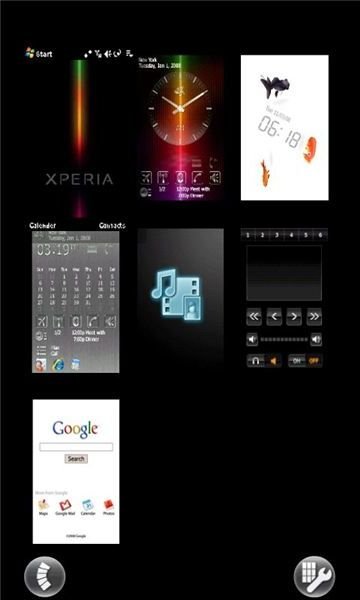
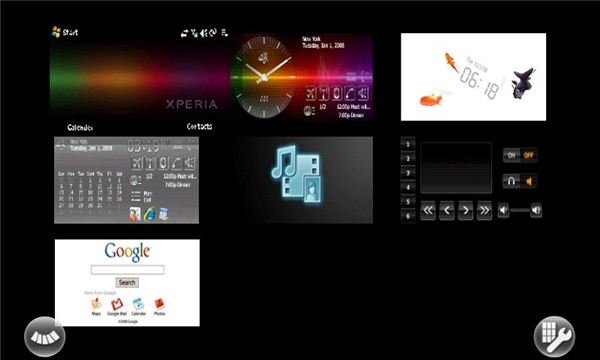
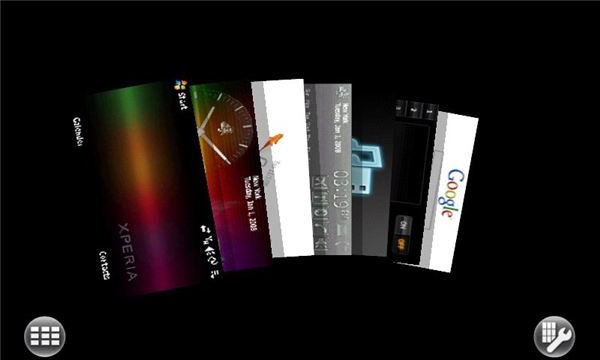
rmally I wouldn’t dedicated an entire review section to one application, but in the case of the Xperia X1 the “Panels” constitute the main hype of the device, by clicking on the dedicated X-Panel button on the front of your device a set of “Panels” appear on your screen, users can use the included panels which includes 7 easy to navigate to applications or you can assign your own panels. I liked the panels screen especially the ability to change between views, for instance pressing the left soft key lets you toggle between the 3 x 3 grid view and the card view, while the right soft key brings up the X-Panels setup screen where users can change the alignment on the grid or add newly downloaded panels.
It’s easier to show you the panels than to explain them so here they are:
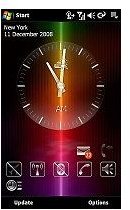
I also liked that the panels took full advantage of landscape mode when the screen was turned. Here’s an example of the regular vs. landscape modes on the Windows Mobile Today screen, it gives a good general reference to the differences in screen output.

The Panels interface may be the best part of the Xperia X1 and for good reason, the panels screen is well designed, offers multiple view types, and it works well in regular and landscape modes, basically it keeps the device interesting by offering new and refreshing display choices on demand.
Connectivity (4 out of 5)
The Sony Ericsson Xperia X1 offers a ton of connectivity options. First and foremost the X1 takes advantage of International 3G standards including the ability to use North America 3G via the HSDPA 850 and 1900 frequencies with the 2100mhz frequency thrown in for international use. The unit also offers Edge/GPRS connections for areas where 3G isn’t yet available. I tested the 3G and Edge connections and both were fast and connected quickly in their respected areas.
Outside of mobile data connections the X1 also offers WiFi 802.11b/g connectivity. The WiFi connected quickly to both secured and non-secured networks and internet pages and downloads were very quick. Overall the WiFi performed up to par with other 802.11b/g devices.
The Bluetooth 2.0 with A2DP was also a nice addition to the device, I hooked up to my Motorola S9 headset and the audio feedback was crisp and clear. It took about 20 seconds to pair the two devices together and I didn’t lose any connections after half an hour of audio playback.
Finally the Sony Ericsson Xperia X1 offered easy data syncing via the included miniUSB port, nothing really special here, but it worked just like other WIndows Mobile 6.1 Professional devices which was good enough for me.
Overall the connectivity standards are on par with other Windows Mobile Pocket PC’s.
Camera (3 out of 5)
At 3.15 mega pixels the X1 isn’t anything to write home about in terms of picture taking. The pics had some yellowish overtones when I took pictures in normal lighting. Luckily the device features auto focus which meant pictures were at least in focus when being taken. I also liked the use of Flash which allowed for low light picture taking. Under low light conditions the pics I took came out nicely, if not with overtones and undertones. The HTC Touch HD offers crisp pictures thanks to a 5.0 mega pixel camera which outshines the Xperia X1, however the use of flash on the X1 is an advantage for low light picture taking.
Overall the camera works well for a 3.15MP camera phone hardware option, however given the hype around the X1 a 5.0MP camera or higher would have been appreciated.
Audio / Video Playback (4 out of 5)
In terms of audio the X1 offers playback for many popular formats including MP3, AAC, AAC+, WMV files and many more. The playback both on the included 3.5MM headphone jack and on the A2DP Motorola S9 headset I used was gr eat, I didn’t notice any background interference and the volume could get pretty loud.
Video playback was also great thanks to the devices VGA output. Unfortunately loading videos took some time, as their appeared again to be at least a slight lag in load times, which seemed to be a constant issue with both X1’s I was able to test. The video player is easy to use and the videos play very well in landscape mode.
Overall the audio and video features are good, audio is crisp and clear and bluetooth playback is competent while videos play with no choppy segments, although load times are slightly slow.
Conclusion
The Sony Ericsson Xperia X1 isn’t a bad device, but its by far not worth the hype that’s been placed on it. The units design is great in terms of stainless steel and chrome finishes, however the plastic keys feel cheap and out of place. I did however like the X1 Panels output and the overall look Sony Ericsson added to Windows Mobile 6.1 Professional.
Overall the X1 is a competent device but its not overly impressive. If you want a device that offers a unique navigation subset with strong design features and excellent software I would recommend the HTC Touch HD over the Sony Ericsson Xperia X1.
