Learn how to use the Windows Mobile operating system in this article. There are links to guides and all sorts of hints and tips.
Windows Mobile
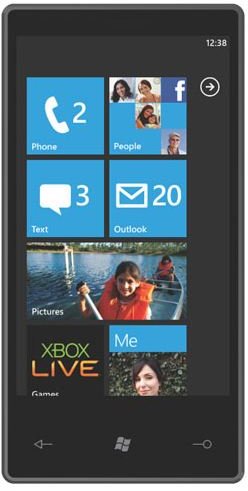
There have been various versions of Windows Mobile released over the years. Despite the versatility of this operating system it has failed to have the same kind of impact as Apple’s iPhone operating system or even Google’s Android operating system. Part of the reason for this is that Microsoft hasn’t thrown a great deal of weight behind Windows Mobile. It is arguably less user friendly and it is certainly not publicised as well. This situation promises to change when the all new Windows Mobile 7 (or Windows Phone 7 as they are re-branding it) hits the market.
While Windows Phone 7 promises to be more user friendly and fall into line with the app hungry, social media obsessed public of today. It is also a completely new operating system and it will not be compatible with old Windows Mobile phones. The new OS might be a big improvement, but for now you can still get a lot out of the older Windows Mobile platform, whether you are using Windows Mobile 6, 5 or 6.5 you still have a powerful OS at your fingertips. Find out what version of Windows Mobile you are running .
Syncing and Security
It is important to keep Windows Mobile smartphones up to date with the latest firmware and you’ll also want to make sure that you back up your contacts information, photos and other files just in case something should happen to your phone. You can find how to use Windows Mobile with Windows 7 or how to use Windows Mobile with Windows Vista.
You may also be concerned about keeping your information safe. Here is a beginner’s guide to Windows Mobile security . If you’re interested in a bit more information you can also check out the series on how to protect your Windows Mobile device.
Windows Mobile Apps
Many of the same apps that are exciting Android and iPhone users are available on Windows Mobile as well. In truth the Windows Mobile Marketplace is not well organised and not much fun to browse, but you could level the same accusation at Android Market or the Apple App Store .
You can certainly find some great Windows Mobile freeware to download but many of the best Windows Mobile apps cost money. There certainly isn’t any shortage of choice. Once you have identified the software you want simply download and install it. If you get fed up of any app you have installed, or just want to free up some space, then you’ll need to know how to uninstall apps .
Entertainment
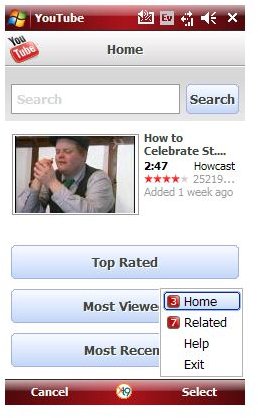
You can enjoy various types of media on your Windows Mobile device. Check out our guide to the Windows Mobile Media Player . If you love to watch video on your phone then a necessity for you will be access to YouTube. Well, here’s how to access YouTube on your Windows Mobile phone .
The vast majority of phones come with decent camera functions nowadays and photography can be a rewarding way to pass the time. Check out this guide on how to take pictures to get great results every time.
General Windows Mobile Tips
You may be interested in a few extra general guides offering tips on getting the best from your Windows Mobile phone. One of the top irritations for most users is dwindling battery life so check out these power saving tips . Just by tweaking a few options you can extend you battery life for hours.
You could also tether your Windows Mobile phone and use it as a modem with a PC or laptop. Just make sure you watch out for big data charges.
How about setting up free push email ? That way you can stay up to date with the latest entries in your inbox. You could also configure access to a home or work PC so that you can grab files remotely. Check out how to set up remote desktop with Windows Mobile 6.1 for more on that.
Finally here is how to record phone calls on your Windows Mobile phone . This is ideal for phone interviews. Just remember that you have to inform the person on the other end that they are being recorded.
Future for Windows Mobile
The experience of using Windows Phone 7 promises to be very different to Windows Mobile 6. Microsoft has integrated Zune for music and there is some sort of crossover with Xbox Live as well. The result could be something special but we’ll have to wait until the end of the year to find out.
In the meantime hopefully these tips and guides will help you to get more from your Windows Mobile phone. If you have any suggestions of your own then please post a comment.


