Record Phone Calls with Your Windows Mobile Phone

Written by:  • Edited by: Simon Hill
Updated Jan 13, 2011
• Related Guides: Windows Mobile | Windows Mobile Phone | Windows Mobile 6.1

Windows Mobile is a super, flexible mobile operating system that comes with a host of built in goodies that can be used in a number of ways – such as the notes feature which not only allows you to record voice notes and dictation, but also allows you to record calls.

Introduction

If you’re like me and you like to get the most out of the Windows Mobile 6.1 platform, then using it for interviews and possibly even podcasting is probably something you’ve thought about. With the built in Notes feature (Programs>Business Applications) you can take notes written by stylus, entered by keyboard or uttered as sentences.

Recording phone calls on a Windows Mobile device requires three things – a quiet room, the permission of the person you’re calling and a useful software enhancement.

Gaining permission is of course paramount, and is a key element of state and national laws around the world.

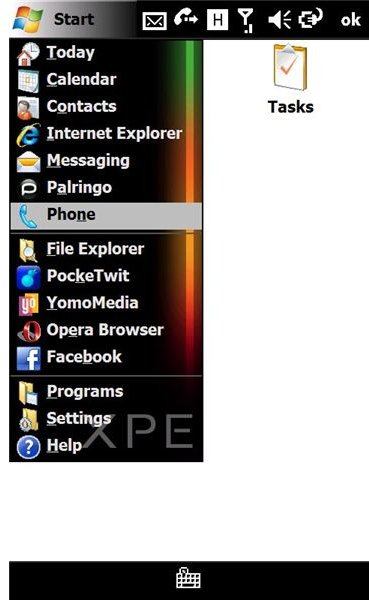
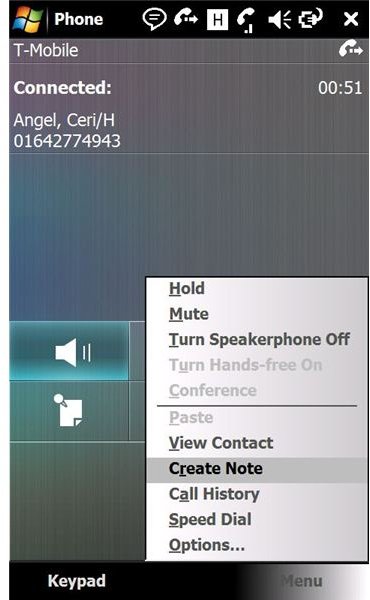
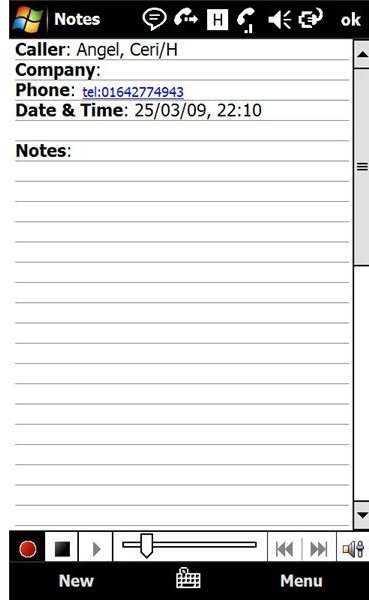
Follow these screenshots for in-call recording
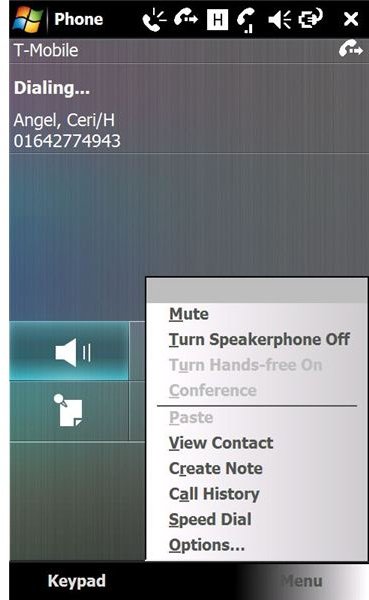
Select your phoneActivate speakerphone and open the menuSelect Create NoteClick record

Before Call Setup

A quiet room is required so that the Notes audio recorder doesn’t pick up any interference or distracting background noise.

Finally, you need a small software enhancement. This is a registry fix that allows your Notes to record for longer – pretty much as long as your Windows Mobile device memory will allow. Download this registry tweak from RapidShare.com.

To apply the fix, copy the CAB file to a folder on your Windows Mobile device – this is best done via ActiveSync when you have your handset connected and synchronised to your PC.

Once you’ve copied it over, navigate to the same folder from your Windows Mobile handset and select the CAB file to apply the tweak, following any on screen instructions. It’s best to restart your phone once installation is completed.

Record your Windows Mobile phone call!

Once your phone has restarted, it’s time to test the call recording! First of all, press the button you would usually use to make a phone call. Then, call the person whose call you intend to record, not forgetting to let them know that the call is being recorded.

Next, activate Speakerphone mode, and place your Windows Mobile handset on a flat surface. Display the in-call menu and select Create Note – this takes you to the Notes screen. From here select Menu > Recording Toolbar, and press the red button to begin recording.

What happens is the Windows Mobile Notes tool records the voice of the person you're chatting with via either the speakerphone or an internal circuit. As the specification for Windows Mobile devices differ from handset to handset, the method we use here is a catch-all approach that guarantees the speech from both parties in the call is captured.

Now it’s time to chat, and archive your phone call, for easy play back and note taking later on!


Comments

Showing all 12 comments
 
Anonymous Feb 12, 2011 7:49 AM
RE: Record Phone Calls with Your Windows Mobile Phone
"Recording phone calls on a Windows Mobile device requires three things – a quiet room, the permission of the person you’re calling and a useful software enhancement."

Well that depends on the legistlation of the coutry you are doing the recording in.
mukesh Sep 11, 2010 12:38 AM
mobile with voice recorder
I have to opt mobile phone to buy which may have good facility of recording conversation of in-comming & out-going calls and vedio recording also apart from usual feature of multi-media phone
Alexandre Marton Aug 13, 2010 2:38 PM
What registry key
What registry keys exactly you have to edit to extend Notes record time?

I found another tweak that makes a soft menu to record calls... but in Notes I still can only record about 30secs.

Can you help telling which keys and how to edit them manualy... tks
BushJohn Apr 20, 2010 2:33 AM
RE: Record Phone Calls with Your Windows Mobile Phone
Thanks for the great article.
I use WM Sound Recorder to record my HTC Touch Pro phone conversation. It could also record outgoing and incoming calls automatically.
obelix Mar 18, 2010 10:56 AM
RE: Record Phone Calls with Your Windows Mobile Phone
here is one can records calls on Windows Mobile Phone: http://riaysoft.perso.sfr.fr/en/?Windows_Phone:Phone_Call_Recorder
Christian Cawley Mar 15, 2010 3:40 PM
sound quality
Unfortunately this tweak does depend on your model of Windows Mobile device - there are differences model to model and manufacturer to manufacturer as to how audio data is routed through the phones
D Pounds Mar 14, 2010 10:43 PM
It...
doesnt record very well when its not on speaker phone.
raju biswas Jan 10, 2010 6:18 AM
RE: Record Phone Calls with Your Windows Mobile Phone
i want to use this software for unlimited call records.
hp singh Dec 22, 2009 8:40 AM
call recordings software

i do not know how to download call recording softwawre for wm6.1 for me help me out pls

jasmin Aug 13, 2009 2:52 PM
call recordings software
i do not know how to download call recording softwawre for wm5 for me help me out pls
Chitrang Jul 29, 2009 6:52 AM
What abt Omnia?
Seems this tip would work with HTC.

I have Omnia with WM6.1. Its voice recording capacity is upto 30 Seconds only. How do I do unlimited call recording with Omnia - WM6.1?

Thanks in advance.
Prathamesh J Jul 16, 2009 11:34 AM
Voice Quality
Hi , My HTC Touch WM6 Prof. is already equpd. wit this facility ... I went directly to the Phone>Create Note & enabled the Recording tool bar .

I just want to know How is the call clarity in this tweak .
Thanks for this article.
 
blog comments powered by Disqus
Email to a friend