Easy to Follow Steps on How to Change Nokia Wallpapers
Wallpaper is the image on your display screen. It is another way to customize your mobile phone. You have a ton of choices on what picture you can use as your wallpaper. It could be a photo you captured or you could download a wallpaper design straight from the internet to your mobile phone. Changing the wallpaper on your mobile phone is as easy as 1-2-3. Read on to learn how to change the wallpaper on your Nokia phone.
Using the Gallery Icon
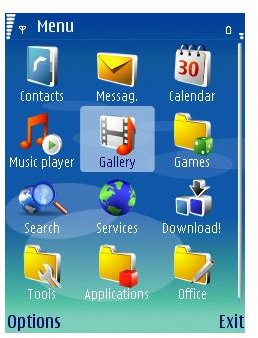
Step 1: From your standby screen, select “Menu” and then choose the “Gallery” icon.
**
Step 2: Enter the “Gallery folder” and select “Images”, the photos in your gallery will then be displayed. Select the picture you’d like to display as your Nokia phone wallpaper.
Step 3: Once you have selected your desired image, press the option button and from there, go to “Use as” and “Set as Wallpaper.” Some mobile phones will automatically crop your image to the appropriate size of your screen display but others have added features that allow you to crop, stretch or tile the image you have chosen manually.
Step 4: Once you are done, return to the home screen and check if the wallpaper has been changed.
Through the Settings Icon
Step 1: From your standby screen, select “Menu” and then choose the “Settings” icon.
Step 2: From the “Setting” folder, select “Personal” and then select “Themes” and after that select “Wallpaper.” Once in there, you can browse from your Nokia phone’s gallery to select the image you want to choose as your wallpaper.
Step 3: Once done, go back to the home screen and check if your mobile has updated the screen display.
Using the Web Browser
If you want to have more images to choose from as Nokia wallpapers, the best place is the Internet. You can browse the Internet through your Nokia’s web browser and choose from different images available.
Step 1: From your web browser, input the URL or web address of the web page you want to download the image from.
Step 2: Once the page or the image has finished loading, select “Options” and then save the image on either your memory card or the phone’s internal memory.
Step 3: As soon as the image has been saved, select “View image”. Then select “Use as” and then set the image as your wallpaper.
Some Nokia mobile phones, especially the newly released series, have additional features for your stored images. These features include photo editing and a retouching built-in program which allows users to edit, crop, add digital frames, add text, filter, smooth, rotate and flip photos with just one click. Using this built-in editing tool, you have more creative options to personalize your image for your Nokia mobile wallpaper. You can use any of the three ways presented above to change the wallpaper on your Nokia phone.
