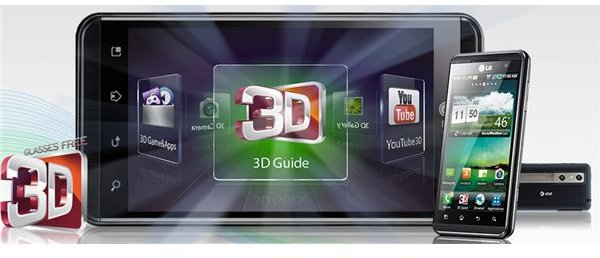
A review of the only 3D phone on AT&T from LG, the LG Thrill 4G. Can the phone prove to be more than a gimmick? Find out all the details in this comprehensive review.
Phones come and go, and loads of new features and innovations come and go with them. The latest trend these days in phones seems to be 3D, and so far only two phones in the world come packing a third dimension. One is the EVO 3D by HTC and then there is the Optimus 3D by LG, the Optimus 3D now comes re-branded as the LG Thrill 4G on AT&T for North American customers. Now the pressing question here is – is this phone’s 3D truly an amazing feature or just a cheap gimmick? And is it a feature worth having at $99 on a two year contract (the phone is $500 contract free)? Belt up as we find out.
Design (4 out of 5)
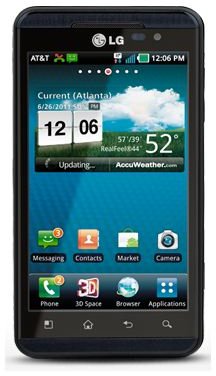
The LG Thrill sports the most basic and staple design a smartphone can have, they simply did not bother to put any effort into the design whatsoever. The perfectly rectangular phone weighs a supremely heavy 5.93 ounces (168 g) and has rather uncomfortable dimensions of 5.07 x 2.68 x 0.47 inches (128.8 x 68 x 11.9 mm), so it’s going to be palm-stretching and thick compared to the other high flyers of the smartphone world. But it is indeed very well built, for a completely plastic phone. The chrome brush effect near the capacitive touch based Settings, Home, Back and Search buttons looks rather dashing, and the cute robot face on the back looks…well pretty cute.
On the front we have a Parallax (i.e. glasses-free 3D screen) 4.3 inch WVGA capacitive touch screen, with a resolution of 480 x 800 pixels which is capable of supporting 16 million colors. On the top left side we have a mini-HDMI port nestled next to a mini-USB 2.0 slot. Both slots are protected by two very difficult to open and rather flimsy plastic flaps. Over on the right side the thin and rubbery volume rocker does not fare much better. You seriously have to pay attention when changing the volume or you’ll simply miss the rocker. Beneath the rocker we have a 3D button where the camera shutter key is traditionally found. Oddly enough it has nothing to do with taking pictures in 3D. Press it and it will launch into the 3D “hub” where you can access all of the phone’s media centric 3D features, while in the camera menu it will switch the picture or video mode from 2D to 3D. It is not a quick camera launch button. The quickest way to launch the camera on the LG Thrill is to keep it as an app on your home screen.
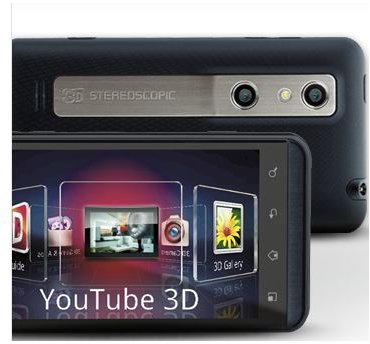
Up on top we have the 3.5 m headphone jack and the Lock/Power button. On top of the screen we have the usual two sensors for brightness and proximity, with a front facing 1.3 MP camera. The bottom has nothing but the tiny mic hole. On the back we find something unique indeed, two stereoscopic 5 MP cameras with a tiny flash in between them. Oh and the AT&T logo.
As far as the design goes, it’s pretty boring, but well built. The side buttons and slot covers are a hassle to use, while some are badly placed, others feel too brittle and rubbery. So it scores a good rating, but not great, all because of those pesky side buttons and because the MicroSD card slot is under the battery cover.
User Interface (3 out of 5)
If you were expecting a pure Android Gingerbread (2.3) experience on the LG Thrill, you’re unfortunately out of luck here. Instead you have to make do with a Froyo (2.2) experience when compatriots are all stocked with the latest Gingerbread. However, AT&T has promised an upgrade to Gingerbread soon. If you know your way around an Android phone you could always simply upgrade it yourself but remember that doing so will void your warranty.
Anyhow, LG has added a few tweaks and UI elements to improve upon Froyo, nothing too drastic thankfully. You get a black background in the apps menu, with your apps segregated by the Applications, Downloads and Favorites sections. A unique twist is that you can minimize everything into three simple bars with the pinch-to-zoom function, while tapping on Applications, for example, will open up the apps drawer, the same applies for the remaining two sections. Pinching-to-zoom in the opposite direction does not reopen all sections as they were, bit of an oversight by LG there. Also you can choose between LG’s keyboard and the superior Android one.
Otherwise, the best Froyo has to offer, including Flash is on the table with the Thrill, the phone has absolutely no lag whatsoever. Multitask to your heart’s content, keep as many apps open as you wish, nothing will cause this phone to stutter. Eventually if overburdened, it will open the multitasking menu and inform you that certain apps need closing, but it will not stutter. So of course the real question here is, how does the 3D UI fair? Well, it’s a bit of a mixed bag to be honest.
3D User Interface
To access the 3D menu you can use the dedicated 3D UI icon on the icon dock, or used the dedicated 3D button. Either way you’re introduced to a carousel-like system, simply flick your finger sideways and you’ll be able to rotate between the following options – 3D Camera, 3D Gallery, 3D Guide (a tutorial on how to use the 3D aspect of the phone, the guide itself is in cool 3D as well), 3D Games and Apps, and finally YouTube 3D.
The 3D camera also gives you options to shoot in 2D, but more on the camera in our Features section on the second page. The 3D gallery shows all of your 3D content, and only 3D content. Which translates to – content that you acquired via use of the phone’s 3D camera, such as videos, pictures or converted pictures in 3D. Speaking of picture conversion, if you have a 2D image, you can convert it to 3D on the phone. The results are horrific to view, and it barely qualifies as a 3D picture, but the option exists nonetheless.
The 3D Guide shows you how to create, share, view and connect 3D content on the phone.
3D Games gives you access to the following games in 3D, and thankfully they’re not trial games. You get to Play NOVA (it’s like Halo for phones), Asphalt 6, Golf Pro 2 and Gulliver’s Travels. If you purchase any more 3D games (so far the only available ones are from Gameloft) they’ll be stored here. The icon for the 3D Games and Apps is rather uninspired, it shows all your apps and some sort of handheld console inside a dustbin, what’s up with that?
YouTube 3D is an exclusive YouTube portal available to users of the LG Thrill or HTC EVO 3D, you can capture 720p videos and upload them to YouTube, where other people with the LG Thrill or EVO 3D can view them. Of course vice-versa applies as well.
If you’re someone who gets headaches from viewing 3D movies, you’ll be getting migraines with the LG Thrill, it is absolutely not for people with weak eyesight or epilepsy. Overall the 3D menu is a fun way to wow your friends or a stranger you’re attempting to befriend, either way it’s a sometimes only thing, not an all the time thing.
Features (5 out of 5)
The LG Thrill has one more high performance number up its sleeve, and that number is “4”, followed by a “G”. The LG Thrill’s 4G capabilities are a bit of an over statement, it’s more like very fast 3G. You’ll be constantly blanketed in HSDPA+ most of the time, and you’ll get somewhere around 800 KB download speeds and 1.6 MB upload speeds. Not bad at all really. You get a full range of GSM frequencies (850, 900, 1800, 1900) and UMTS 800 and 1900, while Bluetooth is blessedly updated to version 3.0, and of course microUSB 2.0 is along for the ride as well.
Now for the beast that runs this machine, and that beast is a Texas Instruments OMAP4, 1000 MHz dual-core processor. The RAM is a dual-split 512 MB, while the graphical grunt is provided by a PowerVR SGX540 GPU. Internal memory comes in at 8 GB and you can add a 32 GB microSD card without any problems.
Now for the 3D camera. Well, as far as creating 3D images – it does the job. You can shoot 3D images in either the MPO format or JPS format, JPS being the default format. After you’ve taken the picture you’re free to convert it to MPO. 3D pictures are pretty hard to shoot, you need to be very steady and very close to the subject, so taking pictures of funnily shaped clouds isn’t a really good idea –unless you can fly. Also you can’t take pictures while the flash is on. Pictures turn out pretty good if you can fulfill all the above requirements, if you can’t then they’re just a huge eyesore.
3D video, on the other hand, is only available in 720p at 30 FPS (frames per second), and you again need to very steady if you want capture any decently viewable video. Once captured, you can simply HDMI-out all your 3D content to a 3D TV and enjoy all your content on a large screen.
Now for the normal 2D camera, and it’s pretty bad. Almost shockingly so. Pictures with big backgrounds (like a parking lot or a park) start to bleed color and appear to wash or fade out. Otherwise close up pictures in good lighting appear pretty crisp and in very sharp detail. Night time shooting, however, or even shooting in low light conditions, even with the flash on, is horrific. You can see a fuzzy picture of what you’ve snapped, and a huge ominous shadow surrounding it. The further you back away from the object you wish to snap a picture of, the further the quality deteriorates. Oh also the phone has no ISO balance or panorama mode, other than those two it has every mode, feature and shooting style you can name, including auto focus which works with the 3D camera.
The 2D video camera does not fare any better. Although you can shoot in 1080p at 25 FPS, it looks like barely acceptable 720p, and you have to be deathly still to capture anything of viewable quality, which defeats the purpose of a video camera to some extent. It’s as if LG is punishing the customer for having the gall to dare and use the 2D camera, while ignoring the oh-so-groundbreaking 3D camera they worked so hard on.
Now for some good news, the phone has a pretty good music player. Apart from the usual tidbits you get from an Android music player (shuffle, select, preset equalizers, etc.), you also get a unique double stacked iTunes cover-flow like look, alphabetically organized. It’s pretty cool. You’ll also be pleased to hear that this phone plays virtually every common musical file format there is, you get the full range as follows – MP3, AAC, AAC+, eAAC+, WAV and MIDI.
But where the phone really shines is when watching movies, you can watch a DIVX/XVID video at a resolution of 1920 x 1080 pixels with absolutely no lag. Granted the WVGA screen won’t amaze your eyes but it’s still a pretty good experience. 3D movies on the other hand are a bit of a no-go still, you can enjoy 3D content via the YouTube player, but you’ll have a hard time getting 3D movies from DVD discs onto the phone. As for formats, you get a pretty sweet deal with MPEG4, H.263, H.264, DivX, WMV, AVI and 3GP all supported, the only format missing is MKV.
As for third-party apps, well since this is on AT&T, it comes chock full of them. Kindle, YPmobile, Polaris Office, Qik Lite, Live TV, my AT&T, AT&T Code Scanner, AT&T FamilyMap, AT&T Navigator and the list goes and on and on and on. But you still get the basic essentials, fear not. You get an excellent document viewer/editor, Google Maps, YouTube (2D), SNS integration, a digital compass, Google Search, Gmail, Google Talk, JAVA, A-GPS and Geo-Tagging.
Performance (4 out of 5)
Now we come the grand finale, and also the most testing part of our review, we’ve determined that the Thrill is a multimedia mogul of a phone, but is it any good as a good old fashioned phone? We’ll answer that question as we test out the Thrill’s call quality, browser and battery life.
Call quality slides between fantastic to average depending on where you are. Callers can always hear you very well, but you might not always be able to return the favor is a general principle when it comes to call quality on the Thrill. Also the signal bar seems to have a mind of its own, as it tends to be misleading about the actual signal strength.
The web browser is simply excellent. No other way to put it. The tabs view is a copy of Safari’s cover flow and the pinch to zoom works buttery smooth, even on heavy Flash content. Speaking of Flash, the phone’s 10.2 version of Flash works flawlessly, it never crashed even once during my tests and was always game when it came to fast in and out zooming.
The battery life is a bit of a disappointment, the Li-Ion 1500 mAh battery is simply not strong enough to drive the processing monstrosity that the Thrill is. Heavy (constant 3D) use will render it dead within 4 hours, while average (little to no 3D) will keep it going for about 9 hours. Frugal users can get about 12 hours out of the phone. This is one phone where the task manager will come in handy quite a bit.
Verdict (4 out of 5)
The phone has a few sticking points, but the good outweighs the bad by a huge landslide on this phone, as long as you’re not a camera fanatic. The phone is a wonder of processing power, the phone’s 3D feature should be taken exactly as that, one of the phone’s many features, not its main purpose. Apart from the camera, weight and outdated OS version (soon to be updated), the phone is phenomenal value for money. Even at $250 on contract this phone would have been a fantastic deal, but at $100, you won’t find a phone featuring 3D cheaper anywhere else. So if your eyes can take the strain, and if you are alright with the flaws outlined above, this phone is a pretty good buy.
References
- AT&T, http://www.wireless.att.com/businesscenter/devices/lg-thrill.jsp#fbid=jM8mdvVUOzg
- Author’s personal experience.
- LG, http://thrillbylg.com/


