Want to keep track of all the books in your personal library on your iPod Touch? iBookshelf can help you do that. All books can be saved in the app and maintained as a catalog. Sort of like Delicious for Books on the iPod Touch. Read on to learn more.
Personal Book Catalogue for the iPod Touch
iBookshelf is an application that allows you to maintain a database of the books that you own, which can be helpful in keeping track of any of the books in your personal library. I am sure that you would immediately be thinking of the Delicious Library for the Mac, and you’re right it’s a similar tool except that it runs on the iPod Touch and the iPhone. Not so long ago there was a Delicious app available from the guys over at Delicious Monster, but it was later pulled and to this date has never returned to the app store. For now, there aren’t many choices available for any iPod Touch user to carry a catalog of books or any other items along with them. iBookshelf seems to be one of the apps that is trying to fill this space by allowing you to keep a decently functional catalogue of books.
iBookshelf

Features (4 out of 5)
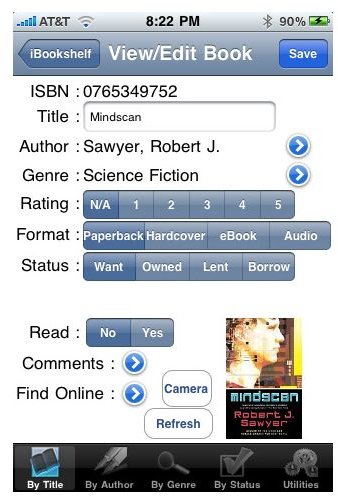
The features that iBookshelf provides are basic and simple. Books have to be entered manually, that is the ISBN code for the books allows the app to pull up relevant information. The requirement for the ISBN code is strict and the app cannot search for books based on just their names or author information. This is a bit annoying, though there is no way around it. iBookshelf supports only the ISBN format, UPC or ASIN codes are not accepted. The app allows sorting of books based on author, genre and title. The books can also be marked as read, owned, lent etc. which helps in keeping track of the books. You can also add books that you would like to own, also add comments regarding a book or borrower.
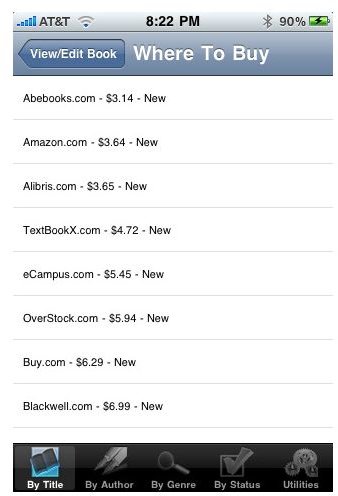
The app also allows backing up the book database to its own online server, which is handy but still wouldn’t be difficult to allow a PC based backup either. iBookshelf allows the user to also select the best place to buy a book that they have listed in the “wanted” section. The app does a price comparison on several sources including Amazon, eCampus, Abebooks & Powell’s allowing you to go in for the best deal. The app supports only cataloging of books and does not allow other stuff like DVDs or games.
Interface (3 out of 5)
The interface of the app is not really inviting and will require some makeover to really shine. The menus are pretty straight forward though not intuitive. The inclusion of the coverflow style view of the book catalogue in the landscape mode is helpful, but it is not executed very well. The book covers look pixelated and at times the text labels on them are not visible. The idea of entering a book by typing in the ISBN code may be a straightforward approach for a few books but if you’re looking to put in a considerable sized library - it becomes an arduous task. Yes, the application can import catalogue files from other applications that are capable of exporting data in the CSV format but this feature is constricted by the special formatting requirements.
iBookshelf - Best Book Cataloging Solution for the iPod/iPhone Platform

On the Mac there is no question as to the power of Delicious Library which allows you to store and catalog your previous collections of books, movies and games. Though there was a Delicious app available for the iPhone, but there no longer is! And right now the only solution to tracking your book collection on the iPhone is through iBookshelf. Till a better app comes up iBookshelf is the best available app for the cataloging your book collection. Available from developer Josh Pressnell iBookshelf is a simple and capable app for the iPhone which will cost you $1.99, though the free version allows you to play with a couple of books and get a feel for the app.


