How to Find Out How Much iPhone Data You Have Used
iPhone Data Plan
For those who have been with the iPhone for any of the first three generations it may seem a little odd to have to track your iPhone data use when you are in the normal service area. If you have signed in to a new two year contract with the purchase of the iPhone 4 you may find that you have a data plan that limits the amount of overall iPhone data use that you are allowed. Here are three simple ways that you can check on your iPhone’s data use to make sure that you do not exceed the limits set by your iPhone data plan.
So How Much iPhone Data Have I Used?
The most logical way to find how much iPhone data you have used is to utilize AT&T’s website. Start by going here and logging on,
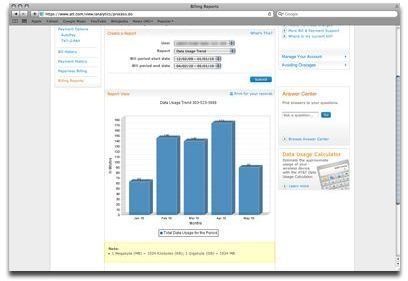
provided that you have already created an online account with the website. This is a good practice either way because it will make bill management simpler. Go to Bills & Payments, and from here you can go to Billing Reports. Choose to Create a New Billing Report and then select Data Usage Trend. You can choose to just keep it open for your entire usage or set a period of time that you would like to see the iPhone data usage for. This will give you a graph read out that will show you how much iPhone data you have used over the Edge or 3G networks.
AT&T iPhone App
The AT&T iPhone app should be a must for any iPhone user as it is a free iPhone application and directly related to your cell phone service. Download and log in to the AT&T iPhone app and you will receive fairly quick read out surveys of, not only your iPhone data usage, but also things like how many text messages you have sent or received in a specified period of time. This is going to be the quickest way to get iPhone data usage statistics without having to post up and interact with their website.
iPhone Usage
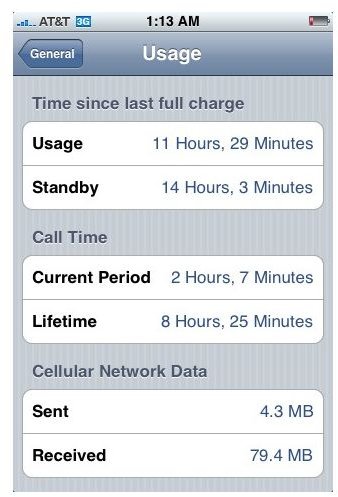
There is an easy way to check your iPhone’s data usage right on the iPhone itself. Start by going to your Settings and then go and select General, which is at the top of the third section of options right above Mail, Contacts, Calendars. Once in here go to Usage, which is near the top right under About. Here you are going to see a series of different lines of information, including how much phone usage you have had, how much standby time, your current period of call time, lifetime call time, and how much sent and received Cellular Network Data there has been. At the bottom of this Usage menu you can Reset Statistics, but you will want to do this only at the beginning of every month so you can see the correct read out of how much iPhone Data you have used during that period.
