Can Your iPhone Play Music Through Your Car Speakers? Yes!
Car Stereos and the iPhone
Your iPhone has a headphone jack on it for connecting the included pair of earbuds or any other kind of speakers. Did you know that it can be used to play your iPhone music through your car stereo, too? There are several ways you can go about it, and what you use depends on your car stereo. In many cases all you need is a ten dollar cable to turn your iPod into a mobile jukebox for your car. If you want to learn how can your iPhone play music through your car speakers, keep reading to see your options.
Auxiliary Audio Cable
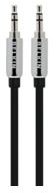
The best and cheapest way to play music from your iPhone through your car stereo speakers is by using an auxiliary audio cable, but it only works if your stereo has an auxiliary audio port. This is the kind of cable that has a 1/8 inch connector on both ends, so that each end looks just like the end of the headphone cable that plugs into the iPhone. You connect it to your stereo using the auxiliary audio port, which is typically located on the stereo’s face. Many modern vehicles now include one of these ports, as do many after market stereo systems. It looks just like a headphone jack and doesn’t require any configuration. If your car doesn’t have one of these, you still have more options.
(Image credit: Apple.com)
FM Transmitter
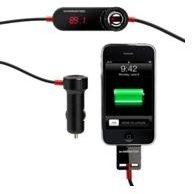
If your car stereo doesn’t have an auxiliary audio port, another option you can try is an FM transmitter. These types of devices have been around for many years and got their start during the days when people used portable CD players in their vehicles when they couldn’t afford a regular CD player car stereo. They are very commonly found these days when connecting portable satellite radios to car stereos. The FM transmitter works by letting you set your radio to a particular station where there is no interference from nearby radio stations, then you match the transmitter to that frequency and it broadcasts from your iPhone directly into the radio.
The downside to using an FM transmitter is that you will often run into interference from outside sources like other radio stations, especially if you are traveling. Nothing is better than a direct cable connection, but if that option is not available you can still get pretty decent performance from an FM transmitter if you configure it correctly. There are many different choices for iPhone FM transmitters, so be sure to shop around.
(Image credit: Apple.com)
Aftermarket Stereos
Another option you may consider is to upgrade the stereo in your vehicle. There is a huge market for car stereos that feature tons of options you won’t find on dealer installed car stereos. On top of that, you can get some really good CD MP3 car stereos for less than a couple of hundred dollars. I drive a 2005 Toyota Tacoma and found the factory installed stereo to be very weak and muddy sounding, so I upgraded my whole system and added a subwoofer and now my system rocks.
Almost every aftermarket stereo I’ve seen has an auxiliary port on the front, with many even including a USB port, too. A great many stereos also have built-in iPhone and iPod controls that will display song titles and information on the stereo screen so that you don’t have to fiddle with the iPhone while driving. There are too many makes and models to go into specifics here, but a good start would be to visit Crutchfield.com and see what fits your vehicle.
