iTunes, by default, will sync all of your media with your iPhone. You can also manually pick and choose which files to sync with your iPhone.
How Automatic Sycning Works
Many iPhone owners may notice that when they plug in their iPhone to their computers, that it syncs to your library. What this means is it adds all of the media such as photos, music, videos and so on that you have in your entire iTunes library. This would be a great feature if your iPhone had an unlimited amount of space.
Problems with the Automatic Sync Feature
All of the benefits of having your iPhone automatically sync to your computer, as you all know, are not always a benefit as the iPhone is limited to either 4GB, 8GB, 16GB or 32GB . Thus, users who have very large libraries of movies, music and pictures may exceed those limits.
So what can you do if you only want a couple songs from an album instead of the whole thing? Well that’s where selecting the manual option to manage your iPhone feature comes into play.
Here we’ll go through the steps you can take to disable the automatic sync option on your iPhone/iTunes so that you can manually manage which songs are added to your iPhone to conserve precious hard drive space.
How to Disable the Automatic Sync Option
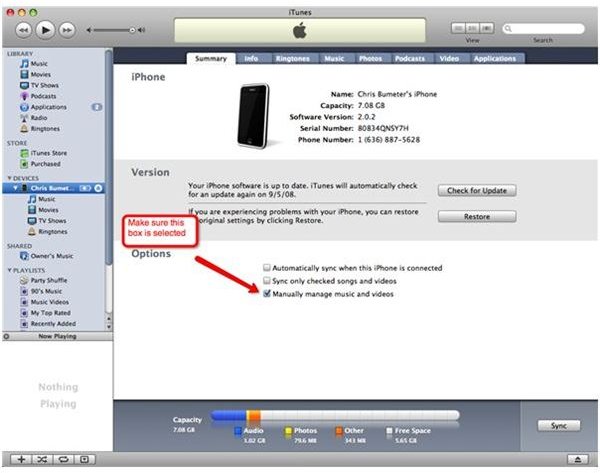
Your first step to setting this up is to plug in you iPhone to your computer. When this is done you will see that it will show up as a device in iTunes. When you see it show up click on the name of your iPhone, for example, mine is called Chris’s iPhone. When you click on it it will show your overall menu for your iPhone, things like the info, ringtones, music, photos, but the very first tab should say summary. This
is where you will select the option manually manage music and video.
You will see three boxes in the lower half of the menu, it’s technically located under the “options.
The default box checked is normally the “automatically sync when this iPhone is connected. Deselect that box and then check the manually manage music and videos. This will ask you if you want to erase and sync, approve that.
Continue reading on the second page to find out how to manually add songs and videos to your iPhone.
Syncing on Your Own
Once the manually manage option is checked and it has synced up you are ready to go. Keep in mind that this is the only time the iPhone will sync, once it’s done you will be able to manually pick and choose your songs and videos you want on your iPhone.
How to Manually Add Songs
So the hard part is done. You should now have the manually manage music and video box checked. From here you can click on the music option on the left side under the Library section. You then will just click on a song and simply drag it to your iPhone. You should
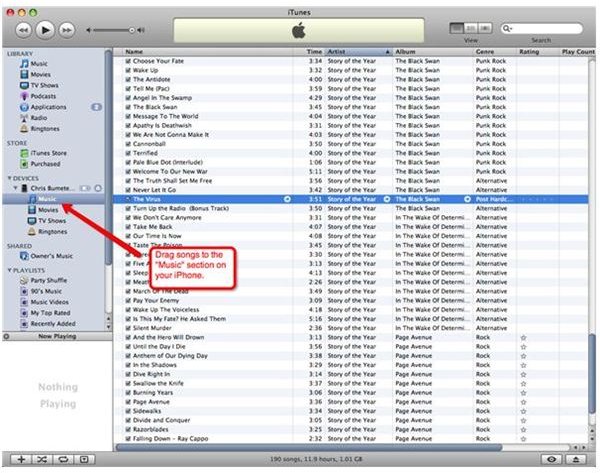
see a a little green plus icon pop up as the song hovers over the iPhone. When you release the mouse, it will be added to the iPhone. That’s all you got to do.
Now if you would like to remove an item from your iPhone it’s just as simple. Make sure your iPhone is plugged in and click on the music option that is located under your iPhone. Go and select the song you want to remove and just click the delete button on your keyboard. That’s all that needs to be done. You will see the file disappear and it is no longer on your iPhone.
Now you are only able to sync your iPhone to one iTunes library, so every time you plug an iPhone into a different computer then you will have to erase and sync your iPhone so it will only remain to not sync if you keep using the same iTunes library.
This feature makes it a little easier to maintain the space on your iPhone for what you want so take advantage of it and enjoy. Check out a guide about deleting iPhone apps from your iPhone to save even more space.


