Troubleshooting Your HTC Evo

Written by:  • Edited by: Simon Hill
Published Aug 4, 2010
• Related Guides: Android | HTC

Many potential HTC Evo problems are no secret. Any new device will, luckily the highly popular and much anticipated Evo has problems that are easily fixed. The niggles are minuscule compared to the performance that it delivers. Learn about some of the known issues and how to fix them.

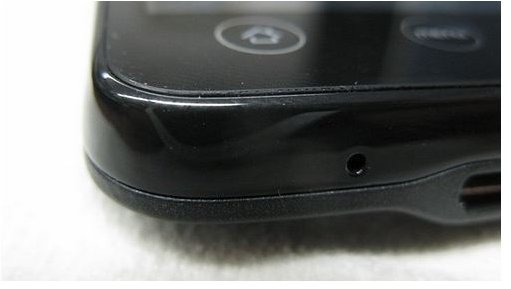
Glass Separation

Slide 1 of 4

Notice the EVO glass separation.
click to enlarge
Place your EVO on a flat surface with the screen facing up. Look at the device with a level-eye and notice if the glass has lifted. The gap will not be big, at the most maybe one millimeter. If the glass is lifting on your EVO, you may want to get this inspected further. The consequences of the gap include the possibility that dirt, debris and moisture can seep into the device. With these foreign elements in the device, it may prevent the HTC EVO from performing at the high capacity that it is known for. The device may be taken to a Sprint Service and Repair center for further diagnosis if the device is more than 30 days old. If the device is less than 30 days old, contact the the original location you purchased the device (Sprint Telesales, Sprint customer service, Sprint Store) and let them know what issue you are having. They will provide further troubleshooting for the issue.

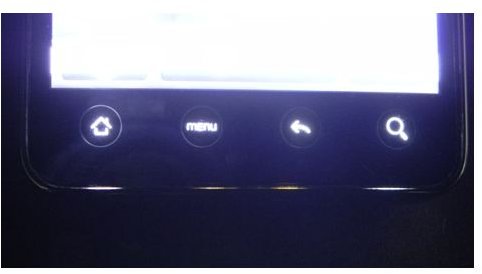
Light Leakage
Slide 2 of 4

Check the light emission on the EVO.
click to enlarge
Turn the lights off in a room and turn on your HTC EVO. The light on the EVO should illuminate the entire device quickly. Look around the edges of the device and check to see if there is any light emitting from the edges. If you notice any light, you are not alone. Some EVO customers have complained of having light leakage. To fix this problem, remove the back cover on the device by sliding your fingertips around the edges until it pops off. Locate the four screws on each corner of the device underneath the back cover. Use a T5 screwdriver to tighten these screws. Place the cover back on the device. Do a light test again to check the light emission. If there is still light coming out of the device and it is less than 30 days old, contact the location where you purchased the device from and report the issue. If it is greater than 30 days old, make an appointment at your nearest Sprint Service and Repair Center to have the device repaired.

Power Cycle Loop

Slide 3 of 4

Synchronization of some HTC EVO's with Microsoft Exchange has prompted a never-ending looping cycle for some EVO owners. HTC and Sprint acknowledged the issue and have since come up with a fix for it. While synchronizing the EVO with Exhange, a password will be required in the process to continue the synchronization. Entering a password such as "1234567" will result in the forever looping process, therefore the password must not contain all numbers. Choose a password with letters and numbers to avoid this malfunction.

HTC EVO Problems Solved
Slide 4 of 4

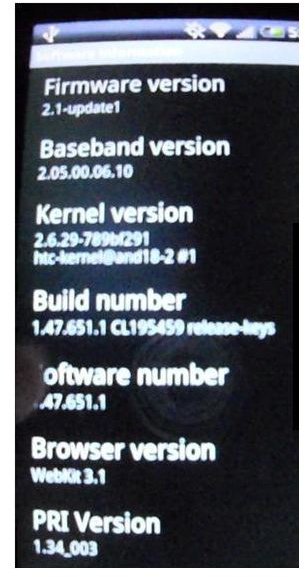
Update the software for the EVO.
click to enlarge
Solving a vast majority of the HTC EVO problems on August 3, 2010, Sprint pushed a software update that all EVO users will greatly enjoy. The new software update may be familiar to all Droid users that spend time "rooting" their Droid devices. Rooting means the stock ROM (operating system) is replaced by a personalized tweaked ROM. The new update is called the "Android 2.2" or "Froyo" for those familiar with the rooting processes. This update was not expected until September, but due to all the malfunctions many users have experienced, Sprint was nice enough to release it early. That is great news for all you Droid users that may be jumping up and down at this time with a sigh of relief. If your phone has not updated yet, you may do a manual update by clicking "Menu," selecting "Settings," clicking the "System Update" icon and choosing "HTC Software Update." The update process takes approximately five minutes and during this time you will not be able to use your device. Once it completes the phone will shut down and turn back on with the new updates in place.

If you find your HTC EVO battery keeps running out then check out our article on How to Extend HTC EVO Battery Life.


Comments

Showing all 13 comments
 
Sandy Sanders Sep 16, 2011 2:57 AM
Browser/Internet Doesn't Launch Sometimes
Sometimes I get "cannot connect to page" error because the internet won't connect. I reset the phone and it may or may not work. A few minutes later it won't launch/connect again. Sometimes it works for a whole day but at some point it quits. Is there some kind of adjustment that can be made to insure the internet is always connected?
Michael Robicheaux Jul 27, 2011 1:30 AM
About screen lock
When I turn my screen on, it goes back to where I left off. The screen that allows you to slide down to unlock phone is not showing. What is the solution? I went through the settings menu, and couldn't find a thing...
LaVelle Mar 3, 2011 6:22 PM
RE: Troubleshooting Your HTC Evo
@shopperholic2
That's not correct. I updated the weather in the account sync section in the settings and it has been working fine.
Rick Boomer Mar 2, 2011 5:01 PM
Angry Birds
To Barry Henry: you sure can install Angry Birds on the EVO. I play it all the time on mine.
shopperholic2 Feb 24, 2011 12:46 PM
@Michael Robicheaux
If your phone is operating slowly, it is because you need to do some cleaning on the phone. I don't mean physically, but you may have apps running that you didn't even know were running. You need to download a app like "Task Killer" to kill off all the apps not in use. You need to also go through and clear the cache of ALL the apps and the web services, clear the history of your browser, backup your storage and clean or delete items you never use.
shopperholic2 Feb 24, 2011 12:44 PM
@Lavelle
If your weather is not updating, it is because you need to contact the technical support department. From there, what they will do is reset your towers and data services from their system. This is important because with the time change, the data update will force the correct information to go through. This was a known glitch.
shopperholic2 Feb 24, 2011 12:42 PM
@Barry Henry
Barry, if you can't install Angry Birds, that is because the Angry Birds app only works with certain phones. The EVO is not one of them.
Michael Robicheaux Feb 24, 2011 10:16 AM
Issues on speed of phone.
Recently my phone has been operating slow when a bottom or key is pressed. I haven't installed the last update because or the issues I had with last phone. What can cause the phone to operate slowly when keys are pressed?
Lavelle Dec 5, 2010 11:55 AM
Re: Running out of Storage
Have you used a file manager app to verify the space on your sd card?
T A Nov 30, 2010 4:49 PM
Running out of Storage
Out of the blue, I'm getting a message that I can't do anything with text messaging because I'm low on storage space.

I have deleted just about everything I can think of, and the message remains the same, despite the fact that I was texting a few minutes before the error message.

It won't allow me to remove any texts because of the same issue. Anyone experiencing that? WHat might be the fix? Thanks.
CE Nov 9, 2010 12:06 PM
ringtones??
So when i am on a call and get a text the phone plays the ringtone in my ear to where i cant hear the person im talking too. So i have to pull down the notification from the top and open the text to make it stop. Sprint cust serv told me to try a different ring tone i changed it but when i get texts it still the old one. It maybe user error and i may have it set up to do the ringtone in my ear but i cant figure out how to change it...........
Barry Henry Nov 6, 2010 2:55 PM
Can't install "Angry Birds"
I had a screen blackout on the last day of my first 30 day warrenty. Sprint "IT department" wrote a ticket and since then the phone has had a "hard reset" done on it by Sprint 3 times and I am still unable to install the app. I have been to the repair store and now it is three weeks past my 30 day warrenty, I know, I know, I'm screwed... Is there a diagnostic test that can be performed? Now it is like Sprint does not want to have anything to do with me...
Lavelle Sep 17, 2010 4:20 AM
The weather not updating
We all have seen the widget with the time and the weather. I have to manually update the weather everyday. I thought Froyo would fix the problem, but I was wrong.

This is the only real issue I have with the EVO besides the apps that run on their own.
 
blog comments powered by Disqus
Email to a friend