What is the Best Facebook App for Android?

Too Many Facebook Apps!!
When I first got my Android phone I knew I’d need an app for Facebook. After all, you now have a cool phone, you might as well show it off to your friends by posting comment on the go. However, I quickly became frustrated. The Android Market has far too many Facebook apps to choose from, some of which cost money. Not only this but some of these applications appeared to just bring up the Facebook website, which I could just as easily do through the browser. So what is the best Facebook app for Android phones?
In this review I will run through the Facebook apps that appear towards the top of the list of a search for “Facebook” on the Android Market that way you can see what these apps really are before you go through the trouble of downloading them. We’ll start with some of the worst and then head towards the better ones. At the end we’ll decide which one is the best for you to use!
Facebook Touch (1 out of 5)
Facebook Touch is one of those deceiving applications that really does nothing at all. As its own application description says it is only a wrapper for the normal Facebook website. It looks just like the normal website except it has “Facebook touch” at the top. It comes in an ad-supported version or one that costs £0.50–so basically by using it you are just paying someone else to use a Facebook site you could just as easily use in the browser that comes on your phone. Don’t get it!
Facebook Plus (1 out of 5)
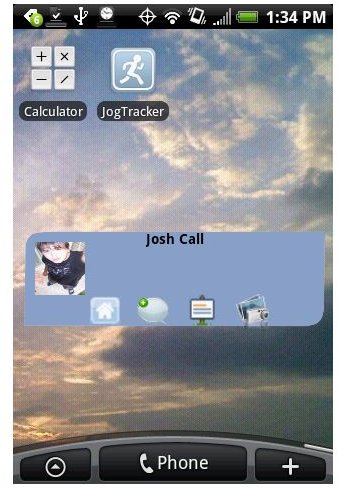
This application is rather confusing and poorly formatted. Instead of functioning through an application it forces you to work through a widget on the screen (so you can’t have a direct link to the program). When you try to open the application it tells you to place a widget on a screen. Once you do this it gives you the sign-in screen and lets you select how often the app updates.
The widget wouldn’t be a bad idea if it didn’t look so horrible. It shows my profile picture–horribly stretched–followed by buttons to access the home menu, update status, view notifications, and upload a picture. These buttons are too small for easy selection and not terribly functional. Once you do click on one what comes up is a poorly formatted version of Facebook that looks crowded together.
The app has both a free version and a paid version but I don’t see why you’d bother.
FBook (2 out of 5)
To get full functionality with FBook you have to buy the app, which costs $1.50 otherwise you’re running with a lesser version with ads. Is it worth the bit of money?
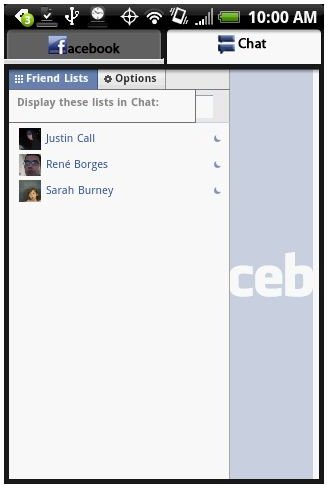
The app is pretty simple. It consists of two tabs at the top, one says “Facebook” and the other says “Chat.” Each one requires that you log in, which I immediately found suspicious. It quickly became clear that this app is doing something very simple: for the Facebook tab it is simply opening the mobile Facebook website. For the chat tab it is opening the normal Facebook website and the centering you on the part that has the chat. This in itself isn’t horrible–it is a pain to try to get on the normal website to chat using a browser. So if you like using FB chat then you might actually consider using this program. But most likely your friends on Facebook can also text message or IM using another client, which any phone will have built in, so it’s not really worth the $1.50
Facebook Pro (2 out of 5)
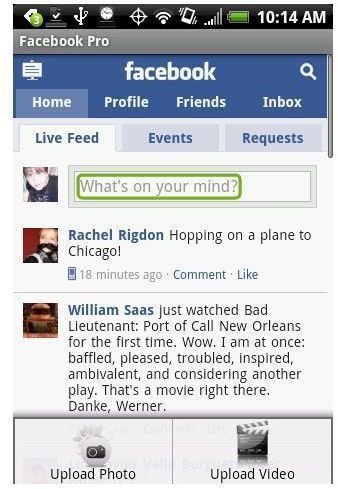
Facebook Pro is a free app that functions primarily as a widget. To launch you place the widget on a homescreen. It is just a blue box that will have a little sign that says “Connect.” You press this to log in. Once you log in, however, the widget has some difficulty displaying your status like it is supposed to and I found it difficult to click precisely on the icon (the little house) to take me to the actual Facebook display. When I did click on it, it took me to a framed window of the Facebook mobile site. The only functionality they added was an easy “upload photo” and “upload video” option when you hit “Menu” on your phone. These buttons take you to your albums/videos then let you select one to upload. Overall not a bad feature but also unnecessary since virtually any phone with Android on it will already have this integration built in–for example any HTC Android phone will let you select any picture and automatically upload it to Facebook without any extra apps.
Mobile Facebook (4 out of 5)
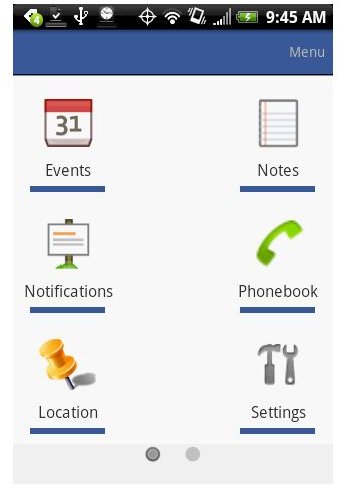
This Facebook app costs $3.49 on the Android market and has a few features that may make it worth it. Upon opening it has a long list of options of things to look for. These symbols look quite similar to those found on the Facebook for Android app put out by Facebook. On the first page is News Feed, Profile, Photos, Friends, Inbox, and Requests. If you scroll down you also have options for Events, Notes, Notifications, Phonebook, Location, and Settings. Some of these things are pretty cool features that you couldn’t normally have on other FB apps or even on the FB mobile site. For instance, the Location feature lets you easily post your location as a status update and the Phonebook section will allow you to easily scroll through your friends to get emails and any phone numbers listed. A little creepy but helpful.
The Settings menu also allows for the most customization. You can set notifications, refresh intervals, and lots of security settings from this menu. Also, the news feed and setup of the app keeps a blue color scheme similar to other FB apps but adds some shading.
What I do find frustrating is that scrolling through the various items, whether in the news feed or pictures, it doesn’t highlight one as a selected item so you can’t make use of a mobile mouse ball. This also makes it difficult to know where you are pressing. Many times I went to go click “comment” and accidentally selected the persons name on the post below. Also, it appears to run a bit slower than some of the other applications and because of the increased menus can be difficult to navigate.
Facebook for Android (5 out of 5)

This is the official Facebook application put out by Facebook and is the one you will get if you go the Facebook website as well as the top result if you look for Facebook in the Android Market.
Upon bootup it shows a nice clean menu that easily allows you to select from your news feeds, friends, photos, inbox, profile, and notifications. The icons are large for easily selection. Everything runs fast and contains all of the options and menus you’d need to comment on others posts, search for friends and photos, and update your status easily.
A really helpful and cool feature is the little camera button right next to the status update. This will take you right to your camera on your phone; once you take a picture it will take you right to the menu to upload the photo. This is even more helpful than most features on phones that allow you to upload pics to Facebook because you can do it right out of the FB app.
One thing that is frustrating is the frequency with which it updates. You can change this if you go to the home menu of the app and hit Menu < Settings < Refresh Interval. (From that same menu area you do have some good customization of notifications). Of course like any app you have to have it up to refresh. This can be worked around by using the “Refresh” button that comes up when you hit “menu”.
The widget is also somewhat frustrating. It allows you to quickly update your status but only scrolls through status updates of your friends, ignoring any filters you may have placed for friends you don’t really know well. Overall, a good FB interface, not such a great widget.
Verdict!
The truth of the matter is most of these Facebook apps are worthless. Don’t waste your time with most of them since the only thing they do is bring up the Facebook Mobile website. Admittedly they do this a little quicker than you might in a browser (depending on your phone) but they don’t add much functionality at all.
The only two worth looking at are Mobile Facebook, which costs $3.49 and the free Facebook for Android app actually put out by Facebook. Unsurprisingly the two apps are similar with easy interfaces that allow you to easily look through your Facebook information on a mobile screen. The added functionalities of Mobile Facebook can be helpful–I really found the location and phonebook menus to be really cool. However, I was really annoyed at how difficult it was to select things.
So in this case I will actually have to go with the App put out by Facebook itself. In the end it makes sense: Facebook has the biggest investment in making sure its products and services function well on your device and they have done more research into what their users want and need than anyone. In this case, the simple menus offer full functionality to do the stuff you’d normally want to do on your phone (which I think doesn’t include FB chat for most people) and adds a few helpful phone-specific features, such as the ability to quickly take pictures to upload to your Facebook.
So then, what is the best Facebook app for Android?
Final Verdict: Get the Facebook for Android App put out by Facebook.
