Keeping track of your contacts on an Android smartphone can be a hair-losing experience, but fear not, the Smartr Contacts app is designed to make communicating with people through your device as simple as possible. Does the app live up to its billing, or is it just blowing smoke?
As you send and receive email, message random people and dive into conversations on social networking sites, your list of contacts can quickly grow out of control. To help you with this particular issue, the good folks at Xobni have created the Smartr Contacts app for Android devices. The app is designed to consolidate your contacts from several sources and organize them in a way that makes it easy to find the people you communicate with the most. While the app succeeds in some areas, it fails in others, and claiming that the app is in beta status after it has been released on the Android Market isn’t a good enough excuse for Smartr Contacts failings.
Setup
Smartr Contacts is available from the Android Market, and installing the application from there is a simple process. Once you download and run the app, you’ll then have to complete a registration process. I’m not a huge fan of requiring an account with Xobni in order to use the app, but at least the signup process is quick. Once you have created the account, you will be asked to link your existing Gmail account on your phone, and you are free to add another Gmail, Google Apps or Outlook-based email account. Choosing the Outlook option will require you to install a piece of Xobni software on the PC where your Outlook is located.
Once your email accounts are all set up, you can choose to add a Facebook, LinkedIn or Twitter account to further enhance your experience. Each social network requires that you sign in to that network and agree to let Smartr Contacts access your information, but the whole process won’t take all that long. After that, the app will take a few moments to compile your info, and you’ll be taken to the home page.
For all the different account names and passwords required, the setup process really wasn’t that bad and only took a few minutes.
Using Smartr Contacts
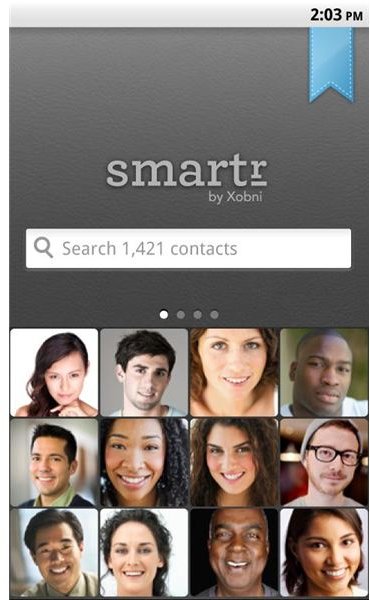
The app launches to a screen that has a simple search box and images that correspond to twelve of the contacts you have frequently corresponded with. I didn’t agree with every choice for that list, but I’ll go into the reasons for that a bit later. You can tap the image of the person to view their profile, or you can type in a name to view all of your contacts, and then tap the desired person to view their profile.
The profile page features four different tabs and a ton of interesting information. The “Details” tab will give you the email address and phone numbers of the contact, while the “Common” tab will use the information in your Gmail messages to display the names of any contacts you have in common. The “Social” tab will provide you with access to your contact’s Facebook, LinkedIn and Twitter profiles, along with recent information from all of those services. The “History” tab will provide a list of all the emails, SMS messages and phone calls you have traded with the contact.
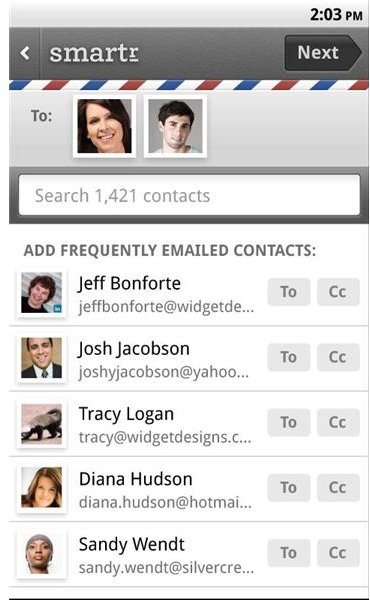
The Smartr Contacts app also features a small creation button on the home screen which lets you select multiple contacts and send a new email message. Again, your contacts appear here based on how much you communicate with them, so selecting multiple contacts is a breeze. Additionally, you can choose to send the email message through a non-Gmail account, which is nice but brings up an issue that I’ll address later.
Hits and Misses
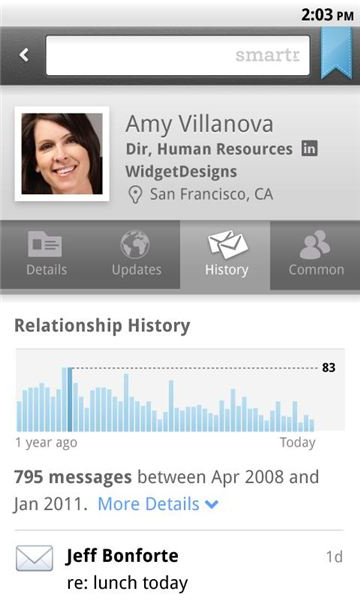
Smartr Contacts has some of both, so let’s start out with the hits. When it works, having a list of your most frequently used contacts appear when you first start the app is amazing. It just makes communicating on your Android device that much easier. Also, the ability to quickly see a list of your communication history with a contact can be a real time saver. Finally, since the Smartr Contacts app will load your calendar as well, you can also check your upcoming appointments from within the app.
There are, however, quite a few misses with the app as well. First, it did not accurately compile my text messages, so two of the people that I contact the most didn’t appear anywhere near the top of my contact list because I only communicated with them by text message. Sure, I can always type in their name and select them, but I can do that in the stock contact app as well. Second, if you use a non-Gmail account for most of your correspondence, and don’t have Microsoft Outlook on your computer, the Smartr Contacts app won’t be very helpful. The app was great at consolidating my Gmail address book, which I use for work, but my personal email account was left out in the cold, making the app much less useful than it could have been.
Third, the menu system appears to not have been thought out very well. I thought, for quite some time, that if you wanted to change your account information you would have to essentially log out and then log back in. I wasn’t until later that I discovered that you have to press the “Menu” button while searching for a contact, instead of on the home screen, to access this feature. Frustrating, to say the least. Also, there doesn’t seem to be a way to consolidate multiple social networking accounts, and it doesn’t include Google+ at all, again leaving out a large portion of the people I communicate with.
The Verdict
Smartr Contacts is barking up the right tree, but has a little bit further to go before I can say this is a must-have app. Of course, consolidating information from a number of networks is a difficult proposition, but for me there are too many contacts on platforms that this app doesn’t support to make it worth my while. If all of your communication is centered on Facebook, Twitter, LinkedIn and Gmail, then Smartr Contacts may be just what you’re looking for. Anyone who uses another avenue to communicate, or uses multiple accounts with these services, will probably be disappointed.
References
- Android Market, https://market.android.com/details?id=com.xobni.contacts
- Images from Android Market


