Say goodbye to paper and hello to the HoneyDew Synchronized Todo List. Make and share lists with other Blackberry users that are always updated and never forget your groceries again.
Introduction
Making lists can always be a chore. This is where the wonderful world of mobile technology comes in handy. On our BlackBerry devices, while we have a Memopad to jot down lists, sometimes that’s just not enough. The HoneyDew Synchronized Todo List makes sure you never forget a chore and lets you handle all sorts of list with ease.
The HoneyDew Synchronized Todo app also lets two BlackBerry users keep updated consolidated lists. You can also break down the lists according to categories as the app will remember those categories for future use.
Overall Usage (4 out of 5)
As I accessed the app in my BlackBerry Downloads folder, I was struck by the simple interface of the application. You don’t need to read the help menu or the guidelines and can start using the application straight away.
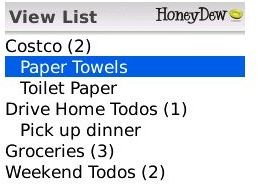
There is an “Add Items” option, which is divided into “Item” and Category. I added “Milk” “Bread” and “Butter” in the first option and “Grocery” in the second.
After I finished adding stuff to the “grocery” option, I made another category which I termed “Pet”. There I added all the items I required for my lovable pooch. All these categories are then displayed in a threaded view.
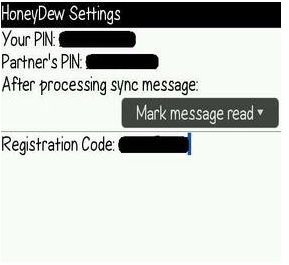
After I finished adding lists, I decided to share this list with my friend. I went to settings, entered both mine and my friends Blackberry Pin and selected “Mark message read” in the “After processing sync message”. As the devices synced we were able to very simply share our lists.
I wanted to test out this feature further so I deleted “Milk” from my list. As expected, the application alerted my friends device and deleted the “Milk” entry in her list as well. This can be extremely handy for couples that are living together or co-workers who are working on projects in teams.
Thanks to the synching abilities, HoneyDew also alerts you when an item is added. As soon as my friend added “juice” in the grocery list, I received an alert on my device, I found this quite brilliant.
Final Thoughts (5 out of 5)
HoneyDew Synchronized Todo List application is one of those little’ gems which further enhance the BlackBerry experience.
The app is extremely simple to use and I love the fact that a single purchase entitles you to use it on two BlackBerry devices. This one is a keeper and will make shopping for groceries or other boring household items more fun, while also helping manage projects at work among other uses that I’m sure our readers will discover on their own.


