Figure out who’s emailing you without even looking at your BlackBerry by using the MailTones application and its customized ringtone feature.
Setting customized ringtones is so passé, now you can even customize your email alerts and distinguish who is mailing you without ever glancing towards your BlackBerry device. The MailTones application lets you set distinct email sounds for different senders, contacts, groups and subjects. This way you can sift through your important mails from the not so important ones.
The MailTones application for the BlackBerry lets you also set your default mail tone to silent, so this way you will be only alerted when someone important emails you. So the next time your device beeps or chimes or even rings, you know that you got mail from someone who matters!
Basic Usage (4 out of 5)
I accessed the MailTones application from my Downloads folder. As soon as I opened the program I came across an options menu that was extremely easy to figure out.
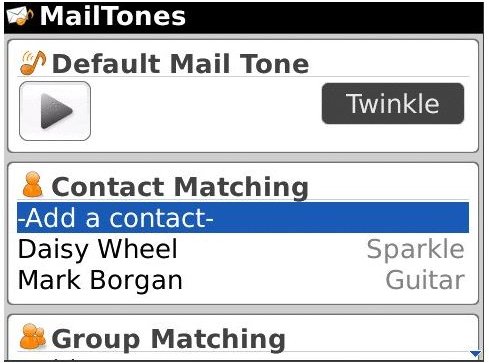
The first option in the menu was “Default Mail Tone”. There I chose to keep the “Silent” option. However Blackberry users can also select tones like “You Got Mail”, “Sparkle” etc. or even choose tones from your memory card or music folder.
Then came the “Contact Matching” option. There I choose to enter all my work related contacts and I selected the “You Got Mail” option.
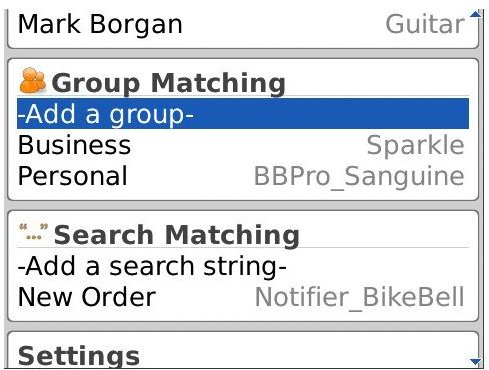
BlackBerry users can also customize their MailTones according to another option called “Group Option.” I chose to divide my contacts into two groups, which were “personal” and “business” and once again picked a different mail tone.
Once I configured all these options, I played the waiting game as I was expecting some important emails. As soon as I got an email from a client, I was instantly alerted by a woman’s voice that said “you got mail”. This encouraged me to give up my comfortable couch and reach for my device!
Final Thoughts? (4 out of 5)
It’s hard to find faults with the MailTones application as who doesn’t like customized alerts or ringtones?
The application worked flawlessly on my device and not once did I experience any kind of lag.
The interface was also extremely simple to figure and I liked the fact that application comes pre-loaded with its own tones. I found it completely worth the $2.99 price tag and for now I’m really enjoying the trial and thinking of upgrading soon.


