No one likes rejection! With the PhonePlus Callback application you can set reminders about your missed calls and also let the caller know that you saw their call and will respond as soon as possible. It’s a simple little application that offers a very useful function.
The PhonePlus Callback application by AppManiax, Inc ensures that you never treat family, friends or clients rudely by rejecting calls without giving the reason. The next time you’re in a meeting or tied up with something, instead of just cancelling a call you can make use of the PhonePlus Callback application.
The application is capable of sending a predefined SMS or email to missed or ignored callers about your current situation, keeping your callers in the know. The PhonePlus Callback application also lets BlackBerry users set a reminder for returning calls, which is very useful when on the run from appointment to appointment.
Overall Usage (4 out of 5)
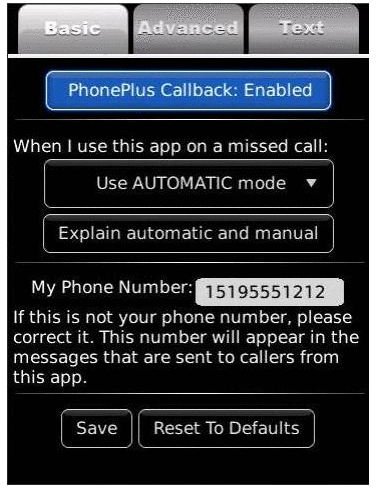
The Settings options have three basic tabs, which are: “Basic”, “Advanced” and “Text”.
The “Basic” option lets you enable or disable the application and also lets you select modes like “DND”, “Automatic Mode”,” Manual Mode”, “Autoreply on Missed Calls”, “Autoreply on Rejected Calls” or “Autoreply on missed and rejected calls”. I selected the last option and the proceeded to the “Advanced” tab.
The” Advanced” tab has callback reminders like “Reminder Alerts” and “Callback Reminder Snoozes”. Here I selected “Notifications and Popups” and “Auto dismiss on 1st snooze”.
The “Text” options in the Settings tab lets you select or write the predefine sms and you can add up to two custom messages of your own.
Since I had activated the Autoreply option, I was able to send a predefined text message to my ignored caller (sorry mom). It worked flawlessly and I was quite impressed by the application. I then turned on the DND mode and the application started automatically ignoring all my calls (once again, sorry mom).
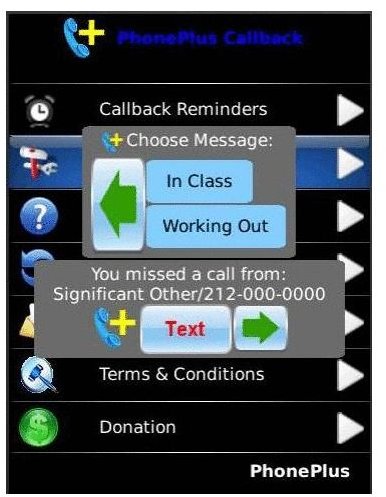
The callback reminder also popped up on my screen with options like “Show All”, “Snooze All” and “Dismissed All”. I selected the first option, saw my reminders and then opted for “dismiss all”.
Verdict (4 out of 5)
The PhonePlus Callback application is a must have for all the busy bees out there. For $5.99 , (Regularly priced at $9.99) you get an application that almost acts like a personal assistant – and I love the reminder feature.
The one gripe I do have is that the application doesn’t make use of the address book and because of that, at times it’s hard to identify the caller.


