Bloomberg is a world wide leader in financial information. Whether you want to check up on your favorite stock or find financial based information this program can provide you with all your needs. You can now utilize their network no matter where you are.
I am personally always checking Bloomberg.com for daily, even hourly news stories that affect my own personal bottom line. I also track my personal holdings by searching the companies stock database, while reading “related” news based on the stocks I’m browsing. I’ve always found Bloomberg to be the best source of financial news and millions of other Bloomberg users agree.
Now thanks to Bloomberg Mobile, Blackberry users can quickly access all of the financial information they want, right at their fingertips.
Keep reading to learn more about this useful mobile finance application.
Overall Use (4 out of 5)
Using the Bloomberg Mobile Application is simple. I personally chose to search for stocks when first using the application. The search bar allowed me to enter in any company name or stock code, for example I could find “Oracle’ by typing “Oracle” or by typing “ORCL” for Oracle US.
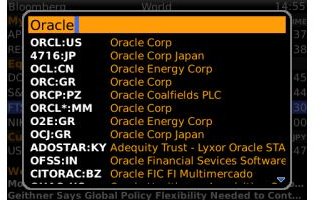
The search is also dynamic so it shows all of the options as you type out what you’re looking for. As you can see this is useful in case you weren’t aware that Oracle offers various stocks based on international divisions of their company.
The program once a stock is chosen then provides all of the pertinent information a user will want to see on the “face level” this information includes highs, lows, trading volume and evne a 52 week summary graph.

You’ll also notice that below the company profile information there’s also a “related news” section. This information shows not only stock information directly for the company in question, but also shows news that “best suits” the company you’re investigating. For example the Research In Motion stock (a Canadian company) shown above includes Canada stock issues.
Aside from the stock related news, the program also offers the ability to check news based on various factors, such as “Most Read, Worldwide, Exclusive (To Bloomberg) and Technology news. Users can also examine certain markets such as “Bonds, Commodities, Currencies and Economy.
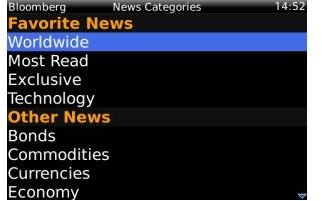
Once a news story is chosen the program then includes any pictures and text from the Bloomberg news feeds. I found that the news stories offered good text for easy reading and available pictures displayed well on my Blackberry Curve.

The program also offers quick access to “market info” including current market prices and changes. It’s a basic option but it allows users to see up to date changes in large marketing pricing.

In terms of “general use” the program also offers some other nice additions that shouldn’t be overlooked. Here’s a list of added fucntions as discovered on the Blackberry App World website:
-
Auto refresh
-
Full support for Storm devices, including zoom & pan of charts using finger swipes
Advertisement -
Equity Index Futures in “Markets”
-
Fractional positions in “My Stocks”
Advertisement -
Option to clear stock history in “Stock Finder”
-
Option to change the “My Stocks” column order using the column order from the home screen
Advertisement -
Show status of background story downloading
-
Change the default “News” pre-fetch setting to WiFi only (to change go to the
Advertisement -
News Settings from the News Screen)
-
Maintain custom settings and personal stocks after an OS upgrade
Advertisement -
Many performance & reliability improvements
Conclusion
Bloomberg Mobile is a simple to use financial application. I particularly liked that the program offered quick access to most of the major information found on the Bloomberg.com website.
Whether you want to check on your stocks price level at any moment or just read news from around the financial world, the Bloomberg Mobile app is well worth the download.
I should also mention that the program is available from the Blackberry App World for free! So you have nothing to lose, now if only that were true with your portfolio.
Give it a try today, you won’t be disappointed.


