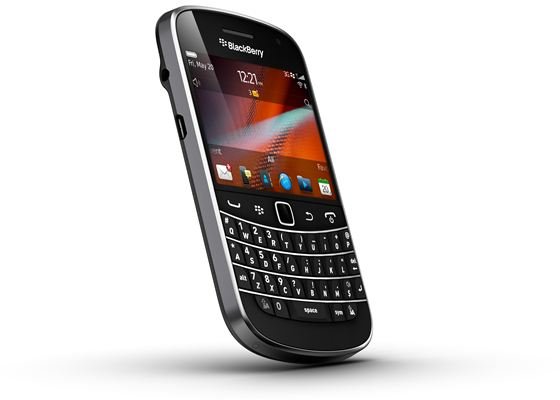
BlackBerry devices are capable of handling intensive tasks, and for that reason many enterprise customers store secure documents on their phones. In this article I’ll explain how you can wipe out that data using 5 completely different data delete methods.
Anyone who uses their phone a lot, or likes to keep up with the latest tech trends, will probably want to change their smartphone well before the end of their device’s life cycle. In those cases, rather than scrap your phone, you might want to sell the device on eBay, or to friends. Of course due to the personal nature of your enterprise work, you can’t simply hand the device over to a new user. Instead you must delete the information on your BlackBerry before passing it on, thus ensuring complete privacy for your personal information.
In this article I’ll show you 5 ways in which you can wipe out your BlackBerry’s data and applications with some simple, easy steps.
1. The Wipeout Handheld Option
Step 1: On your BlackBerry Home Screen click the “Options” choice.
Step 2: Next you’ll need to click on the “Security Options” followed by “General Settings” If you’re using a version of BlackBerry software lower than 4.1 you can simply click “Security” and avoid the Security Options choice altogether without having to update the system.
Step 3: Open the General Settings Menu and click on “Wipe Handheld” next click “Continue”.
Step 4: When prompted for a word type “blackberry” and hit the Enter key.
It’s really that simple, you’ve now deleted the data from your BlackBerry cell phone.
2. The Incorrect Password Method
I’ll start this tutorial by mentioning that in order for this process to work your device must already be protected with a password . This is the most basic way to delete the content on your smartphone.
BlackBerry devices will reset themselves after a user has mistyped their password 10 times. Simply lock your BlackBerry and type an incorrect password 10 times. During the incorrect attempts your device may ask you to type the word “blackberry”, make sure you type the word into the box. This assures your device that the unit isn’t on in your pocket. Think of it as a failsafe for accidental password attempts. Continue to type wrong passwords, typing “blackberry” when prompted. After 10 failed attempts your device will wipe itself.
3. Delete Data Using the BlackBerry Application Loader Tool
- First you’ll need to connect your BlackBerry to your device via the USB data sync cable.
- Second, you’ll open the BlackBerry Desktop Manager on your computer’s desktop and type your BlackBerry password (if asked to do so, sometimes a password option will not be displayed).
- Third, you’ll need to Double Click on the Application Loader file and hit “Next”.
- Next you’ll encounter the Device Password option, type in your device password and hit “Next”.
- After clicking “Next” you’ll see the Device Application Selection screen simply click Next again.
- The next screen is the “Completing the Application Loader Wizard” on that screen choose the “Advanced” option.
- To delete the applications for your BlackBerry you can simply choose the “Erase All Application Data” checkbox and then click “Next”.
- Finally you’ll need to click the “Do Not Automatically Back Up And Restore The Device Application Data During The Loading Process” and select “Next” then click “Finish”.
After clicking Finish your BlackBerry device will restart and your data will be once again be deleted.
4. Delete BlackBerry Applications Using the Backup and Restore Tool
- For this process you’ll need to attach your BlackBerry smartphone to your computer and launch the BlackBerry Desktop Manager Application on your desktop.
- This time you’ll Double Click the “Backup And Restore” option and then “Advanced”.
- Now you’ll need to hold down the “Shift” key. While holding the “Shift” key select the databases in the Handheld Databases list box.
- Next simply click “Clear”.
- Finally click “OK”.
Your applications are all now deleted. Another simple and quick BlackBerry data wipe process is complete.
5. Application Loader Incorrect Password Method
This option will delete all of the data from your BlackBerry smartphone. But please note that you’ll also need to have your BlackBerry OS software reinstalled after using this method, which is why I’ve saved it for last.
- You’ll need to connect your BlackBerry via your USB cable to your computer once again and open the BlackBerry Desktop Manager.
- In the Device Manager double click on the Application Loader and then in the Application Loader Wizard click “Next.”
- When prompted for your Device Security Password type in the wrong password and choose the “Next” option. Continue this incorrect password step 10 times.
- Finally click the “Close” option and the device error 507 should appear.
- Reinstall your BlackBerry device software and you’re ready to once again start using your device with a fresh data free setup.
Delete Data, Applications or Both?
The above methods will allow you to delete your data, your applications or both at the same time. While some methods are easier than others, such as the 10 incorrect password attempts, it’s ultimately up to you, the user, to choose whether or not you need to delete just your data, just your applications, or both.
References
- Author’s own experience.
- Image, https://www.rim.com/newsroom/mediagallery/9900.shtml


