FollowUp is an extremely handy application for BlackBerry phones that alerts and reminds you to respond to selected important e-mails, messages, or calls. It allows you to mark important calls and e-mails and specify the time when you want to respond to this incoming communication.
Overview
The inbox of my e-mail account is always flooded with e-mails, and sometimes it becomes pretty hard to figure out which ones are important and which ones can be deleted without reading. The situation is the same with all my incoming calls because I receive a lot of calls and messages on my BlackBerry, which makes it practically impossible to remember an important one and respond back in time. What I need is an application that can alert me and remind me to respond back to a call or an e-mail while I am busy following my schedule.
FollowUp is one such application for BlackBerry phones designed by Link-Two Software that notifies and reminds you to respond back to an e-mail or a phone call of great importance for you. It is a small application occupying very little space on your memory card and effectively reminding you to follow up on your important incoming communications. It allows you to mark the e-mails and calls that have to be responded back to on time. Just specify the time after which you want to respond, and, once that time comes, you are prompted by an alert.
Installation
FollowUp can be purchased from the website of Link-Two Software for $19.99 . Both over-the-air download and zipped demo version for trial purposes are available on developer’s website. The setup file FollowUp.jad is just 604 bytes in size and downloads in only a few seconds. Once you have downloaded the setup file onto your desktop PC, you can use the BlackBerry Desktop Manager to install the application on your phone. Or, you can directly download the OTA file by opening your BlackBerry’s browser, and run the installation from there.
Main Features
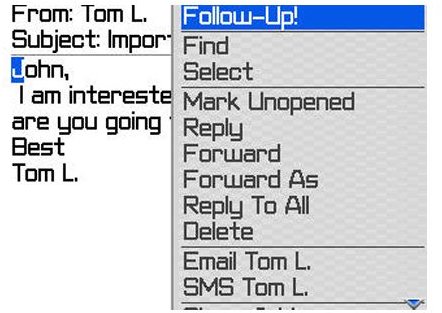
After installing the application, you will notice that an additional FollowUp option had been added in the options menu of your e-mail’s inbox.
Clicking this option will lead you to the main settings window of the FollowUp application where you can then mark all significant incoming communications and configure the time after which you want to get a reminder so that you can follow up on this communication. I started by marking my important communications and assigning a time after which I wanted to receive a reminder for the marked e-mails. When this time arrived, I was prompted by an alert signaling that I should now respond back to that e-mail. The alert also showed details of the e-mail as I scrolled down the notification message.
I used the latest version of FollowUp that also displayed the task and calendar entries in the notification message and listed the complete detail of the e-mail. This feature allowed me to have an idea about the matter and contents of the message and respond back accordingly without having to revisit the original message. After using the application for a few days, I got used to it and felt that it worked fine for me. The only thing that I disliked about the software was its lack of showing all the marked communications on a single list so that I could quickly and easily view all the follow ups and their subject matter. This application is compatible with almost all BlackBerry models so you don’t need to go through a compatibility test for your device.
Final Verdict
FollowUp is a great productivity tool that will make your life much easier by reminding you of all the important incoming communications you want to get back to. By doing this, it takes quite a load off your mind because now you don’t have to keep reminding yourself that you have to follow up on a certain e-mail or contact at a specific time. It is a small application that needs very little space on your phone memory card. It works quickly without any flaws and is quite easy to use, but it would be better if the upcoming versions include a provision for viewing all the marked follow-ups as a list.
SOURCE: Link-Two


