If you use social networking sites, this would be a great browser for you. Read this review to see what the Flock web browser has to offer.
Overview of Flock Browser (5 out of 5)
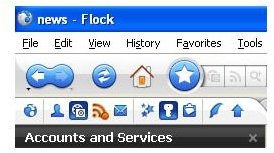
The Flock web browser is powered by Firefox. This is a social networking type browser with many options available when visiting social networking sites. With this browser, it is easy to keep up with all of your social networking sites, email accounts, blogs, and more. Uploading photos to PhotoBucket and Flickr are made easy with the Flock Browser. Posting to your blogs is also a breeze with this browser. Flock Browser makes everyday activities easier because it is all at your finger tips.
Flock Browser Social Networking Tools (5 out of 5)
Flock Browser offers many tools that will make your social networking experience easier. Flock provides a side toolbar called People. With the toolbar, you can view all of your friends on different social networking sites. The friends are located in the side bar and from there you can see what they are doing, if they are online, send them email, send them comments, and more. It doesn’t matter what site you are browsing. Your friends will stay in the sidebar until you close it.
Another great thing about the social networking tools is the ability to email your friends photos and links just by dragging and dropping the photo or link on your friend’s photo in the people sidebar. For example, if you want to send one of your friends a photo, click the photo and drag it to your friend’s profile and let go of it. A window will open with the email fields. Simply type your message and send the email. Your friend will get your email and photo you sent.
Flock Browser RSS Feeds (5 out of 5)
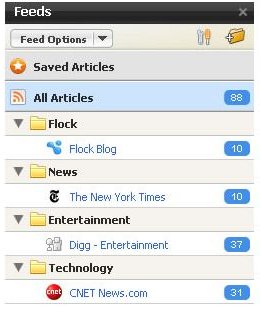
In the Flock Browser Tools menu, you will have the option of opening RSS Feeds . The feeds will open in the sidebar of your browser. The feeds will be listed by category. Under each category, you will see the links. Click a link to view the different feeds. You can also open the select your feeds option. From this panel, you can select the feeds you want to load in the sidebar. For example, if you want feeds pulled from Fox News, you can set it up to pull feeds from Fox News.
Flock Browser Photo Uploading Tools (5 out of 5)
Flock Browser has a built in tool which allows you to quickly upload photos to PhotoBucket and Flickr. You must set up your account information in the browser before using the photo tools. Once you have set up your account information, you can click the Photo Uploading icon and begin uploading your photos to the site of your choice.
Flock Browser Web Mail Client (5 out of 5)
Flock Browser also has a built in email client for YMail and gmail. On the toolbar of Flock Browser, you will see the mail client icon. Clicking the icon will give you the option of logging into one of the accounts. Select your option and login in. You will stay logged in until you close the Flock Browser.
Flock Browser Themes (3 out of 5)
The only downside to Flock Browser is the amount of themes available for it. While searching the Themes section of Flock, there only appeared to be two themes available. You can search Google for themes and every now and again come up with themes you can use for Flock.
Overall Rating (4 out of 5)
Overall Flock deserves 4 out of 5 stars. The browser has many useful features making social networking easier. However, not having a wide selection of themes reduces our rating.


