Do you like the look of those cool rollover and hover text effects that you’ve seen on other sites? These effects are easy to achieve with Dreamweaver, and this tutorial will walk you through the steps.
Hover text effects in Dreamweaver can allow a change in font, color, or background when the text is rolled over by the mouse cursor. Cascading Style Sheets, or CSS, is a useful way for beginner web site developers to maintain and make changes to their web page’s appearance, using just one file. Simple CSS coding can also be used to enhance numerous aspects of a web site or blog. This CSS rollover effect is created by using the “a:hover” style. Use this simple tutorial to create a hover text effect on your web page using Dreamweaver.
Open Existing Web Page in Dreamweaver
After opening your Dreamweaver software, open up a new HTML document. This will present you with a fresh white page. On the
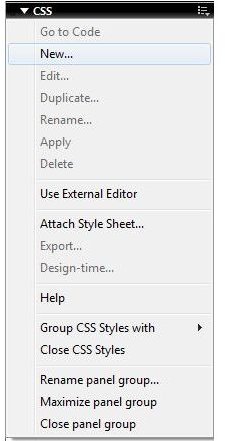
navigation bar located towards the top of your Dreamweaver software, click the link titled “Window”. When the “Window” link is clicked, a drop-down menu will appear. From this menu, select the “CSS Styles” link. A box located on the right side of the screen should appear titled “CSS”. On the right side of the title bar, click the file icon. From this drop down menu, select “New” to open a new CSS style.
Complete the New CSS Rule
When a new CSS style is chosen, a pop-up box will appear titled “New CSS Rule”. In this box, you will first be presented with a choice
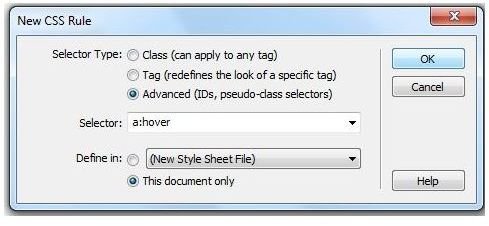
of a ‘Selector Type’. This choices include Class (can apply to any tag), Tag (redefines the look of a specific tag), or Advanced (IDs, pseudo-class selectors). To create a hover text effect , chose the “Advanced” selector type. Next, open the drop down menu to the right of the “Selector” option and chose “a:hover”. Lastly, you will have a choice for the “Define in” option. For this area, select the choice that says “This document only”. Finish my clicking “OK”.
Customize the Hover Text Effect
When you click the “OK” button on the “New CSS Rule” box, a new pop-up box will appear titled “CSS Rule definition for a:hover”.
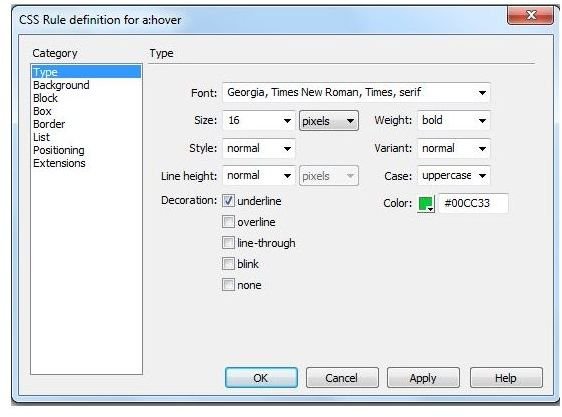
Here you will have the opportunity to customize the hover text. You can change the font, color, size and decoration of your rollover text. In the category box, you will have several links titled Type, Background, Block, Box, Border, List, Positioning, and Extensions. Go through each of these options and customize your hover text effect to fit your needs.
Learning CSS Hover Style
Creating hover text effects in Dreamweaver is a simple technique that can be used to transform plain text into a colorful or fancy font when a cursor is hovered above the area. Dreamweaver has the capabilities to perform hundreds of text effects, such as the hover technique, with minimal computer coding knowledge or computer skills.


