Learning how to create a slideshow in Flash CS4 is simple and fun. Use this user-friendly guide to make your own in no time.
Action!
Adobe has created multimedia software that allows the user to easily learn how to create a slideshow in Flash CS4 . Use Flash to create movie, gaming and design software as well as web pages, animations and advertisements. Using Flash CS4 is simple and efficient in almost every operating system platform. Here you will find instructions on how to create a slideshow using the Flash software.
Edit Slideshow Pictures
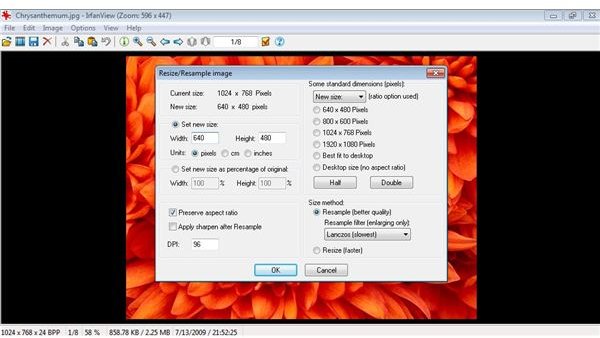
Before you can begin to learn how to create a slideshow in Flash CS4, you will need to edit the images that will be used in the slideshow. This can be done by using any general image editor, such as IrfanView. IrfanView can be downloaded free of charge by going to www.irfanview.com . Each picture should be edited to 640 x 480 pixels. Save each picture in .jpeg format .
Open New Document
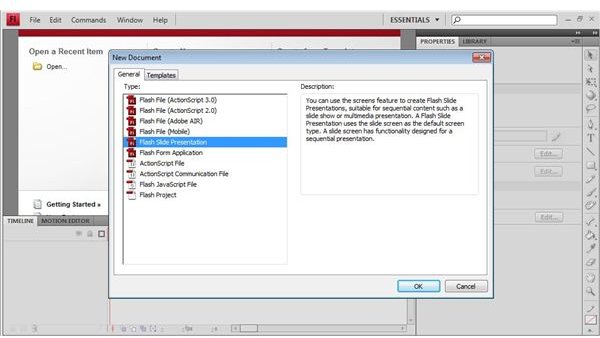
Open Flash CS4 on your desktop and allow the software to fully load. Click ‘File’, then ‘New’, then the ‘General’ tab. From the general tab, click ‘Flash Slide Presentation’ and then ‘OK’. You should now see a preview format of the slideshow template. You will need to remove all the preview pictures before you can add your own. This can be done by selecting the picture layer and then selecting the trash can icon.
Upload Chosen Images
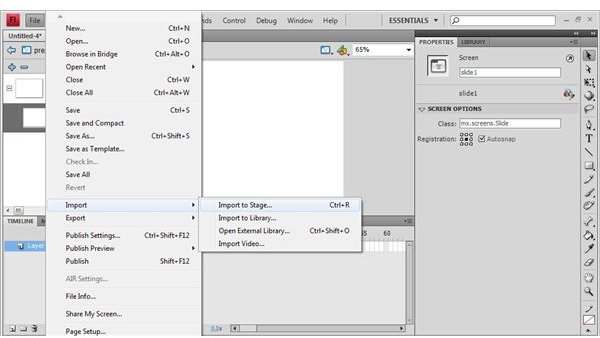
The key to learning how to create a slideshow in Flash CS4 is to choose images that are clear and highly pixilated. This will make for a more professional and entertaining slideshow.com. To upload images into your slideshow, you will first need to make a new layer. This can be done by clicking ‘Insert Layer’ and name it something simple such as ‘My Images’. Next, click the keyframe by clicking ‘File’, then ‘Import’, then ‘Import to Stage’. Select the images you wish to add from your computer. Select ‘Add’ then ‘Import’. When prompted, select ‘Yes’.
Preview and Save the Slideshow
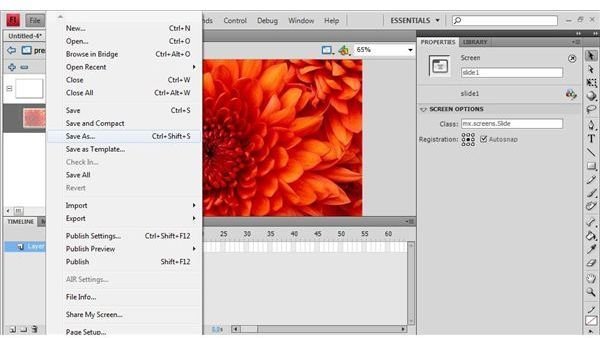
Before using your slideshow, you will want to preview the show to check for any mistakes in order or clearness. On your keyboard, hold down ‘Ctrl’ + ‘Enter’ at the same time. This will load your slideshow and allow you to view your images. Save your file by going to ‘File’ then ‘Save As’. Save your file to your computer so it’s easily available to make changes to later if needed.
Using Flash CS4 for Projects
Flash CS4 is a popular and well known multimedia software that has the capabilities to create numerous design projects, web pages and related components. Making a flash CS4 slideshow to spice up a web page, school or work project or just to show off your favorite images can be simple and enjoyable. Follow these easy to read instructions with matching visual aids to create your own stunning slideshows at home.


