Secure passwords should consist of at least eight completely random letters and numbers, plus symbols if allowed. The only problem is most people have trouble remembering this long a sequence of letters. An alternative is to form a password by combing two unrelated words. Do this with JavaScript.
Basic Principle
A few lines of JavaScript will set up a system for picking two word combinations. The number of possible permutations depends on how many words you use. For example, 21 different words will give 420 permutations, 50 words create 2,450 pairs, and 100 words will offer 19,800 pairs. The only real work is setting up the original words list, but you can use any page of public domain text from the web and convert the words to an array without retyping. An array is a data type that contains x number of pieces of data. Each item is numbered and referred to as an element. The associated number is its index. Javascript creates the array and then randomization picks two elements from the array.
JavaScript Code
For simplicity, use Notepad or another text editor to create the short JavaScript code. You can also use Web development software like Dreamweaver. The latter is easier to customize if you want to get a bit fancy with the display. Open a new file in Notepad and type the code below. The fourth line continues with the fifth line, which begins with the word “array. Do not insert a line break between lines four and five. Do not type the four asterisks; they are here only to keep this script from executing on the Web page where this article appears.
****
You can replace any of the words in the array with any other words. Arrays begin counting with zero, so the total number is always one more than you would expect. There are twenty-one words in the above example. If you increase or decrease the number then change the lines that define the index variables “i” and “n” to match the number of elements. For example, if using 25 words, the relevant code should read “var i=Math.floor(25*Math.random()); and “var n=Math.floor(25*Math.random());
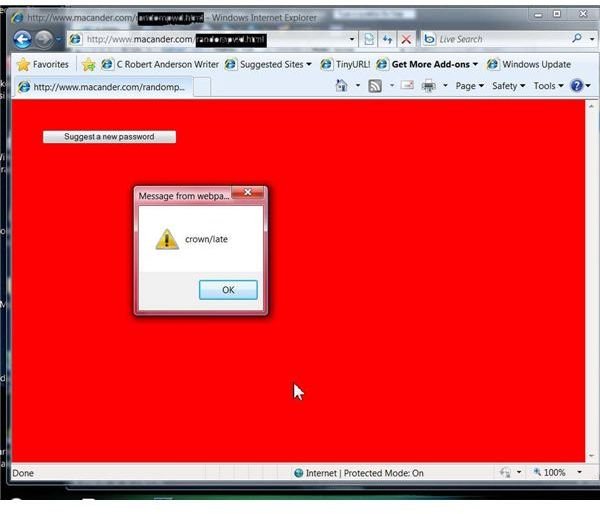
The code defines a function called with some additional lines. The index variables are the result of two Javascript functions. Math.random creates a random number between .000 and .999. To ensure the total number of possible random numbers equals the total number of words, the result is multiplied by the number of words. A second function, Math.floor, truncates the result to an integer. The last line, “window.alert(pwd[i] +"/" +pwd[n])” opens a window and prints a new password consisting of two words separated by a slash mark (“/”). This can be any separation character you wish. You also can delete that item and the words will run together.
Making It Work
Only three more lines of code will make this work. Add this information below the .
Save the file with an HTML extension. Check it quickly by locating the file through Windows Explorer. Right click on it, select “Open With” and either IE or Firefox. You should see the window shown in the associated image, which is a live Web version, somewhat dressed up. When you click on the button, you will get a suggested password. To run this from a Web page, add HTML coding to the beginning:
Add this to the end:
Possible Enhancements
To increase the possible word combinations, you could open a longer word document, use the Find and Replace operation to surround each individual word with quotation marks and separate them by commas. Remove all other punctuation and then paste the result into the array definition (the “var pwd =” section of code). To prevent possible, but unlikely duplication of words, add code to test the result with an ‘IF” statement. For example:
if (pwd[i]==pwd[n]
pwd[n] = pwd[n+1];
There is no “then” statement in Javascript. At some point, there might be an error if n+1 went beyond the maximum number of elements, so you might need an additional error test if you get into this level.


