Web form input uses RadioButtons to restrict user choice to one of two or more options. By using the ASP.NET Radiobutton to add this control to Web forms, you can speed up programming and development time, while adding dynamic features to the design.
Set Up the Page
To get started, open a new Web page with Microsoft’s free Visual Web Developer 2008 Express Edition. Open an existing Website or create a new one. Then click on “website” in the top menu and select “Web Form,” which should be highlighted by default. At the bottom of this page, change the name from the default to “RadioButton.aspx” and save it with the Visual Basic option. Click on “Add” to do this.
Create RadioButtons and Text
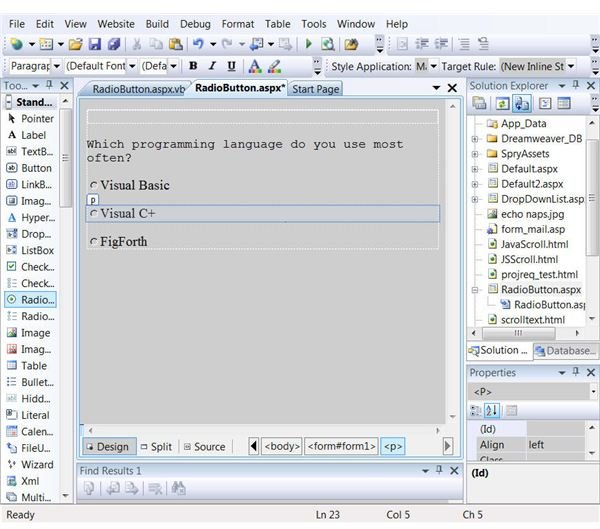
Click on the Design tab if the Source view is showing. In the display type, “Which programming language do you use most often?” Below this text, insert three radio buttons from the ToolBox on the left. Click and drag the ToolBox panel wider so you can see the full contents. There is a RadioButton control and a RadioButtonList control. When button options come from a database at view time, the latter type is used. This example uses the simple RadioButton. You can either do these all at once by double clicking on the control three times, or click and drag each one. Depending on design considerations, place them all on the same line or each below the preceding one. The image shows the way your example should look before any content or formatting changes.
Set the Properties
Now you need to provide IDs for each ASP.NET RadioButton and some accompany text. Bring up the Properties window by clicking “View,” “Properties window.” Click on the first button and edit the Properties as follows:
Text: “Visual Basic”
ID: “VisualBasic”
Do the same with the next two buttons, except make the second “Visual C+” and the third “FigForth.” On the ID part, you have to run the words together and you cannot use the “+” sign, so the IDs should read “VisualC” and “FigForth.” If you previewed this now in a browser, you would be able to select one, two or all three buttons. To complete the process group the three ASP RadioButtons together. The page also needs some way to transmit the information selected. Both steps are simple. To ensure only one can be selected go to the properties for each button. In each case, there is a “GroupName” value. It does not matter what name you use as long as they are the same. For this example, use “ProgLang.” Add this value to the properties of the three RadioButtons. Now when viewed in a browser, only one at time can be selected. When you change, the dot in the previous selection vanishes.
Finish the Programming
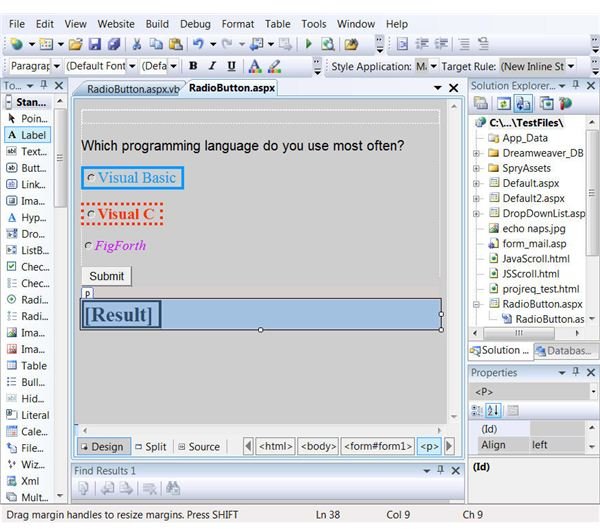
There are only two steps left to finish this programming. Add a regular button and give it the name and ID of “Submit.” Normally, a developer would have the results either sent to an email or added to a database. Programming this requires specific knowledge of your own application and how your Web server handles email. However, you can test whether the page works by adding a small bit of code to the “Submit” click event. First, add a label control and change the ID to “Result.” Then, in Visual Web Developer, double click on the “Submit” button. In the code view for this, add these lines between the “Protected Sub Submit_Click” and the “End Sub” lines:
If VisualBasic.Checked Then
Result.Text = “You prefer Visual Basic.”
ElseIf VisualC.Checked Then
Result.Text = “You prefer Visual C+”
ElseIf FigForth.Checked Then
Result.Text = “You have a strange mind!”
End If
End Sub
When you view this now with a browser and choose a button, a message will display in the label. RadioButtons have many properties in common with other ASP.NET controls so each can be enhanced with things font, size, color, borders and other values. The last image uses some of these as examples although in practice a design would not use this much variation on a page.


