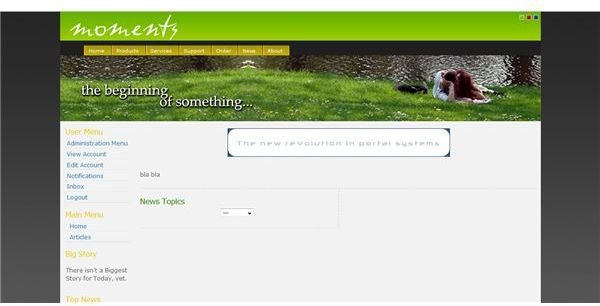
Xoops is a well-known content management system that is easy to use and object oriented. An Open Source CMS, Xoops is free as are a wide variety of addons and modules that can be used to enhance your website. Learn about Xoops, how to install it, use it and benefit from a Xoops web site.
A Quick Introduction to Xoops CMS
XOOPS is a web content management system written in PHP for the MySQL database. An object-oriented system, it is easy to get the grasp of and can be used for both small and large sites. It is easily expandable and makes a good base for community websites, portals, news sites and multi-purpose sites.
Using Xoops modules and add-ons, you can create a feature-rich site with minimal knowledge of CSS and HTML.
Because it is Open Source, it is free to download and free to use. You can download it to your own personal server, download it to your PC and upload it to your hosted web site, or in many cases your web hosting company will have it as a web program offering and you can opt to have your web provider install it for you (the best option for a quick and clean install).
Xoops Features and Benefits
Xoops has been around for a long time and has been developed by programmers from around the world. Development is an ongoing process and new modules and themes are constantly being introduced. Easy to use and fairly intuitive to understand, Xoop offers the following features and benefits :
- Database-Driven
- Fully Modular
- Easy to Personalize for Users
- Built-in User Management System
- Supported worldwide in multiple languages
- Supports multi-byte languages like Japanese, Chinese and others
- Versatile Permission Settings for Various Groups
- Theme-Based Skinnable Interface
- Hundreds of Free Templates and Addons Available
One of the things I like about Xoops is the fact that you can easily move between the administration panel and the various support sites for Xoops with just a click on a tab. Additionally, it is written in fairly plain English which makes it easier for non-techies to get the hang of it.
I personally like the styles offered for Xoops themes and the fact that Xoops has been around for a while means that a majority of the optional modules as well as the base program and core modules are relatively stable.
Installing and Getting Started With Xoops
Xoops installation is easy, particularly if you have a web host that will do it for you. Once you have installed it you can log in as the Administrator and select your settings and options from the Administration Panel. You will need to install most of the modules yourself as the base package only comes with a few modules. If you do decide to install Xoops yourself, you can choose between four pre-configured module packs to add functionality to your site or select modules individually. Either way, you need to:
Download the module or module pack .
Unzip it on your computer.
Upload the files to the appropriate directory in Xoops on your site - add modules one at a time so that if one blows up your system you know what caused it and can delete it.
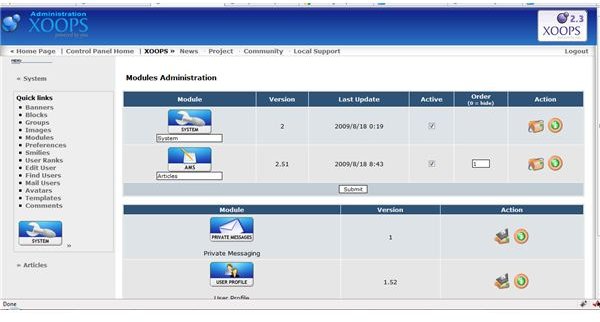
Activate and enable the module and choose your options in the Xooms administration menu under System, Modules on the left side of your admin panel.
Find a template for your site.
Download the template, unzip it and upload it to the templates file in your Xoom directory.
Activate and enable your template in the Xooms administration menu under System, Templates, on the left side of your administration panel.
Select and set up your system preferences under System, Preferences on the left side of your administration panel.
Choosing Xoops Modules for Your Site
Xoops modules can extend your site functionality. Check out the modules offered on the Xoops site and choose the modules that will help you promote your business, sell your products and services, manage your users and provide you with what you need to build your dream site. Xoops has several E-Commerce modules that integrate with popular packages like Zen Cart and OSCommerce. Many of the modules are a few years old so make sure they will work with your Xoops version (the current version is 2.3) or find the patches to make them work with your version of Xoops.
If the module is based on another system, make sure you visit the site of the provider (i.e. Zen Cart or OSCommerce) to see if the secondary program has all the features you would like to have on your Xoops site. A little research can save you a lot of time and headaches in the long run.
Adding Content to Your Xoom-Based Website
Once you have your design and have your modules installed, you can start adding content and users to your site. Read the Xoops Operation Guide to get up to speed on all the features you have and how to add your chosen content to the system. Write your own content, incorporate videos and photo galleries into your site, set up user interfaces, create your web community, your shop, whatever it is you want to do with the site.
Make sure that you obey copyright laws and that your content is fresh and compelling. If you need to add content from other sources, ask first. If you are writing your own articles, make them as clear and concise as possible.
Add images, either from your own photos or from photo websites. There are several websites that offer royalty-free photos and if you are selling products, your vendor should be able to get you pictures and product descriptions to post on your website.
Is Xoops the Right Content Management System for You?
To learn more about Xoops, you can visit the Xoops forums , get the Xoops newsletter, or “Google” Xoops to find resources to make your site exactly as you want to have it. Visit the Beginners’ Corner, ask questions in the forums and read what others are doing with Xoops. Xoops is developed and powered by a community of volunteers from around the world. If you decithful foadvantage of the tips and tools you receive from other Xoops community members.
Xoops is worth taking a look at and is reasonably easy to use, the one caveat is the age of many of the posts and modules. It gives one the feeling that Xoops is either so easy no one needs to ask questions or so old that it may not function. The truth is that Xoops has a lot of functionality and a lot of loyal users.
Before you decide on a CMS for your site, you should evaluate a few of the packages out there, I would look at Xoops, Joomla and possibly PHPNuke or one of the Nuke dirivatives before making a fast and firm decision. Each has its strengths and weaknesses and a different way of structuring the site and administering it. What may appeal to me as a site administrator or user may not appeal to you and vice versa. Whatever you decide to do with your site, a good CMS can be a valuable asset and significantly enhance your credibility and exposure.


